
Regarding the USB‑DOM pin issue, we don't have any information to share at this time. As for converting the TOS 6 initboot on the USB‑DOM to a TOS 7 version, we'll discuss it with the project team and try to work out a solution.Gremlin wrote: ↑01 Aug 2026, 01:21 Time to pick up on an old discussion:
Is there a way to update the USB-DOM boot device(s) without removal from the Tnas
I like to keep the original usb as a backup, so the nas can be reverted to it's original spec, or swapped for a specific experiment. It has been said that the included USB-DOM is "proprietary". From the pictures I have seen, they do appear to be different from any generally available "industrial" model, particularly around the screw down. Usually these have a solid hole in the daughter board, but the TM version has a semi-circle on the end of the board and seems slimmer overall. Perhaps someone at TM can provide dimensions? I have read the oem come from a particular manufacturer, but I have not been able to trace any, even through Ali-Express
Not surprisingly, nothing of the sort exists in TM's web site.
I have not checked yet, but is there sufficient space inside the nas for a vertical mount board rather then the horizontal mount supplied. (I am aware that some newer models have an older usb2 port on the board as well, but that might not apply to all and may change in future; and that seems a retrograde step, anyway.)
How to Flash a New USB Initboot for TOS on Windows PC?
Re: How to Flash a New USB Initboot for TOS on Windows PC?USB-DOM for newer models
To contact our team, please send email to following addresses, remember to replace (at) with @:
Technical team: support(at)terra-master.com (for technical support)
Service team: service(at)terra-master.com (for purchasing, return, replacement, RMA service)
Technical team: support(at)terra-master.com (for technical support)
Service team: service(at)terra-master.com (for purchasing, return, replacement, RMA service)

Re: How to Flash a New USB Initboot for TOS on Windows PC?
You don't need to remove the built-in USB-DOM boot device. Create a bootable drive from a standard USB flash drive, plug it into an external USB port on the NAS, then enter the BIOS and set this external drive as the first boot option. The NAS will boot from the external drive on every subsequent startup.
To contact our team, please send email to following addresses, remember to replace (at) with @
Technical team: support(at)terra-master.com (for technical support)
Service team: service(at)terra-master.com (for purchasing, return, replacement, RMA service)
Technical team: support(at)terra-master.com (for technical support)
Service team: service(at)terra-master.com (for purchasing, return, replacement, RMA service)


Re: How to Flash a New USB Initboot for TOS on Windows PC?
I just noticed something:
I don't have a Gembird PhotoFrame - did @TM buy Gembirds surplus stock, strip out the chips and stick them in the Tnas 
Code: Select all
lsusb
Bus 004 Device 002: ID 0bda:0423 Realtek Semiconductor Corp. 4-Port USB 3.2 Hub
Bus 004 Device 001: ID 1d6b:0003 Linux Foundation 3.0 root hub
Bus 003 Device 004: ID 04f2:0400 Chicony Electronics Co., Ltd USB Keyboard
Bus 003 Device 003: ID 0bda:5423 Realtek Semiconductor Corp. 4-Port USB 2.0 Hub
Bus 003 Device 002: ID 1908:1320 GEMBIRD PhotoFrame PF-15-1
Bus 003 Device 001: ID 1d6b:0002 Linux Foundation 2.0 root hub
Bus 002 Device 001: ID 1d6b:0003 Linux Foundation 3.0 root hub
Bus 001 Device 001: ID 1d6b:0002 Linux Foundation 2.0 root hubF5-221 TOS7.0.1201 - 4x4TB (Ironwolf) Traid
F2-424 TOS7.0.1278 - 2x500GB nvme (P3) Traid, 2x6TB HDD (HGST) Traid
F2-221 TOS7.0.1278 - 1x3TB Ext4, 1x4TB Btrfs
F2-425+ TOS7.0.1278 - 2x500GB nvme (P3) Traid, 2x6TB HDD (EXOS) Traid
F2-424 TOS7.0.1278 - 2x500GB nvme (P3) Traid, 2x6TB HDD (HGST) Traid
F2-221 TOS7.0.1278 - 1x3TB Ext4, 1x4TB Btrfs
F2-425+ TOS7.0.1278 - 2x500GB nvme (P3) Traid, 2x6TB HDD (EXOS) Traid


Re: How to Flash a New USB Initboot for TOS on Windows PC?
Terramaster f4-425 with 4 HDDs installed, xpenolodgi installed. The RR bootloader is implemented via a flash drive installed in a USB port inside the NAS case.
Goal: Reset the NAS to factory settings, install TOS, and configure the system to boot from a flash drive soldered onto the board (USB DOM), rather than one installed in a USB port.
Goal: Reset the NAS to factory settings, install TOS, and configure the system to boot from a flash drive soldered onto the board (USB DOM), rather than one installed in a USB port.
Re: How to Flash a New USB Initboot for TOS on Windows PC?
First I would open the chassis and determine whether you already have a USB-DOM installed on the motherboard via a usb pin set.
viewtopic.php?t=10427
viewtopic.php?t=10427
F5-221 TOS7.0.1201 - 4x4TB (Ironwolf) Traid
F2-424 TOS7.0.1278 - 2x500GB nvme (P3) Traid, 2x6TB HDD (HGST) Traid
F2-221 TOS7.0.1278 - 1x3TB Ext4, 1x4TB Btrfs
F2-425+ TOS7.0.1278 - 2x500GB nvme (P3) Traid, 2x6TB HDD (EXOS) Traid
F2-424 TOS7.0.1278 - 2x500GB nvme (P3) Traid, 2x6TB HDD (HGST) Traid
F2-221 TOS7.0.1278 - 1x3TB Ext4, 1x4TB Btrfs
F2-425+ TOS7.0.1278 - 2x500GB nvme (P3) Traid, 2x6TB HDD (EXOS) Traid


Re: How to Flash a New USB Initboot for TOS on Windows PC?
You can restore your F4-425 to official TOS by following these steps:
1. Remove the Third-Party Boot Drive:
Power off the device and unplug the RR bootloader USB drive from the USB port.
2. Enable TOS Boot First in BIOS:
Power on the NAS, press Del or F7 during boot to enter the BIOS, enable the TOS Boot First option, then save and exit.
3. Reinstall TOS via the Reset Button:
Follow the instructions in our guide to reinstall TOS using the Reset button: viewtopic.php?t=9523
To contact our team, please send email to following addresses, remember to replace (at) with @
Technical team: support(at)terra-master.com(for technical support)
Service team: service(at)terra-master.com(for purchasing, return, replacement, RMA service)
Technical team: support(at)terra-master.com(for technical support)
Service team: service(at)terra-master.com(for purchasing, return, replacement, RMA service)

Re: How to Flash a New USB Initboot for TOS on Windows PC?
Like others, I have had an issue after upgrading F5-422 from TOS 6 to TOS 7. I have built USB drive using usb_initboot_legacy_2037.img (from first post of thread) which boots to GRUB but fails with:
/boot/bzImage not found
I was able to boot with a TOS 6 BOOTINIT so am confident that USB drive & NAS are OK.
Please advise if there is a different version of the TOS 7 legacy file.
/boot/bzImage not found
I was able to boot with a TOS 6 BOOTINIT so am confident that USB drive & NAS are OK.
Please advise if there is a different version of the TOS 7 legacy file.

Re: How to Flash a New USB Initboot for TOS on Windows PC?
If you are upgrading from 6.0.794 to TOS 7, you can do so by uploading the 7.0.0747 update package:
viewtopic.php?t=10183
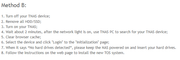
If you want to install TOS 7 directly by reinstalling the system, you can refer to the following steps:
viewtopic.php?t=423
When upgrading or reinstalling, please first confirm the location of the system disk and select all system disks; otherwise, a conflict between the old and new systems will cause the boot to fail.
To contact our team, please send email to following addresses, remember to replace (at) with @
Technical team: support(at)terra-master.com(for technical support)
Service team: service(at)terra-master.com(for purchasing, return, replacement, RMA service)
Technical team: support(at)terra-master.com(for technical support)
Service team: service(at)terra-master.com(for purchasing, return, replacement, RMA service)