How to Restore to Factory Default via the RESET Button?

New system installation, system re-install
User avatar
TMzethar
TM Support
Posts: 2815
Joined: 27 Oct 2020, 16:43

How to Restore to Factory Default via the RESET Button?

Post by TMzethar »

Applicable Versions
TOS 5 / TOS 6

Applicable Models
Models that require removing the cover:
F2-424, F4-424, F4-424 Max, F4-424 Pro, F6-424, F6-424 Max
Models that do NOT require removing the cover:
F2-425, F2-425 Plus, F4-425, F4-425 Plus, F4-SSD, F8-SSD, F8-SSD Plus

Issue Description
When the device experiences an abnormal power outage, or when an NVMe M.2 SSD or HDD fails, the TOS system may not function properly.

Solution
Since NVMe M.2 SSDs do not support hot swapping, it is not possible to reinstall the TOS system by simply removing and reinserting the SSD when a TOS failure occurs.
For HDD-related issues, when resetting the TOS system using the RESET button, it is not necessary to remove the HDD. The system can be reset directly based on the existing drives.

Operating Steps

I. Steps for Models That Require Removing the Cover
Step 1:
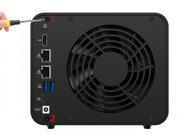
Use a screwdriver to remove the screws and open the side cover.
Image
Step 2:
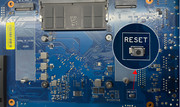
Press and hold the RESET button on the product’s mainboard. After 30 seconds, without releasing the RESET button, continue holding it while briefly pressing the power button to start the device.
Once you hear three consecutive beeps, you may release the RESET button.
Image
Step 3:
Use the TNAS PC Client to re-scan for the TNAS device, and follow the instructions in the client to restart the TOS system initialization process.

II. Steps for Models That Do NOT Require Removing the Cover
Step 1:
Power off the device. There is no need to remove the NVMe M.2 SSD or HDD.

Step 2:
With the device powered off, use a paperclip to press and hold the RESET button on the back of the product. After 30 seconds, without releasing the RESET button, continue holding it while briefly pressing the power button to start the device.
Once you hear three consecutive beeps, you can release the paperclip.
(Using the F4-425 Plus as an example, as shown in the figure below)

Image

Step 3:
Use the TNAS PC software to re-search for your TNAS device. Clear your browser cache, select the device, click “Login” to enter the Initialization page, and follow the on-screen instructions to install a new TOS system.
To contact our team, please send email to following addresses, remember to replace (at) with @:
Technical team: support(at)terra-master.com (for technical support)
Service team: service(at)terra-master.com (for purchasing, return, replacement, RMA service)
User avatar
CraftyClown
Posts: 47
Joined: 03 Jan 2023, 17:13
Great Britain

Re: How to Restore to Factory Default via the RESET Button?

Post by CraftyClown »

Hi there, I need some help reinstalling TOS 6 on my SSD, however for some unknown reason my F4-424 Pro does not have a reset button on the motherboard! I purchased mine just after it was released, was there an earlier version that didn’t have this functionality?

If that is the case, what are my options here? TOS appears to be corrupted following a power failure; The UI is not accessible, SMB shares do not work. I can SSH in to the device but that is all

Please help as I use this device for my work and I urgently need it up and running again!
User avatar
CursaYang
TM Support
Posts: 740
Joined: 06 Jan 2025, 16:34
China

Re: How to Restore to Factory Default via the RESET Button?

Post by CursaYang »

CraftyClown wrote: 02 Jan 2026, 07:29
Hello, even the early F4-424 Pro motherboards have a reset button. Could you take a photo of the motherboard and send it to us for confirmation?
If your SSD is only used to install the system and does not store data, you can refer to this post to reinstall by formatting the hard drive: viewtopic.php?t=7179
If you need to retain data on the SSD, we will provide further suggestions after confirmation.
To contact our team, please send email to following addresses, remember to replace (at) with @

Technical team: support(at)terra-master.com(for technical support)
Service team: service(at)terra-master.com(for purchasing, return, replacement, RMA service)
User avatar
CraftyClown
Posts: 47
Joined: 03 Jan 2023, 17:13
Great Britain

Re: How to Restore to Factory Default via the RESET Button?

Post by CraftyClown »

CursaYang wrote: 02 Jan 2026, 12:22
CraftyClown wrote: 02 Jan 2026, 07:29
Hello, even the early F4-424 Pro motherboards have a reset button. Could you take a photo of the motherboard and send it to us for confirmation?
If your SSD is only used to install the system and does not store data, you can refer to this post to reinstall by formatting the hard drive: viewtopic.php?t=7179
If you need to retain data on the SSD, we will provide further suggestions after confirmation.

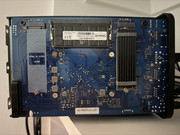
I’ve attached a photo of the motherboard but it looks different to the image above. My device is definitely an F4-424 Pro with 32gig of ram, so this is very confusing!

Unfortunately the SSD is used for data as well as the TOS OS so reformatting isn't an option

A second issue that has arisen at the same time is that the TRAID volume on the 4 internal HDDs is being shown as corrupted! Once we have TOS back online I would also appreciate some help troubleshooting this.


Image
User avatar
CursaYang
TM Support
Posts: 740
Joined: 06 Jan 2025, 16:34
China

Re: How to Restore to Factory Default via the RESET Button?

Post by CursaYang »

Please go to the official website's live chat to book an engineer for remote handling. We can help you delete the system on the SSD via SSH connection so that you can reinstall the system. Please include the link to this post when making the reservation.
To contact our team, please send email to following addresses, remember to replace (at) with @

Technical team: support(at)terra-master.com(for technical support)
Service team: service(at)terra-master.com(for purchasing, return, replacement, RMA service)
User avatar
jhalter9
Posts: 1
Joined: 13 Feb 2026, 06:22
United States of America

Re:How can I restore an F2-210 without resert button to factory Default

Post by jhalter9 »

My F2-210 does not have a factory reset button. I would like to reset it to factory default and just start the installation process over again. I am not concerned with losing the data since I have a complete backup. Just want to get the Terramaster working again. I don't remember my admin user name or password.
User avatar
crisisacting
Silver Member
Posts: 499
Joined: 20 Jan 2022, 16:42

Post by crisisacting »

jhalter9 wrote: 13 Feb 2026, 07:05 F2-210 does not have a factory reset button.
This thread is specifically for the 2024 & newer ×86/×64 TNAS models, as those have reset options available; all other models have their own different method.
jhalter9 wrote: 13 Feb 2026, 07:05 … would like to reset it to factory default and just start the installation process over again. Am not concerned with losing the data; have a complete backup. Just want to get the Terramaster working again. Don't remember admin user name or password.
If your 210 TNAS is bricked, follow this: viewtopic.php?f=76&t=696

If your 210 TNAS is functional, then turn off, pull the HDDs, start-up & wait until it's accessible on your network via https://TNAS.local or a local IP address on your network to then configure it through the Initial Bootloader (initboot) environment.
User avatar
marsfan
Posts: 4
Joined: 11 Oct 2024, 13:59
Germany

Re: How to Restore to Factory Default via the RESET Button?

Post by marsfan »

Hello!
I have a F6-424.
A couple of days ago I tried to get tailscale running via portainer. Instead, I lost access to TOS, even though I could still access my containers.
I decided to do a hardware reset as written in the first post to reset the OS but keep data intact.
I did the hardware reset and entered new user. After that, it tells me to Create a Volume.

In the post viewtopic.php?t=423 it says:
If it prompts "Format","Create","Delete"disk/storage/raid, please stop the operation immediately and Please prepare other devices or new hard drives to backup data. If you need help exporting data, please contact us.

I do not have the data backed up elsewhere. Can you help me not lose the data on my HDDs if I am forced to reset them?
Thanks
User avatar
CursaYang
TM Support
Posts: 740
Joined: 06 Jan 2025, 16:34
China

Re: How to Restore to Factory Default via the RESET Button?

Post by CursaYang »

marsfan wrote: 20 Jun 2026, 20:06
What version of your operating system are you using? If it's TOS 4 or TOS 5, we can remotely help you skip this prompt. Please visit the link and schedule a remote appointment with our online support:

https://salesiq.zohopublic.com/signatur ... 97d0be8892
To contact our team, please send email to following addresses, remember to replace (at) with @

Technical team: support(at)terra-master.com(for technical support)
Service team: service(at)terra-master.com(for purchasing, return, replacement, RMA service)
User avatar
marsfan
Posts: 4
Joined: 11 Oct 2024, 13:59
Germany

Re: How to Restore to Factory Default via the RESET Button?

Post by marsfan »

Hi Cursa! It is TOS 6.
Can you still help me remotely?
Please note that I removed both SSDs and formatted them in Windows, since I had TOS 6 installed on the SSD, and my data is on separate HDDs in TRAID.
Post Reply

Return to “Initialization & Installation”