TOS 7.0.0765 Official Release (X86) is Now Available

Official news about TOS, mobile app, PC app updates or beta releases.
User avatar
thierrys73
Posts: 36
Joined: 23 Jul 2022, 19:57
France

Re: TOS 7.0.0765 Official Release (X86) is Now Available

Post by thierrys73 »

thierrys73 wrote: 02 Jul 2026, 02:55 Hello
Issue with e-mail test and notifications.
Smtp local server
On my t6-423 ,the email test is with failed message and i don't receive test email.
On my f2-221 the e-mail test is with successfull message but i dont receive any test email

What can i do to résolve the issue ?
Thanks
Sorry on f2-221 the test email is functional .
But failed on t6-423
Tnas T6-423
Tnas F2-221
User avatar
dcx41
Posts: 1
Joined: 02 Jul 2026, 07:29
Great Britain

Re: TOS 7.0.0765 Official Release (X86) is Now Available

Post by dcx41 »

Would anyone be able to assist? I tried to update from TOS6 to TOS7 ( f4 423). The system then rebooted with the 5 minute countdown, however it now shows in TNAS PC as uninitialised, cannot access anything regarding TOS. I have checked the raid array in Ubuntu to ensure it is still built (which it is with all data). I just need to be able to recover or reinstall the TOS system but don't want to have the drives wipe as the 48tb array has around 43tb full. Please can someone assist.
User avatar
GevinKe
TM Product Manager
Posts: 251
Joined: 08 Dec 2023, 10:27
China

Re: TOS 7.0.0765 Official Release (X86) is Now Available

Post by GevinKe »

sianderson wrote: 01 Jul 2026, 21:02
Thank you very much for your suggestion. We will reevaluate this. Currently, when a new TOS version is available, you will receive a desktop notification immediately after logging in to TOS.

Regarding whether email notifications should be enabled by default, users have different needs—some may find them convenient, while others may consider them disruptive. Therefore, we prefer to give users the choice.

In addition, our current strategy is that for situations with potential risks, TOS will enable both desktop notifications and email notifications by default. For regular operations or situations that do not cause serious consequences, only desktop notifications will be enabled by default.
To contact our team, please send email to following addresses, remember to replace (at) with @:

Technical team: support(at)terra-master.com(for technical support)
Service team: service(at)terra-master.com(for purchasing, return, replacement, RMA service)
User avatar
gustang
Posts: 9
Joined: 22 Mar 2023, 10:55

Re: TOS 7.0.0765 Official Release (X86) is Now Available

Post by gustang »

viewtopic.php?p=57600#p57600
This update still doesn't allow logging into TOS Web with an LDAP account. Please fix this bug as soon as possible.
User avatar
EriChan
TM Support
Posts: 196
Joined: 06 Jan 2026, 12:27
United States of America

Re: TOS 7.0.0765 Official Release (X86) is Now Available

Post by EriChan »

gustang wrote: 02 Jul 2026, 10:06
Thank you for your continued attention. This issue has been confirmed to be fixed in the next version. Please stay tuned.
User avatar
benno
Posts: 9
Joined: 17 Nov 2024, 06:05
Australia

Re: TOS 7.0.0765 Official Release (X86) is Now Available

Post by benno »

dcx41 wrote: 02 Jul 2026, 07:34 Would anyone be able to assist? I tried to update from TOS6 to TOS7 ( f4 423). The system then rebooted with the 5 minute countdown, however it now shows in TNAS PC as uninitialised, cannot access anything regarding TOS. I have checked the raid array in Ubuntu to ensure it is still built (which it is with all data). I just need to be able to recover or reinstall the TOS system but don't want to have the drives wipe as the 48tb array has around 43tb full. Please can someone assist.
With the 424, I just had to remove the USB drive and booted fine.
User avatar
joergurmel
Posts: 16
Joined: 05 Nov 2022, 03:30
Germany

Re: TOS 7.0.0765 Official Release (X86) is Now Available

Post by joergurmel »

Hallo!
Bin schon am versuchen gewesen mit dem Support das Problem zu lösen. Kann nicht mehr über WIN 11 Exploer auf die NAS423 (F4), vielmehr deren Ordner zugreifen. Bis vor ca 2 oder 3 Updates ging alles noch. Mit der F4 210 oder meiner Synology besteht der Fehler nicht.
Habe sonst immer über Win11 und dem Exploer zwischen den NAS DAten kopierern können. Nun kommt bei der F4 423 folgender Fehler:
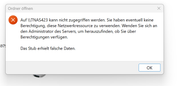
Image
Leider konnte mir der Support per Mail und Chat auch nicht weiter helfen? Es muss aber mit dem vorletzten Update zusammen hängen. Betrifft alle PC´s, die im Heimnetz auf die 423 zugreifen wollen. Emby Server ist aber im Internet erreichbar, von meinem Sohn und einem Kumpel.
Die Fehlermeldung gabs mal vor Jahren bei Windows, aber wies genau zusammen hängt, ist mir unbekannt. Vielleicht hat jemand ne Idee, was da los ist!

\\TNAS423 funktioniert nicht \\TNAS423\HDFilme dagegen kann ich auf den Ordner zugreifen. Vorher mit nur \\TNAS423 hatte ich im Exploer eben alle Ordner gesehen und konnte dort Daten über Windows verschieben/kopieren. Ich denke das Update hat was getan, was den Fehler verursacht!

MFG Jörg
User avatar
Metrogeek
Posts: 25
Joined: 13 Jan 2026, 09:19
Canada

Re: TOS 7.0.0765 Official Release (X86) is Now Available

Post by Metrogeek »

Terramaster f4-425 plus on latest TOS.

Sometime, when i want to open docker manager it brings me to the app center because the app is disable, so i click enable... It takes a few minutes to make it enable. However, my docker stack working even if it's show disable... I tried to uninstall and re-install docker manager and get same issue. No errors show in the docker manager logs. Should i delete all my config and rebuild my stacks? Anyone else?

Thks
User avatar
Nitrokalel
Posts: 37
Joined: 24 Apr 2024, 05:51
Mexico

Re: TOS 7.0.0765 Official Release (X86) is Now Available

Post by Nitrokalel »

Metrogeek wrote: 03 Jul 2026, 00:45 Terramaster f4-425 plus on latest TOS.

Sometime, when i want to open docker manager it brings me to the app center because the app is disable, so i click enable... It takes a few minutes to make it enable. However, my docker stack working even if it's show disable... I tried to uninstall and re-install docker manager and get same issue. No errors show in the docker manager logs. Should i delete all my config and rebuild my stacks? Anyone else?

Thks
AMI TAMBIEN ME PASA PERO CON MAS DE UNA APLICACION, PARECE SER QUE LA APLICACIONES NO ESTAN DEL TODO CUMUNICADAS CON EL CENTRO DE APLICACIONES POR ESO LAS MUESTRA COMO INACTIVAS,,,,,, PERO CUANDO INTENTAS ABIR DE NUEVO LA APLICACION SIN ACTIVAR O DESACTIVAR ABRE.
F8 SSD Plus (8x4TB NVMe, TRaid, 48GB, prod)
F8 SSD Plus (6x1TB+2x2TB, TRaid, 48GB, beta)
F4-424 Pro (2x22TB+2x10TB HDD +1TB+500GB NVMe, TRaid, 32GB, beta)
F2-423 (2x18TB, TRaid, 32GB, beta)
F2-221 (6TB+10TB, TRaid, 10GB, beta)
D1 SSD (2TB, prod)
User avatar
hellotonothing
Posts: 1
Joined: 09 Oct 2024, 10:04
Brazil

Re: TOS 7.0.0765 Official Release (X86) is Now Available

Post by hellotonothing »

hey there! After doing a manual update from TOS6 to TOS7, all i can see is a debug mode screen when logging in. nothing else. when i right click the "desktop" interface, i can see my user, etc, but nothing related to the NAS itself. Also, if i refresh the screen, i see a Failed To Retrieve Data message.
The system is a F4-423 installed on the hdds (they boot as i can log in).

Any tips?

thanks in advance
Post Reply

Return to “Update Notice”