How to Resolve the Issue of F8 SSD Failing to Boot or Automatically Restarting After Installing a 3rd Party OS or TOS7

About TNAS hardware
User avatar
TMnight
TM Support
Posts: 181
Joined: 30 Sep 2022, 16:40

How to Resolve the Issue of F8 SSD Failing to Boot or Automatically Restarting After Installing a 3rd Party OS or TOS7

Post by TMnight »

Applicable Models: F8 SSD / F8 SSD Plus

Fault Symptoms:
After installing a third-party operating system or updating to TOS7, abnormal behaviors may occur, such as failing to boot properly after installing Proxmox, or the system repeatedly restarting automatically.

Cause:
The F8 SSD / F8 SSD Plus has compatibility issues with certain third-party systems. To resolve this, the motherboard BIOS and the PCIe expansion chip (ASM2806) firmware (FW) need to be updated.

Solution
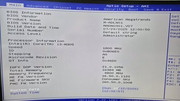
1. Check the current BIOS version of the motherboard.
If it is MADN0301.V07 or higher, no update is required.
If it is lower, please refer to Steps > BIOS Upgrade Steps below for updating.
Image

2. Check the firmware (FW) version of the motherboard PCIe expansion chip (ASM2806).
The required version is 24082140-0000.
Checking method:
1.Download the following files and upload them to the NAS shared folder (e.g., /Volume1/public/), as shown below:
https://download2.terra-master.com/240821_40_00_00.bin
https://download2.terra-master.com/218xfwdl
Image

3.Refer to this guide to log into the terminal: viewtopic.php?t=2350
Then execute the following commands one by one:

Code: Select all

cd /Volume1/public/

Code: Select all

chmod 755 218xfwdl

Code: Select all

./218xfwdl /s
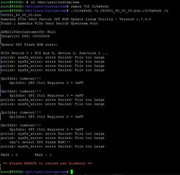
If the red box in the output shows “24 08 21 40 00 00”, no firmware update is required.
If it shows a lower version (e.g., 17 11 01 40 00 00), please proceed to Steps > PCIe Expansion Chip (ASM2806) Firmware Upgrade Steps below.
Image

Steps
A. BIOS Upgrade Steps
1.Power off the NAS, remove all M.2 SSDs and the TOS boot USB drive from the motherboard.
2.Prepare a FAT32-formatted USB drive, download the BIOS upgrade package, and unzip it:
F8 SSD download link: https://download2.terra-master.com/F8_S ... 01.V07.zip
F8 SSD Plus download link: https://download2.terra-master.com/F8_S ... 01.V07.zip
Copy all extracted files to the root directory of the USB drive.
Image

3.Insert the USB drive and start the NAS. The system will automatically complete the BIOS upgrade and reboot.
Image
Image

4.Restart the NAS again. The motherboard information will be automatically written. Once the device reboots again, the BIOS upgrade is complete.
5.After the BIOS upgrade is complete, remove the USB drive.

Notes:
Ensure the power supply to the NAS is stable during the upgrade; do not power off.
Do not remove the USB drive, press keyboard keys, or plug/unplug the power during the upgrade.
The entire process is automatic. Please wait patiently.


B. PCIe Expansion Chip (ASM2806) Firmware Upgrade Steps
1.Download the following files and upload them to the NAS shared folder (e.g., /Volume1/public/):
https://download2.terra-master.com/240821_40_00_00.bin
https://download2.terra-master.com/218xfwdl

Image

2.Refer to this guide to log into the terminal: viewtopic.php?t=2350
Then execute the following commands:

Code: Select all

cd /Volume1/public/

Code: Select all

chmod 755 218xfwdl

Code: Select all

./218xfwdl /u 240821_40_00_00.bin
Image

3.Restart the NAS, log back into the terminal, and run the following again to verify:

Code: Select all

cd /Volume1/public/

Code: Select all

./218xfwdl /s
Check whether the PCIe expansion chip (ASM2806) firmware version has been
upgraded to “24 08 21 40 00 00”, as shown in the figure.
Image

At this point, the PCIe expansion chip (ASM2806) firmware has been successfully upgraded.
To contact our team, please send email to following addresses, remember to replace (at) with @:
Technical team: support(at)terra-master.com(for technical support)
Service team: service(at)terra-master.com(for purchasing, return, replacement, RMA service)
athurdent
Posts: 43
Joined: 05 Aug 2025, 00:53
Germany

Re: How to Resolve the Issue of F8 SSD Failing to Boot or Automatically Restarting After Installing a 3rd Party OS

Post by athurdent »

Updated my F8 SSD fine (BIOS and PCIe chip).
I am running TOS 6, not a 3rd party OS, but recently encountered a situation where one of my (perfectly healthy) WD RED 1TB NVMes just disconnected, no heat problems either.
A shutdown / power on fixed it.
Ran into postgres problems afterwards, had to manually stop/start it for the web GUI to come up again BTW. Hope this BIOS / firmware update brings the desired stability.

Two things to note for this guide:

a) the code blocks to execute the firmware utility in the public folder are all missing a dot.
Instead of e.g.

Code: Select all

/218xfwdl /s
it needs to say

Code: Select all

./218xfwdl /s
for all the executable parts.

b) the BIOS update clears Auto Power On, so this switch needs to be unchecked, applied, and again checked, applied after the update for the NAS to start on power loss as configured here:

Image
User avatar
TMnight
TM Support
Posts: 181
Joined: 30 Sep 2022, 16:40

Re: How to Resolve the Issue of F8 SSD Failing to Boot or Automatically Restarting After Installing a 3rd Party OS

Post by TMnight »

Thank you very much for pointing out our oversight, and we have promptly made the correction. Regarding your second point, after the BIOS update it will revert to the factory default settings. If you have any custom configurations in the BIOS, please re-enter the BIOS after the update to adjust them accordingly.
To contact our team, please send email to following addresses, remember to replace (at) with @:
Technical team: support(at)terra-master.com(for technical support)
Service team: service(at)terra-master.com(for purchasing, return, replacement, RMA service)
User avatar
ParaWM
Posts: 1
Joined: 12 Oct 2025, 21:53
Netherlands

Re: How to Resolve the Issue of F8 SSD Failing to Boot or Automatically Restarting After Installing a 3rd Party OS

Post by ParaWM »

Dear @TMnight.

Just bought an F8 SSD Plus and still had older bios and asm fw. Wanted to update both just to be up to date and perhaps lower power consumption.

BIOS update went perfect. The ASM FW update not: "file too large", both through SSH and through unRaid terminal itself.

- Any idea how I can do the chip FW update?
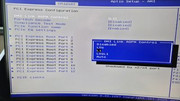
- Is L1 the correct option for the DMI Link ASPM Control? (seem to have more options than your screenshot in another topic).


Image

Image

Image
User avatar
kuenka123
Posts: 6
Joined: 04 Jun 2025, 01:14
Spain

Re: How to Resolve the Issue of F8 SSD Failing to Boot or Automatically Restarting After Installing a 3rd Party OS or TO

Post by kuenka123 »

Hi,

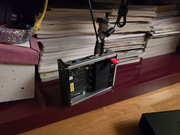
...Sorry for my ignorance, but I'm not sure where to plug in the USB witj the firmware. Is in the f8 boost usb? Is mandatory an keyboard? I onlu find a black screen when i try to start from usb in any of the USB slots and with several USBs (everyone formatted in FAT32 )

Could anyone really provide me with some instructions? Thank you in advance for your help!
Image
User avatar
TMeric
TM Product Manager
Posts: 227
Joined: 03 Jul 2023, 11:01

Re: How to Resolve the Issue of F8 SSD Failing to Boot or Automatically Restarting After Installing a 3rd Party OS or TO

Post by TMeric »

kuenka123 wrote: 25 Jan 2026, 16:50 Hi,

...Sorry for my ignorance, but I'm not sure where to plug in the USB witj the firmware. Is in the f8 boost usb? Is mandatory an keyboard? I onlu find a black screen when i try to start from usb in any of the USB slots and with several USBs (everyone formatted in FAT32 )

Could anyone really provide me with some instructions? Thank you in advance for your help!
Image
Hello,

Please first remove the previous USB drive from the device, and then follow the steps above to create a new USB drive. Insert the newly created USB drive into any USB port on the device, and connect the monitor and keyboard.

After powering on, follow the prompts on the monitor to press the Del key to enter the BIOS. Then, set the boot option to the USB drive, save the changes, and exit the BIOS.

I hope these instructions help you!
To contact our team, please send email to following addresses, remember to replace (at) with @:

Technical team: support(at)terra-master.com(for technical support)
Service team: service(at)terra-master.com(for purchasing, return, replacement, RMA service)
User avatar
kuenka123
Posts: 6
Joined: 04 Jun 2025, 01:14
Spain

Re: How to Resolve the Issue of F8 SSD Failing to Boot or Automatically Restarting After Installing a 3rd Party OS or TO

Post by kuenka123 »

Thanks a lot for the reply. I'm afraid I’ve already tried that. I tried both with and without a keyboard attached, and I'm not hearing any beeps now.

In fact, I tried reverting to the original setup (using the stock USB) and I still don't hear any beeps. I also tried resetting the NAS by holding the reset button for 30 seconds after pressing the power button.

I honestly don't understand what's going on. I started this update to fix the NVMe drive disconnection issue, and now things are even worse. Any suggestions?
User avatar
CursaYang
TM Support
Posts: 740
Joined: 06 Jan 2025, 16:34
China

Re: How to Resolve the Issue of F8 SSD Failing to Boot or Automatically Restarting After Installing a 3rd Party OS or TO

Post by CursaYang »

If there is no beeping sound when powering on or starting by pressing the reset button, and the monitor also shows no output, this may indicate an abnormality with the BIOS. Have you updated or modified the BIOS?
To contact our team, please send email to following addresses, remember to replace (at) with @

Technical team: support(at)terra-master.com(for technical support)
Service team: service(at)terra-master.com(for purchasing, return, replacement, RMA service)
User avatar
kuenka123
Posts: 6
Joined: 04 Jun 2025, 01:14
Spain

Re: How to Resolve the Issue of F8 SSD Failing to Boot or Automatically Restarting After Installing a 3rd Party OS or TO

Post by kuenka123 »

Following technical support's recommendation, I attempted to update the BIOS as described in this thread to resolve some intermittent and random NVMe drive disconnections. Unfortunately, neither the update nor the configuration rollback worked. As a result, my device is currently unresponsive and stuck. Is there a way to perform a full factory restore or a clean reinstall from scratch?

Thank you very much
Julian
User avatar
TMzethar
TM Support
Posts: 2817
Joined: 27 Oct 2020, 16:43

Re: How to Resolve the Issue of F8 SSD Failing to Boot or Automatically Restarting After Installing a 3rd Party OS or TO

Post by TMzethar »

After you tried to update the BIOS, are the HDMI monitor and the startup beeper not working? Please check the operation steps again to see if anything was missed or done incorrectly.
Please disconnect the power and perform the following steps to try to resolve the issue:
If there is no a beep sound during startup (RAM self-test), please unplug and reinsert the RAM module.
In addition, remove the battery, wait for A few seconds minutes, and then put it back.
To contact our team, please send email to following addresses, remember to replace (at) with @:
Technical team: support(at)terra-master.com (for technical support)
Service team: service(at)terra-master.com (for purchasing, return, replacement, RMA service)
Post Reply

Return to “Hardware”