Page 1 of 1
Plex not seeing my media folders after I upgraded to TOS 6?
Posted: 27 Jan 2025, 11:28
by rigveda
I currently have Plex Version 1.40.2.8395 running on my TNAS F5-221 running TOS - 6.0.610
I had no problems running plex and have been updating Plex when it was required. However, when I upgraded to TOS6 recently in the past 2 weeks or so I notice that my Plex had stopped working, specifically it looked like PLex could not locate the media files.
The folders location is still in PLex, but I cannot navigate to that location as it seems to stop at the "volume1" folder and does not display any of the other sub-folders in it in Plex. But if I navigate using File Manager in TOS6, I see all the files and folders - no change.
Is there some permissioning or other changes I need to make to fix this?
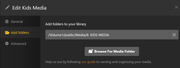
Here is the folder in TNAS - File Manager:
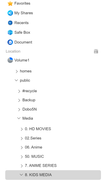
And here is what Plex shows when I try edit the existing folder, note that it only shows up to "Public" folder and nothing further below that:
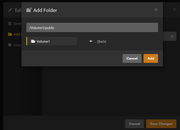
I suspect it has something to do with permissioning of the folders, but not sure how to fix it? How do I change what folder permissions Plex has visibility to see?
Re: Plex not seeing my media folders after I upgraded to TOS 6?
Posted: 27 Jan 2025, 13:28
by TMbuddy
Hello! Please try the methods provided in the following link. We hope it helps resolve your issue smoothly!
viewtopic.php?t=5742
Re: Plex not seeing my media folders after I upgraded to TOS 6?
Posted: 28 Jan 2025, 10:50
by mcd
TMbuddy wrote: ↑27 Jan 2025, 13:28
Hello! Please try the methods provided in the following link. We hope it helps resolve your issue smoothly!
viewtopic.php?t=5742
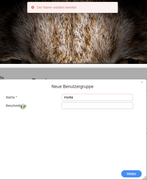
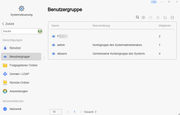
I've upgraded to TOS 6 today and are experiencing the exact same error. Your guide didn't work for me as all previous users and groups were lost during the update. So the media group.
When I try to follow your guide and want to create the group, the error "The name already exists" occured.
Re: Plex not seeing my media folders after I upgraded to TOS 6?
Posted: 29 Jan 2025, 03:42
by sianderson
mcd wrote: ↑28 Jan 2025, 10:50
TMbuddy wrote: ↑27 Jan 2025, 13:28
Hello! Please try the methods provided in the following link. We hope it helps resolve your issue smoothly!
viewtopic.php?t=5742
I've upgraded to TOS 6 today and are experiencing the exact same error. Your guide didn't work for me as all previous users and groups were lost during the update. So the media group.
When I try to follow your guide and want to create the group, the error "The name already exists" occured.
have you definitely made sure that the plex user has read / write access to the shares
also check that your volume numbers havent changed, i changed hard drives and found originally it had set up with Volume 1 and 3 when i installed plex (volume 2 was a different drive that i had taken out), since a reboot it re-ordered it back to volume 1 and 2, so when plex was trying to scan volume 3 it wouldnt find any files
Re: Plex not seeing my media folders after I upgraded to TOS 6?
Posted: 29 Jan 2025, 06:23
by Badger3981
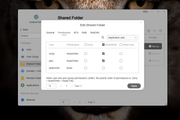
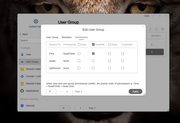
Make sure that the folder containing the media has the correct permissions should be something like this in my case i use the public folder for my media.
Re: Plex not seeing my media folders after I upgraded to TOS 6?
Posted: 28 Feb 2025, 09:14
by Niyi
Badger3981 wrote: ↑29 Jan 2025, 06:23
Make sure that the folder containing the media has the correct permissions should be something like this in my case i use the public folder for my media.
Very helpful. Thank you.
Re: Plex not seeing my media folders after I upgraded to TOS 6?
Posted: 14 May 2025, 22:47
by bconnor218
I had this same issue, and sorta still do!
The Plex user account is no longer visible, but still exists somehow. I try to recreate it and get an error saying that the account already exists, even though TOS doesn't display the account!
I had to set the Permissions for the media folder to be wide open for now to get Plex to work. This is even after a complete system reinstall!
There needs to be a better fix for whatever TOS6 did to the existing user accounts and permissions.
Re: Plex not seeing my media folders after I upgraded to TOS 6?
Posted: 14 May 2025, 23:08
by bconnor218
I actually just discovered that the Plex user account is listed under Application Users, but only when viewing the shared folder permissions. If you re-apply those permissions to your shared folder then it should resolve the issues.
Re: Plex not seeing my media folders after I upgraded to TOS 6?
Posted: 22 May 2025, 14:18
by jhalfhide
100% fresh install of TOS 6 and I am having the same issue with the Plex/Media user permissions.
I cannot see the Plex or Media user anywhere, yet if I try and create it then TOS tells me it exists.
Re: Plex not seeing my media folders after I upgraded to TOS 6?
Posted: 22 May 2025, 16:14
by OrionXie
5.1 It is necessary to set permissions for the media user group. After updating to TOS6, only the plex permissions for the shared folder need to be set. I hope the following guide can be helpful:
Here are instructions for using Plex Media Server viewtopic.php?t=7261