Plex Media Server Instructions

TOS application, TNAS PC, TNAS mobile
User avatar
RyanYang
TM Support
Posts: 1141
Joined: 01 Dec 2020, 11:50
China

Plex Media Server Instructions

Post by RyanYang »

TNAS can be used as a personal Media Server by installing the Multimedia Server,Jellyfin,Plex Media Server,and Emby Server.

Plex Media Server can organize media on TNAS so that you can easily browse and play these media through your Pad, mobile phone, TV, computer and other devices.

How to use Plex Media Server in TOS 6:
1. Locate Plex Media Server in the TOS 6 app center and install it.
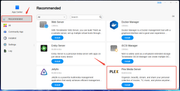
Image
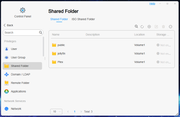
2. After the installation is complete, you can go to the TOS control panel to create a new shared folder for storing media files, such as "video." The system will automatically create a shared folder named "Plex" for storing some configurations and logs of the application. Please do not store any media files in this folder.
Image
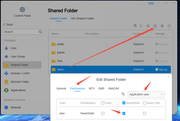
3. Configure permissions for the newly created "video" shared folder: Edit the newly created shared folder and set the read and write permissions for the application user "plex" that is automatically generated during the installation. If the permissions for the plex user are not set, the Plex Media Server will be unable to scan the media files in that directory while running.
Image
4. After saving the permissions, store the media files in the "video" shared folder.
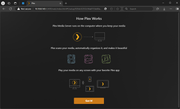
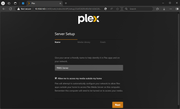
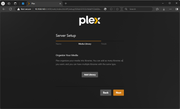
5. Then, open and configure the Plex Media Server, logging in with either your registered account or a newly created account.

Image
Image
Image
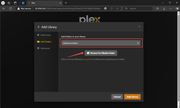
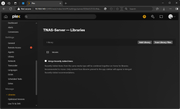
6. Add media libraries according to your needs. You can check which volume your shared folder belongs to in the shared folder module of the TOS control panel.
Image
Image
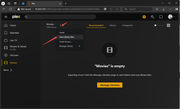
7. After entering the Plex homepage, find the library you added for browsing. If there are media files in the shared folder but it shows as empty, you can rescan the media library files using the method shown in the image below.
Note: Media files in the shared folder that do not have permissions set according to step 3 will not be scanned.
Image
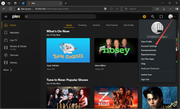
8. If you want to manage the media library again, you can go to the media library section in the user settings for management.
Image
Image
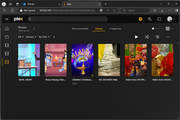
9. Once the scanning is complete, you can click on the library you added on the left to view the media file contents.
Image
10. Additionally, you can download other client software to connect to the media library in your TNAS.
Other client software download link:
https://www.plex.tv/media-server-downlo ... s#plex-app

Other notes:
1.How do PLEX/EMBY scan data in TNAS:viewtopic.php?t=6868
2.Plex cannot be enabled and "Operation Failed" is displayed:viewtopic.php?t=4772
3.Visit the PLEX official website to find solutions to frequently asked questions.
To contact our team, please send email to following addresses, remember to replace (at) with @
Technical team: support(at)terra-master.com (for technical support)
Service team: service(at)terra-master.com (for purchasing, return, replacement)
User avatar
Frostbyte
Posts: 27
Joined: 19 Feb 2025, 17:36
United States of America

Re: Plex Media Server Instructions

Post by Frostbyte »

Super helpful - thanks for sharing!
User avatar
CathyW
Posts: 26
Joined: 18 Feb 2025, 14:16
United States of America

Re: Plex Media Server Instructions

Post by CathyW »

Very helpful sharing ,this helped me a lot !
User avatar
Herewerare2024
Posts: 47
Joined: 06 Oct 2024, 03:48
Canada

Re: Plex Media Server Instructions

Post by Herewerare2024 »

...and remember to mount a temporary "disk" in ram for transcodes.

mount -t tmpfs -o size=16G tmpfs /mnt/ramdisk

Just save to a file and have it run as a startup event.

Point the transcode folder in plex to /mnt/ramdisk

Good to go for reducing writes to NVME drive due to transcoding traffic.
User avatar
samw5
Posts: 10
Joined: 28 Nov 2025, 00:21
United States of America

Re: Plex Media Server Instructions

Post by samw5 »

can't seem to be able to mount a tmp ramdisk... tried mount -t tmpfs -o size=2G tmpfs /mnt/ramdisk but that doesn't seem to be working.
Any ideas?
User avatar
FredMutter
Posts: 89
Joined: 17 Jan 2025, 20:11
France

Re: Plex Media Server Instructions

Post by FredMutter »

samw5 wrote: 05 Dec 2025, 23:23 can't seem to be able to mount a tmp ramdisk... tried mount -t tmpfs -o size=2G tmpfs /mnt/ramdisk but that doesn't seem to be working.
Any ideas?
write mkdir /mnt/ramdisk before
Model: F2-424 with TOS 7.0.0777 Bios V08
you can discuss with me in French, German and English
User avatar
samw5
Posts: 10
Joined: 28 Nov 2025, 00:21
United States of America

Re: Plex Media Server Instructions

Post by samw5 »

that did it. how much can i allocate to it? Running an F2-425 Plus so it only has 8GB of ram.
User avatar
vpmonument
Posts: 1
Joined: 10 Dec 2025, 00:20
United States of America

Re: Plex Media Server Instructions

Post by vpmonument »

What if TOS fails to create a user named plex? I've run into this problem on every attempt to get Plex Media Server running.

TOS is up to date, running on a T6-424.
User avatar
CursaYang
TM Support
Posts: 740
Joined: 06 Jan 2025, 16:34
China

Re: Plex Media Server Instructions

Post by CursaYang »

Hello, after installing Plex, a shared folder with the same name is automatically generated. When creating a user, a personal directory with the same name is also generated, which causes a conflict.
To contact our team, please send email to following addresses, remember to replace (at) with @

Technical team: support(at)terra-master.com(for technical support)
Service team: service(at)terra-master.com(for purchasing, return, replacement, RMA service)
User avatar
izedgrudged
Posts: 6
Joined: 29 Oct 2024, 17:36
United States of America

Re: Plex Media Server Instructions

Post by izedgrudged »

Very helpful share, it helped me a great deal!
Post Reply

Return to “Applications”