Page 7 of 9
Re: Installing TOS7 on second M.2
Posted: 07 May 2026, 08:58
by EriChan
Regarding the issue you mentioned about changing the second M.2 SSD originally used as Hyper Cache to a storage drive and installing the TOS system, here are detailed instructions and suggestions:
You do not need to reinstall TOS 6 on both M.2 SSDs and then upgrade to TOS 7. You only need to change the purpose of the second M.2 SSD to the system disk in the current system and then use it as storage.
Operation steps are as follows:
1. Remove Hyper Cache:
- Log in to the TOS desktop.
- Go to Storage Management > Hyper Cache.
- Select the corresponding M.2 SSD cache configuration and click the "Delete" button.
- Wait for the system to complete cache data write-back and unmounting.
2. Format the M.2 SSD
- Go to Storage Management > Disk.
- Select the corresponding M.2 SSD, click the "More" button, and select "Erase Disk".
- Wait for disk initialization to complete.
3. Set as system disk
- Go to Storage Management > Disk > System Disk.
- Click the "Create" button, select the disk you want to add as the system disk, and click the "Confirm" button.
- Confirm your selection again in the pop-up prompt window and click the "Confirm" button.
4. Reinitialize as a storage drive:
- Go to Storage Management > Storage Pool.
- Click "Create" and select this M.2 SSD.
- Select the array mode according to your needs (such as Single).
- Under the Volume tab, create a new volume based on the new storage pool.
Re: TOS 7.0.0559 Beta (X86) is Released for Update
Posted: 07 May 2026, 09:25
by luismartin
It's working for me now.
Thanks to support.
Re: TOS 7.0.0559 Beta (X86) is Released for Update
Posted: 07 May 2026, 14:03
by Felix
rage wrote: ↑30 Apr 2026, 13:18
After this last update, 2 of my 3 devices came back fine
The other one I see the following
Failed to retrieve data
502 Bad Gateway when running file manager
I seem to have large PostGres files
3.4G /etc/postgresql/13/main/base
3.5G /etc/postgresql/13/main
Thank you for your detailed description. This situation is relatively rare and involves multiple factors. Please visit our official website to contact online customer service and schedule remote technical support for troubleshooting.
Re: TOS 7.0.0559 Beta (X86) is Released for Update
Posted: 10 May 2026, 16:55
by Aritoc
How long should it take to delete a Hyper cache? Mine has been trying to delete for 8 hours+ and is still in the process of being deleted.
Re: TOS 7.0.0559 Beta (X86) is Released for Update
Posted: 10 May 2026, 21:45
by TMzethar
Aritoc wrote: ↑10 May 2026, 16:55
How long should it take to delete a Hyper cache? Mine has been trying to delete for 8 hours+ and is still in the process of being deleted.
If your storage pool RAID is synchronizing, higher loads may affect the deletion and write back of SSD Hyper Cache (which may need to be completed before deletion.)
It is possible that you are running services and applications that are occupying Volumes. Please try disabling them and restarting the NAS to try again.
Some of the operations here can serve as your reference:
viewtopic.php?t=5955
Re: TOS 7.0.0559 Beta (X86) is Released for Update
Posted: 12 May 2026, 01:36
by rfbjr
TMzethar wrote: ↑01 May 2026, 05:52
rfbjr wrote: ↑01 May 2026, 01:35
Removed the SSD's completely. Physically out of the device. System disk is HDD#1.
PCIE correctable errors still flooding syslog.
We will arrange for a sales specialist to contact you.

Good news, the replacement unit just arrived and no PCIE errors!
Thank you and I will let the sales/marketing folks know as well.
Re: TOS 7.0.0559 Beta (X86) is Released for Update
Posted: 12 May 2026, 16:14
by MikeZhang
Please clear browser cache and refresh page, if it's still frozen, you may visit our official website online chat window to book remote session and we will check for you remotely.
Re: TOS 7.0.0559 Beta (X86) is Released for Update
Posted: 13 May 2026, 23:04
by Trident
Hi, can someone help me with this? I've been stuck on this version for a while.
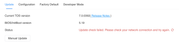
Thans

Re: TOS 7.0.0559 Beta (X86) is Released for Update
Posted: 14 May 2026, 15:26
by MikeZhang
Please check:
1.If you can see WAN IP after you click right side dashboard, sometimes need to wait for seconds
2.Verify if you can install or update any one software from TOS APP center
If the answer is no, you can check solution in the following link:
viewtopic.php?p=33916
You may also update manually with package:
https://download3.terra-master.com/TOS% ... 222142.bz2
then observe again if there is still update error
Re: TOS 7.0.0559 Beta (X86) is Released for Update
Posted: 17 May 2026, 19:53
by storageninja
Hello TM support with my second F4 SSD im facing an issue that it wont auto start/shutdown during the scheduled time window. So my backups are failing from TNAS1 to TNAS2. Do we need to program the startup/shutdown rules after every TOS update?
What kind of information do you need to troubleshoot this blocking auto start problem?