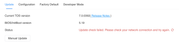
Regarding the issue you mentioned about changing the second M.2 SSD originally used as Hyper Cache to a storage drive and installing the TOS system, here are detailed instructions and suggestions:
You do not need to reinstall TOS 6 on both M.2 SSDs and then upgrade to TOS 7. You only need to change the purpose of the second M.2 SSD to the system disk in the current system and then use it as storage.
Operation steps are as follows:
1. Remove Hyper Cache:
- Log in to the TOS desktop.
- Go to Storage Management > Hyper Cache.
- Select the corresponding M.2 SSD cache configuration and click the "Delete" button.
- Wait for the system to complete cache data write-back and unmounting.
- Go to Storage Management > Disk.
- Select the corresponding M.2 SSD, click the "More" button, and select "Erase Disk".
- Wait for disk initialization to complete.
- Go to Storage Management > Disk > System Disk.
- Click the "Create" button, select the disk you want to add as the system disk, and click the "Confirm" button.
- Confirm your selection again in the pop-up prompt window and click the "Confirm" button.
- Go to Storage Management > Storage Pool.
- Click "Create" and select this M.2 SSD.
- Select the array mode according to your needs (such as Single).
- Under the Volume tab, create a new volume based on the new storage pool.