TOS 7.0.1422 (x86) Official Release Update

Official news about TOS, mobile app, PC app updates or beta releases.
User avatar
CursaYang
TM Support
Posts: 1016
Joined: 06 Jan 2025, 16:34
China

Re: TOS 7.0.1422 (x86) Official Release Update

Post by CursaYang »

billyBob wrote: ↑06 Nov 2026, 19:40
We understand your concerns. However, please note that we cannot remotely access or operate your NAS without your authorization and an established remote connection. We did not perform any operations to delete your data.

To help us investigate what happened, could you please describe the steps you took during the TOS 6 to TOS 7 upgrade, the permission issue you encountered, and the exact steps you followed when reinstalling TOS 6? We will review the details and do our best to identify the possible cause of the data loss.

Thank you for your cooperation.
To contact our team, please send email to following addresses, remember to replace (at) with @

Technical team: support(at)terra-master.com(for technical support)
Service team: service(at)terra-master.com(for purchasing, return, replacement, RMA service)
User avatar
CursaYang
TM Support
Posts: 1016
Joined: 06 Jan 2025, 16:34
China

Re: TOS 7.0.1422 (x86) Official Release Update

Post by CursaYang »

Silko wrote: ↑07 Nov 2026, 02:09
Can you log in to the NAS via SSH and run the following commands to check the status of the services related to the web page:

Code: Select all

systemctl status TOSDaemon.service

Code: Select all

systemctl status nginx.service

Code: Select all

systemctl status [email protected]
To contact our team, please send email to following addresses, remember to replace (at) with @

Technical team: support(at)terra-master.com(for technical support)
Service team: service(at)terra-master.com(for purchasing, return, replacement, RMA service)
User avatar
Silko
Posts: 6
Joined: 22 Sep 2026, 17:56
Netherlands

Re: TOS 7.0.1422 (x86) Official Release Update

Post by Silko »

CursaYang wrote: ↑07 Nov 2026, 14:28
Silko wrote: ↑07 Nov 2026, 02:09
Can you log in to the NAS via SSH and run the following commands to check the status of the services related to the web page:

Code: Select all

systemctl status TOSDaemon.service

Code: Select all

systemctl status nginx.service

Code: Select all

systemctl status [email protected]
Tried it all, none of it was giving any result but errors. Ended up cold resetting as even normal reset didn't work. Now finally running 7.0.1422.
User avatar
krza
Posts: 9
Joined: 02 Jun 2024, 00:35
Great Britain

Re: TOS 7.0.1422 (x86) Official Release Update

Post by krza »

Hi

I've had an issue where after updating from 7.0.0747 to 7.0.1422 Plex has lost access to my media library and I am unable to grant it permissions to access my media. I think I have stumbled on a bigger issue I am having with my shared folders which I hope you can help with.

F2-423
Volume 1 - 2 x HDD (Raid 1) - /public/Media (Contains all my media)
Volume 2 - NVMe - System (Applications also installed on this drive, including Plex)

I recently upgraded from TOS5 to TOS6. That went ok. No issues with Plex. Once on TOS6 I migrated the system disk to just be on the NVMe. No issues with that.

Over the weekend I upgraded from TOS 6.0.794 to 7.0.0747 (manual). I removed my HDDs during this upgrade and I had read that this could reduce any potential upgrade issues. That went ok. Plex lost access to my /Media on Volume 1 and I could not play anything as a result. I managed to fix this by removing all permissions for the Application User "plex" both in Control Panel -> Network Services -> Shared Folder as well as in the File Manager then readding the permissions. I could then play my media and browse /public/Media from inside Plex and from windows.

I then updated from 7.0.0747 to 7.0.1422. Plex has again lost access to my /Media folder and no amount of combination of removing / reading permissions, enabling / disabling Plex and rebooting the NAS seem to restore access.

When trying to troubleshoot the issue I have also noticed that I have two sets of "public" and two sets of "home" folders. One set on volume1 and another set on volume2. I assume that the ones on volume1 were the originals, and the ones on volume2 the new ones which were created when I migrated from TOS6 to TOS7 without the HDDs installed?

I would like both the "public" and "home" folders to reside on volume1 as volume2 does not have enough space. I have tried to move the public folder from volume2 to volume1 but I get an error. I can also see no option to remove the old public and home folders from volume1.

Instead of just creating a new shared folder in volume1 for my media, I would like to make use of the public folder as I believe this is managed by the system and has better functionality. Additionally I would like the home folder migrated to volume1 so that any new users have their home folders created there where there is more storage available.

Please let me know if you need any additional information.

Thanks
User avatar
EriChan
TM Support
Posts: 472
Joined: 06 Jan 2026, 12:27
China

Re: TOS 7.0.1422 (x86) Official Release Update

Post by EriChan »

krza wrote: ↑10 Nov 2026, 01:01
Thank you for your detailed feedback and description of the issue!

To help us better investigate and determine whether there is an underlying anomaly in the TOS system, please generate and download a system report from the TOS WebUI (Support & Help > Issue Feedback), and email it to our technical support team at support(at)terra-master.com.

Please also include this forum thread link along with your forum ID in the email so our engineers can track the issue directly.

Thank you for your cooperation and support!
To contact our team, please send email to following addresses, remember to replace (at) with @

Technical team: support(at)terra-master.com(for technical support)
Service team: service(at)terra-master.com(for purchasing, return, replacement, RMA service)
User avatar
Silko
Posts: 6
Joined: 22 Sep 2026, 17:56
Netherlands

Re: TOS 7.0.1422 (x86) Official Release Update

Post by Silko »

Noticed calculation /display error in USB Copy. Percentage doesn't match files copied. Backup succesfull at less than 14%. Not a big deal as backup has finished succesfully, just esthetics here.

Image

Image
User avatar
EriChan
TM Support
Posts: 472
Joined: 06 Jan 2026, 12:27
China

Re: TOS 7.0.1422 (x86) Official Release Update

Post by EriChan »

Silko wrote: ↑11 Nov 2026, 15:19
Thank you for the feedback.
We will continue to monitor the situation and attempt to reproduce the issue you mentioned.
To contact our team, please send email to following addresses, remember to replace (at) with @

Technical team: support(at)terra-master.com(for technical support)
Service team: service(at)terra-master.com(for purchasing, return, replacement, RMA service)
User avatar
Lau6311
Posts: 33
Joined: 12 Sep 2024, 13:24
Malaysia

Re: TOS 7.0.1422 (x86) Official Release Update

Post by Lau6311 »

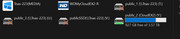
Reporting of bud: (after updating to TOS 7 from TOS 6)
1. PC (win 11, 26H2) and Android TVs (Emby) cannot access to Terramaster NAS drives, frustrating and wasting a few days efforts

TOS 6.0.770 (can access NAS) --> 6.0.794 (can) --> 7.0.0747 (cannot)--> 7.0.1341 (cannot) --> 7.0.1422 (cannot). [not to update to 1536 yet]
(refer to Pic 1)

Symptoms:
A. Can access NAS drives when updated TOS, but restart PC, cannot access NAS.
B. Out of many restarting PC, 1 of 10 times can access NAS drives without doing any changes.
C. Other WD NAS can ALWAYS be accessed by PC.

Can provide help to resolve problem. Thanks...

Image
F2-223, TOS 6.0.648, 2x8T N300 HDD Vol 1 & 3 (Singles)
1x1T Kingston NVME SSD Vol 2 (Single)
1x256G Hynix NVME SSD Hyper Cache (Balance Mode, 238G)
32G RAM
User avatar
Lau6311
Posts: 33
Joined: 12 Sep 2024, 13:24
Malaysia

Re: TOS 7.0.1422 (x86) Official Release Update

Post by Lau6311 »

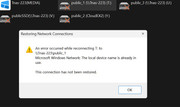
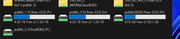
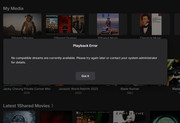
TOS 7 Bug (unable to access NAS Drives)
Additional info: Refer to Attached jpg files
1. "this connection has not be restored"
Image

2. Ramdomly can access NAS Drives
Image

3. Emby cannot access NAS Drives (PC and open Emby app)
Image

Appreciating...
F2-223, TOS 6.0.648, 2x8T N300 HDD Vol 1 & 3 (Singles)
1x1T Kingston NVME SSD Vol 2 (Single)
1x256G Hynix NVME SSD Hyper Cache (Balance Mode, 238G)
32G RAM
User avatar
TMnight
TM Support
Posts: 207
Joined: 30 Sep 2022, 16:40

Re: TOS 7.0.1422 (x86) Official Release Update

Post by TMnight »

Lau6311 wrote: ↑Yesterday, 10:46
If you encounter issues accessing SMB shares, you can refer to the troubleshooting methods in the following forum post and try the suggested solutions:

viewtopic.php?t=2759

The post covers some common causes of SMB access issues on Windows and their corresponding troubleshooting methods. We hope it will be helpful in resolving your issue.
To contact our team, please send email to following addresses, remember to replace (at) with @:
Technical team: support(at)terra-master.com(for technical support)
Service team: service(at)terra-master.com(for purchasing, return, replacement, RMA service)
Post Reply

Return to “Update Notice”