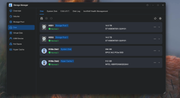
Hello. I need to create a new TOS 7 install from the scratch on a F2-221 device.
Instead of an update package, is there a TOS 7 full OS install file I can use?.
Thanks for helping out.
TOS 7.0.0746 Official Release (X86) is Now Available
-
skyrocket777

- Posts: 4
- Joined: 20 Jul 2024, 01:43


Re: TOS 7.0.0746 Official Release (X86) is Now Available
The proper way, I think, would be to first ensure you have an appropriate Bios version.
Then update your USB initboot image (or, even better, create a new one on a spare usb drive of the correct size):
viewtopic.php?p=37031#p37031
Then, you should be able to perform a new initialisation of your Tnas and download the appropriate Tos7 version (latest available) automatically. Whatever that version turns out to be, further updates may be required to reach the latest release version.
{or, you could possibly check under other models in the support pages and find a Tos7 installation package}
Then update your USB initboot image (or, even better, create a new one on a spare usb drive of the correct size):
viewtopic.php?p=37031#p37031
Then, you should be able to perform a new initialisation of your Tnas and download the appropriate Tos7 version (latest available) automatically. Whatever that version turns out to be, further updates may be required to reach the latest release version.
{or, you could possibly check under other models in the support pages and find a Tos7 installation package}
F5-221 TOS7.0.1278 - 4x4TB (Ironwolf) Traid
F2-424 TOS7.0.1278 - 2x500GB nvme (P3) Traid, 2x6TB HDD (HGST) Traid
F2-221 TOS7.0.1278 - 1x3TB Ext4, 1x4TB Btrfs
F2-425+ TOS7.0.1278 - 2x500GB nvme (P3) Traid, 2x6TB HDD (EXOS) Traid
F2-424 TOS7.0.1278 - 2x500GB nvme (P3) Traid, 2x6TB HDD (HGST) Traid
F2-221 TOS7.0.1278 - 1x3TB Ext4, 1x4TB Btrfs
F2-425+ TOS7.0.1278 - 2x500GB nvme (P3) Traid, 2x6TB HDD (EXOS) Traid


Re: TOS 7.0.0746 Official Release (X86) is Now Available
Please first confirm that your BIOS version meets the upgrade requirements — for example, that you are currently running the official release of TOS 6.skyrocket777 wrote: ↑13 Oct 2026, 03:41 Hello. I need to create a new TOS 7 install from the scratch on a F2-221 device.
Instead of an update package, is there a TOS 7 full OS install file I can use?.
Thanks for helping out.
Download link for the 7.0.1278 installation package:
https://download3.terra-master.com/TOS% ... 241521.ins
You can create a dedicated TOS 7 boot system and then reinstall TOS 7.
To contact our team, please send email to following addresses, remember to replace (at) with @
Technical team: support(at)terra-master.com(for technical support)
Service team: service(at)terra-master.com(for purchasing, return, replacement, RMA service)
Technical team: support(at)terra-master.com(for technical support)
Service team: service(at)terra-master.com(for purchasing, return, replacement, RMA service)
-
skyrocket777
- Posts: 4
- Joined: 20 Jul 2024, 01:43
Re: TOS 7.0.0746 Official Release (X86) is Now Available
Before anything else thanks for helping out.
I had installed and working TOS 6, but after trying to update to TOS 7 the TNAS didn't boot as expected. So, since I have a backup, I want to create a fresh TOS 7 install. But if you have a recommendation, I'd appreciate it. Regards
I had installed and working TOS 6, but after trying to update to TOS 7 the TNAS didn't boot as expected. So, since I have a backup, I want to create a fresh TOS 7 install. But if you have a recommendation, I'd appreciate it. Regards
Re: TOS 7.0.0746 Official Release (X86) is Now Available
Replace the boot system in the built-in USB drive with the TOS7-specific version:viewtopic.php?t=6433skyrocket777 wrote: ↑15 Oct 2026, 01:48 Before anything else thanks for helping out.
I had installed and working TOS 6, but after trying to update to TOS 7 the TNAS didn't boot as expected. So, since I have a backup, I want to create a fresh TOS 7 install. But if you have a recommendation, I'd appreciate it. Regards
, and then directly install the latest TOS7: viewtopic.php?t=423
To contact our team, please send email to following addresses, remember to replace (at) with @
Technical team: support(at)terra-master.com(for technical support)
Service team: service(at)terra-master.com(for purchasing, return, replacement, RMA service)
Technical team: support(at)terra-master.com(for technical support)
Service team: service(at)terra-master.com(for purchasing, return, replacement, RMA service)
-
skyrocket777
- Posts: 4
- Joined: 20 Jul 2024, 01:43
Re: TOS 7.0.0746 Official Release (X86) is Now Available
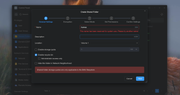
Thanks for helping. I tried to make a fresh install with the F2-221 boot file for TOS 7, but I get this error when I choose the custom install of TOS 7 with the *.ins file.
Can you please help?

Can you please help?
Re: TOS 7.0.0746 Official Release (X86) is Now Available
The page you are currently on does not appear to be the TOS 7 installation page. Please provide a full screenshot of the page — you can see the current boot system version at the bottom of the page.skyrocket777 wrote: ↑16 Oct 2026, 08:23 Thanks for helping. I tried to make a fresh install with the F2-221 boot file for TOS 7, but I get this error when I choose the custom install of TOS 7 with the *.ins file.
Can you please help?
Installation failures can also be related to the hard drives. You can run a check on the drives.
To contact our team, please send email to following addresses, remember to replace (at) with @
Technical team: support(at)terra-master.com(for technical support)
Service team: service(at)terra-master.com(for purchasing, return, replacement, RMA service)
Technical team: support(at)terra-master.com(for technical support)
Service team: service(at)terra-master.com(for purchasing, return, replacement, RMA service)


Re: TOS 7.0.0746 Official Release (X86) is Now Available
Got to be the worst update update yet. No longer an option to manually update apps, file permissions screwed, and completely lost access to the server with Plex and that was a real pain to fix. TOS 6 was installed to SSD and now it apparently has system files on the Raid Hard drives because it can no longer boot without them installed. And since I'm on 7.0.1341 these issues that were present in the initial build have not not been fixed.

Re: TOS 7.0.0746 Official Release (X86) is Now Available
Regarding your concerns:
1. Manual app updates:
The option to manually update applications has always been available. You can update apps manually via Application Center > Installed.
2. System disk location:
Upgrading to TOS 7 will not change your system disk. You can verify the location of the system disk under Storage Manager > Hard Drive > System Disk.
3. Booting or updating with partial drives:
We do not recommend booting the NAS or performing updates with only a subset of hard drives installed, as this will cause a series of unnecessary system anomalies.
Hope this helps!
To contact our team, please send email to following addresses, remember to replace (at) with @
Technical team: support(at)terra-master.com(for technical support)
Service team: service(at)terra-master.com(for purchasing, return, replacement, RMA service)
Technical team: support(at)terra-master.com(for technical support)
Service team: service(at)terra-master.com(for purchasing, return, replacement, RMA service)
Re: TOS 7.0.0746 Official Release (X86) is Now Available
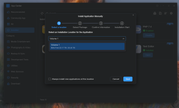
System shows SSD is system drive. Pulling the hard drives no longer allows the unit to boot. So yes system files were placed on hard drive. Plex no longer has access to the same files it has had access to for over a year and they can not be shared. Support did a teamviewer session yesterday and were not able to create a shared folder under TOS 7 to the media files for Plex.The directory for homes on the HHD media /file storage drive is not shareable as TOS 7 says the file location is reserved for system. They also agreed that TOS 7 removed the option to update apps manually through app center. I was able to find the moved option of manually updating apps in the app center. My media files had to be moved from home directory to root of raid hard drives to make shareable and so that Plex could access them. This has been the same directory they were in with TOS 5 and TOS 6,after upgrading to TOS 7 it is no longer possible to create a shareable directory unless it is at root of Hard drives. Also this new screen shows up that confirms manually updating apps installs to root of storage drive and can only be installed there. Also with the update it would not install to system SSD, erred with not enough space on a 256GB SSD that it was supposed to be updating from TOS 6 to TOS 7 so yes even though it says the SSD is system it installed to the storage drives.