[Help] Centralized Backup Questions

Centralized Backup is a professional disaster recovery tool specially developed for business users.
Post Reply
User avatar
Canuck
Posts: 34
Joined: 06 May 2025, 09:23
Canada

[Help] Centralized Backup Questions

Post by Canuck »

Hi there, diving into Centralized Backup. Two questions:
  • It looks like for Windows Computer backup, it uses the IP to identify the machine. So if you don't have a static address and/or uses a different adapter (wired vs wireless), then it thinks it is different computer when the client IP changes. Am I missing something?
  • The backup slams my T424-Pro leaving it basically unresponsive to other tasks. Any ability to reduce the number of cores it is using or otherwise lower the process priority?
User avatar
TMzethar
TM Support
Posts: 3048
Joined: 27 Oct 2020, 16:43

Re: [Help] Centralized Backup Questions

Post by TMzethar »

On computer, you will need to use your TNAS credentials to connect to TNAS. Even if your computer’s IP address changes, this will not affect normal operation.
Regarding the high CPU load you mentioned, we will continue to work on optimizing performance. Could you please let me know which version of the TOS system and Centralized Backup you are using?
For more information on Centralized Backup, please refer to:
https://toshelp.terra-master.com/docs/T ... zed-backup
https://toshelp.terra-master.com/docs/T ... ckup-agent
To contact our team, please send email to following addresses, remember to replace (at) with @:
Technical team: support(at)terra-master.com (for technical support)
Service team: service(at)terra-master.com (for purchasing, return, replacement, RMA service)
User avatar
sergo77
Posts: 15
Joined: 23 Jul 2024, 05:34
Russia

Re: [Help] Centralized Backup Questions

Post by sergo77 »

Hallo!
My question concerns quotas on shared folders for the backup task—what issue arises from this restriction? I use quotas for my backup folders, and my previous version of CB functioned well with this share, but the new version imposes limits on its use. What is the problem? I cannot allocate all partition space to the backup share because this partition holds many shares. What can I do?
User avatar
sergo77
Posts: 15
Joined: 23 Jul 2024, 05:34
Russia

Re: [Help] Centralized Backup Questions

Post by sergo77 »

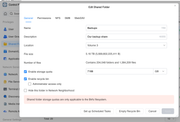
Hmm… My TOS 7.0.1201, CB - 3.0.292, Volume3 - Btrfs.
In share properties, I noted that quotas apply only to Btrfs volumes.
Image


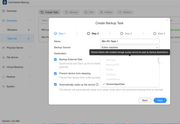
Naturally, when attempting to create a task, warning messages appear regarding usage limitations for the destination folder.
Image
User avatar
EriChan
TM Support
Posts: 400
Joined: 06 Jan 2026, 12:27
China

Re: [Help] Centralized Backup Questions

Post by EriChan »

sergo77 wrote: ↑23 Sep 2026, 05:52
Thanks for your update, and we sincerely apologize for the misleading information in the previous reply.

After verification with our team: Centralized Backup has by design never supported using shared folders with enabled storage quotas as backup destinations (https://help.terra-master.com/docs/TOS7 ... zed-backup).

Reason:Storage quotas are enforced at the filesystem level. When a folder reaches its quota limit, the system reports a generic "disk full" error. Centralized Backup cannot distinguish whether the folder quota is exhausted or the physical volume itself is out of space. This would cause confusing "storage full" failures while the volume still shows plenty of free space. To avoid this ambiguity and ensure task reliability, quota-enabled folders are restricted by design.

Recommended Solutions:
1.Go to TOS Control Panel > Shared Folder, edit the shared folder you plan to use for backups, and uncheck/disable the Storage Quota.
2.Alternatively, create a new dedicated Btrfs shared folder without a storage quota specifically for storing Centralized Backup data.

Thank you for your understanding and support!
To contact our team, please send email to following addresses, remember to replace (at) with @

Technical team: support(at)terra-master.com(for technical support)
Service team: service(at)terra-master.com(for purchasing, return, replacement, RMA service)
User avatar
sergo77
Posts: 15
Joined: 23 Jul 2024, 05:34
Russia

Re: [Help] Centralized Backup Questions

Post by sergo77 »

Tnx for your answer.
I know how to disable quotas, but won't do it. Reason easy - I have big partitons for several shares, and need a plans for space strategy.
I hope your development team eventually realizes that this is a flimsy excuse.
If you are developing hardware, an OS, and application software, you can certainly access data regarding free space in shared folders, including any quotas in place. These imposed limits look like a "kludge"—a quick-and-dirty fix the developer resorted to just to avoid actually addressing the underlying issue.
And yes, I’ll reiterate: there were no such restrictions in earlier 2025 versions, and I used the product successfully back then.
In the meantime, I’ll have to switch to alternatives—like Veeam Backup, for instance. I made a similar switch with the original Photos app, which was still very rough around the edges in TOS 6; Immich has taken its place now.
User avatar
CursaYang
TM Support
Posts: 953
Joined: 06 Jan 2025, 16:34
China

Re: [Help] Centralized Backup Questions

Post by CursaYang »

I will forward your request to our product team for evaluation — specifically, whether it is possible to differentiate between folder quotas and volume space in Centralized Backup, so that a better solution can be found.
To contact our team, please send email to following addresses, remember to replace (at) with @

Technical team: support(at)terra-master.com(for technical support)
Service team: service(at)terra-master.com(for purchasing, return, replacement, RMA service)
User avatar
rfbjr
Silver Member
Posts: 478
Joined: 16 May 2024, 23:43
United States of America

Re: [Help] Centralized Backup Questions

Post by rfbjr »

I have 4 devices, all use NIC #2 as a backup network. Each has a static IP and are connected to it's own switch. Two of the devices are on a different network than the other two on NIC #1. With that said backups run usually in the middle of the night or early morning. One NAS, the F6-424 is the target of the backups.
F6-424 & F4-425 Plus at 7.0.1298
F4-424 Pro (x2) at 7.0.1298
D4-320 (Offline until I can afford more HDDs)
User avatar
sergo77
Posts: 15
Joined: 23 Jul 2024, 05:34
Russia

Re: [Help] Centralized Backup Questions

Post by sergo77 »

CursaYang wrote: ↑25 Sep 2026, 21:50 I will forward your request to our product team for evaluation — specifically, whether it is possible to differentiate between folder quotas and volume space in Centralized Backup, so that a better solution can be found.
Thanx for your attention!
辛苦了
Post Reply

Return to “Centralized Backup”