Thanks for your update, and we sincerely apologize for the misleading information in the previous reply.
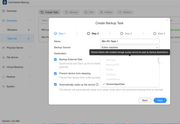
After verification with our team: Centralized Backup has by design never supported using shared folders with enabled storage quotas as backup destinations (
https://help.terra-master.com/docs/TOS7 ... zed-backup).
Reason:Storage quotas are enforced at the filesystem level. When a folder reaches its quota limit, the system reports a generic "disk full" error. Centralized Backup cannot distinguish whether the folder quota is exhausted or the physical volume itself is out of space. This would cause confusing "storage full" failures while the volume still shows plenty of free space. To avoid this ambiguity and ensure task reliability, quota-enabled folders are restricted by design.
Recommended Solutions:
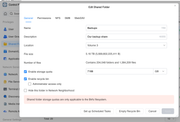
1.Go to TOS Control Panel > Shared Folder, edit the shared folder you plan to use for backups, and uncheck/disable the Storage Quota.
2.Alternatively, create a new dedicated Btrfs shared folder without a storage quota specifically for storing Centralized Backup data.
Thank you for your understanding and support!
To contact our team, please send email to following addresses, remember to replace (at) with @
Technical team: support(at)terra-master.com(for technical support)
Service team: service(at)terra-master.com(for purchasing, return, replacement, RMA service)