What version of TOS were you using before updating to 7.0.0804?Silversnake wrote: ↑03 Aug 2026, 15:16 Jellyfin ( 10.11.0)
Following issues with drive mounting (which were resolved by installing a different version of Storage Manager), I am unable to select a folder library in Jellyfin.
I have performed the following steps:
1) Uninstallation, download, and fresh installation
2) Restart
3) Running and completing the Jellyfin setup wizard
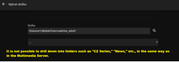
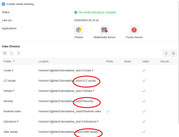
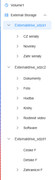
4) During the wizard setup, it is impossible to select folders other than those on the main drive. It appears that Jellyfin cannot see the other drives or their folder structures—only the main drive where the TOS system is installed (Volume1). The other three drives are in "Move" mode. The drives are visible on the network, and the Multimedia Server is working perfectly, SMB etc.
Everything worked fine in the previous version of the TOS system; this version seems to be quite problematic.
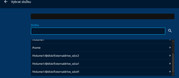
If you need to access it through Jellyfin, please go to Control Panel > Shared Folders > Edit > Application User and reset the permissions.
If the issue persists, you can contact us online to schedule a remote troubleshooting session with an engineer.
https://salesiq.zohopublic.com/signatur ... 97d0be8892
Please include your forum ID and the URL of this post.