TNAS System Reports Array Downgrade Without Specifying Which Hard Drive Failed – How to Handle It?

Hard Drive, volume, storage pool, RAID
Post Reply
User avatar
TMnight
TM Support
Posts: 187
Joined: 30 Sep 2022, 16:40

TNAS System Reports Array Downgrade Without Specifying Which Hard Drive Failed – How to Handle It?

Post by TMnight »

Applicable Version: TOS5

Applicable Models: All Models

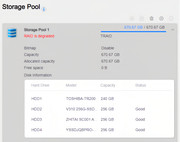
Failure Phenomenon: The storage pool page shows an array downgrade, but does not specify which hard drive has failed. The detailed storage pool information indicates that all hard drives are properly connected.

Cause of Failure:
The array cannot operate normally due to a failure in one of the hard drives. This could be caused by aging, physical damage, connection issues, or other reasons.
Image

Solution:
1.Log in via SSH
First, you need to log in to your TNAS device via SSH. For login instructions, please refer to the following link: viewtopic.php?t=2350

2.Check the Array Status
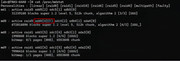
Run the command cat /proc/mdstat to check if any hard drives in the array are experiencing issues. For example, if the output shows sdd4[4](F), the (F) indicates that the hard drive is faulty. If there is no (F), the drive is functioning normally.
Image

3.View Faulty Hard Drive Slot Information:
Run the command cat /var/cache/diskinfo/sdd (replace sdd with the disk identifier found in the previous step) to check the slot information of the faulty hard drive in the NAS. For example, if the output shows "HDD4," it indicates that the faulty drive is located in the 4th slot of the TNAS.

Image

4.Replace the Faulty Hard Drive:
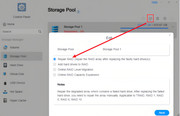
Turn off the device and replace the faulty hard drive. The new drive should be of the same brand and capacity as the original, or a larger capacity from the same brand. Additionally, you can use professional hard drive diagnostic tools to perform a full check on the faulty drive for bad sectors, physical damage, or other issues.
For reference on array repair, please check the following link: viewtopic.php?t=6815
Image
To contact our team, please send email to following addresses, remember to replace (at) with @:
Technical team: support(at)terra-master.com(for technical support)
Service team: service(at)terra-master.com(for purchasing, return, replacement, RMA service)
User avatar
C64emu
Posts: 3
Joined: 11 Jul 2026, 00:36
Germany

Re: TNAS System Reports Array Downgrade Without Specifying Which Hard Drive Failed – How to Handle It?

Post by C64emu »

Point 3 (View Faulty Hard Drive Slot Information) - I get:

Code: Select all

r00t@TNASXXX:~# cat /var/cache/diskinfo/sdza4
cat: /var/cache/diskinfo/sdza4: No such file or directory
r00t@TNASXXX:~#
r00t@TNASXXX:~#
r00t@TNASXXX:~# cat /var/cache/diskinfo
cat: /var/cache/diskinfo: No such file or directory
r00t@TNASXXX:~#
User avatar
TMzethar
TM Support
Posts: 3021
Joined: 27 Oct 2020, 16:43

Re: TNAS System Reports Array Downgrade Without Specifying Which Hard Drive Failed – How to Handle It?

Post by TMzethar »

C64emu wrote: 30 Jul 2026, 16:14
What is model name of your TNAS device?
If you see “sdza4(F)” when running `cat /proc/mdstat`, but the disk does not appear when running `cat /var/cache/diskinfo/sdza4`, it is likely that the disk is no longer recognized.
We recommend that you check the current storage structure and available devices using the following commands:

Code: Select all

lsblk

Code: Select all

ls /dev/sd*
To contact our team, please send email to following addresses, remember to replace (at) with @:
Technical team: support(at)terra-master.com (for technical support)
Service team: service(at)terra-master.com (for purchasing, return, replacement, RMA service)
User avatar
Gremlin
Gold Member
Posts: 1719
Joined: 02 Dec 2022, 22:31
Great Britain

Re: TNAS System Reports Array Downgrade Without Specifying Which Hard Drive Failed – How to Handle It?

Post by Gremlin »

:?: When is /var/cache/diskinfo generated? :?:
I've checked 3 Tnas on Tos7(latest) and it does not appear.
F5-221 TOS7.0.1130 - 4x4TB (Ironwolf) Traid
F2-424 TOS7.0.1130 - 2x500GB nvme (P3) Traid, 2x6TB HDD (HGST) Traid
F2-221 TOS7.0.1130 - 1x3TB Ext4, 1x4TB Btrfs
F2-425+ TOS7.0.1130 - 2x500GB nvme (P3) Traid, 2x6TB HDD (EXOS) Traid
User avatar
C64emu
Posts: 3
Joined: 11 Jul 2026, 00:36
Germany

Re: TNAS System Reports Array Downgrade Without Specifying Which Hard Drive Failed – How to Handle It?

Post by C64emu »

TMzethar wrote: 30 Jul 2026, 18:10
C64emu wrote: 30 Jul 2026, 16:14
What is model name of your TNAS device?
It is a F8 SSD plus
Current TOS version: 7.0.0804
BIOS/InitBoot version: MADN0301.V07
If you see “sdza4(F)” when running `cat /proc/mdstat`, but the disk does not appear when running `cat /var/cache/diskinfo/sdza4`, it is likely that the disk is no longer recognized.
Look at the output.

Code: Select all

r00t@TNASXX:~# cat /proc/mdstat
Personalities : [raid1] [raid6] [raid5] [raid4]
md1 : active raid1 sdze4[0] sdzf4[1]
      233716736 blocks super 1.2 [2/2] [UU]

md0 : active raid5 sdzb4[0] sdzd4[3] sdzc4[2] sdza4[4]
      11687476224 blocks super 1.2 level 5, 64k chunk, algorithm 2 [4/4] [UUUU]
      bitmap: 2/30 pages [8KB], 65536KB chunk

md8 : active raid1 sdzf3[1] sdze3[0]
      1997824 blocks super 1.2 [2/2] [UU]
      bitmap: 0/1 pages [0KB], 65536KB chunk

md9 : active raid1 sdzf2[2] sdze2[0]
      7995392 blocks super 1.2 [2/2] [UU]
      bitmap: 0/1 pages [0KB], 65536KB chunk

unused devices: <none>
r00t@TNASXX:~#
The problem is not a corrupt drive. The problem is the missing diskinfo.

Code: Select all

r00t@TNASXX:~# ll /var/cache
total 40
drwxr-xr-x 9 r00t r00t 4096 Jul 10 14:34 ./
drwxr-xr-x 7 r00t r00t 4096 Jul 30 10:37 ../
drwxr-xr-x 2 r00t r00t 4096 Jul 30 10:38 apt/
drwxr-xr-x 2 r00t r00t 4096 Jul 10 14:34 inadyn/
drwx------ 2 r00t r00t 4096 Dec  2  2025 ldconfig/
drwxr-xr-x 7 r00t r00t 4096 Nov 25  2025 nginx/
drwxr-xr-x 2 r00t r00t 4096 Sep 16  2025 pg_stat_tmp/
drwx------ 2 r00t r00t 4096 Nov 25  2025 private/
-rw------- 1 r00t r00t   39 Jul 10 14:23 public.ip
drwxr-xr-x 3 r00t r00t 4096 Jul 30 22:28 samba/
r00t@TNASXX:~#
We recommend that you check the current storage structure and available devices using the following commands:

Code: Select all

lsblk

Code: Select all

ls /dev/sd*
There is nothing special found with this commands.
User avatar
CursaYang
TM Support
Posts: 789
Joined: 06 Jan 2025, 16:34
China

Re: TNAS System Reports Array Downgrade Without Specifying Which Hard Drive Failed – How to Handle It?

Post by CursaYang »

Gremlin wrote: 30 Jul 2026, 19:41
C64emu wrote: 31 Jul 2026, 05:23
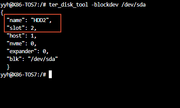
Please note that the commands in this post only apply to TOS 5. For TOS 6 and TOS 7, you can use the following command to view the hard drive corresponding to the drive letter:

Code: Select all

ter_disk_tool -blockdev /dev/sdX
Image
To contact our team, please send email to following addresses, remember to replace (at) with @

Technical team: support(at)terra-master.com(for technical support)
Service team: service(at)terra-master.com(for purchasing, return, replacement, RMA service)
User avatar
C64emu
Posts: 3
Joined: 11 Jul 2026, 00:36
Germany

Re: TNAS System Reports Array Downgrade Without Specifying Which Hard Drive Failed – How to Handle It?

Post by C64emu »

CursaYang wrote: 31 Jul 2026, 07:27 Please note that the commands in this post only apply to TOS 5.
So nobody did try this with TOS6?
For TOS 6 and TOS 7, you can use the following command to view the hard drive corresponding to the drive letter:

Code: Select all

ter_disk_tool -blockdev /dev/sdX
Image
This does not work for me. Look at this output:

Code: Select all

r00t@TNASXX:~# ter_disk_tool -blockdev /dev/sdza
{
  "name": "NVMe Disk_sdza",
  "slot": 0,
  "host": 1,
  "nvme": 1,
  "expander": 0,
  "blk": "/dev/sdza"
  }
r00t@TNASXX:~# ter_disk_tool -blockdev /dev/sdze
{
  "name": "NVMe Disk_sdze",
  "slot": 0,
  "host": 1,
  "nvme": 1,
  "expander": 0,
  "blk": "/dev/sdze"
r00t@TNASXX:~#
The output is the same for sdza and sdze?
User avatar
TMzethar
TM Support
Posts: 3021
Joined: 27 Oct 2020, 16:43

Re: TNAS System Reports Array Downgrade Without Specifying Which Hard Drive Failed – How to Handle It?

Post by TMzethar »

C64emu wrote: 31 Jul 2026, 18:16
Based on the output information you provided, your RAID is currently at least in a synchronized state and is available. Both the TOS version and the nature of the issue seem to be quite different from the topic at hand. We recommend that you start a new thread here and describe your problem from the beginning.
viewforum.php?f=25

Additionally, we recommend that you go to TOS > Technical Support > Report Issues, collect and download a system report, and send it to the technical support email address for review and analysis. Please include your forum username and the URL of your forum post in the email so we can know it's you.
(Please do not post the system report on the forum.)
To contact our team, please send email to following addresses, remember to replace (at) with @:
Technical team: support(at)terra-master.com (for technical support)
Service team: service(at)terra-master.com (for purchasing, return, replacement, RMA service)
Post Reply

Return to “Storage”