Applicable Models: All Models
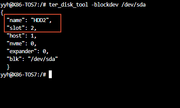
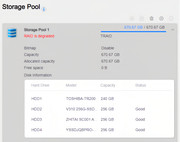
Failure Phenomenon: The storage pool page shows an array downgrade, but does not specify which hard drive has failed. The detailed storage pool information indicates that all hard drives are properly connected.
Cause of Failure:
The array cannot operate normally due to a failure in one of the hard drives. This could be caused by aging, physical damage, connection issues, or other reasons.
Solution:
1.Log in via SSH
First, you need to log in to your TNAS device via SSH. For login instructions, please refer to the following link: viewtopic.php?t=2350
2.Check the Array Status
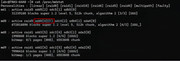
Run the command cat /proc/mdstat to check if any hard drives in the array are experiencing issues. For example, if the output shows sdd4[4](F), the (F) indicates that the hard drive is faulty. If there is no (F), the drive is functioning normally.
3.View Faulty Hard Drive Slot Information:
Run the command cat /var/cache/diskinfo/sdd (replace sdd with the disk identifier found in the previous step) to check the slot information of the faulty hard drive in the NAS. For example, if the output shows "HDD4," it indicates that the faulty drive is located in the 4th slot of the TNAS.

4.Replace the Faulty Hard Drive:
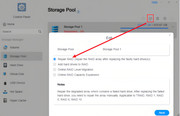
Turn off the device and replace the faulty hard drive. The new drive should be of the same brand and capacity as the original, or a larger capacity from the same brand. Additionally, you can use professional hard drive diagnostic tools to perform a full check on the faulty drive for bad sectors, physical damage, or other issues.
For reference on array repair, please check the following link: viewtopic.php?t=6815


 When is /var/cache/diskinfo generated?