[Help] Spent $1000 For USB4 Direct Connection


Re: [Help] Spent $1000 For USB4 Direct Connection
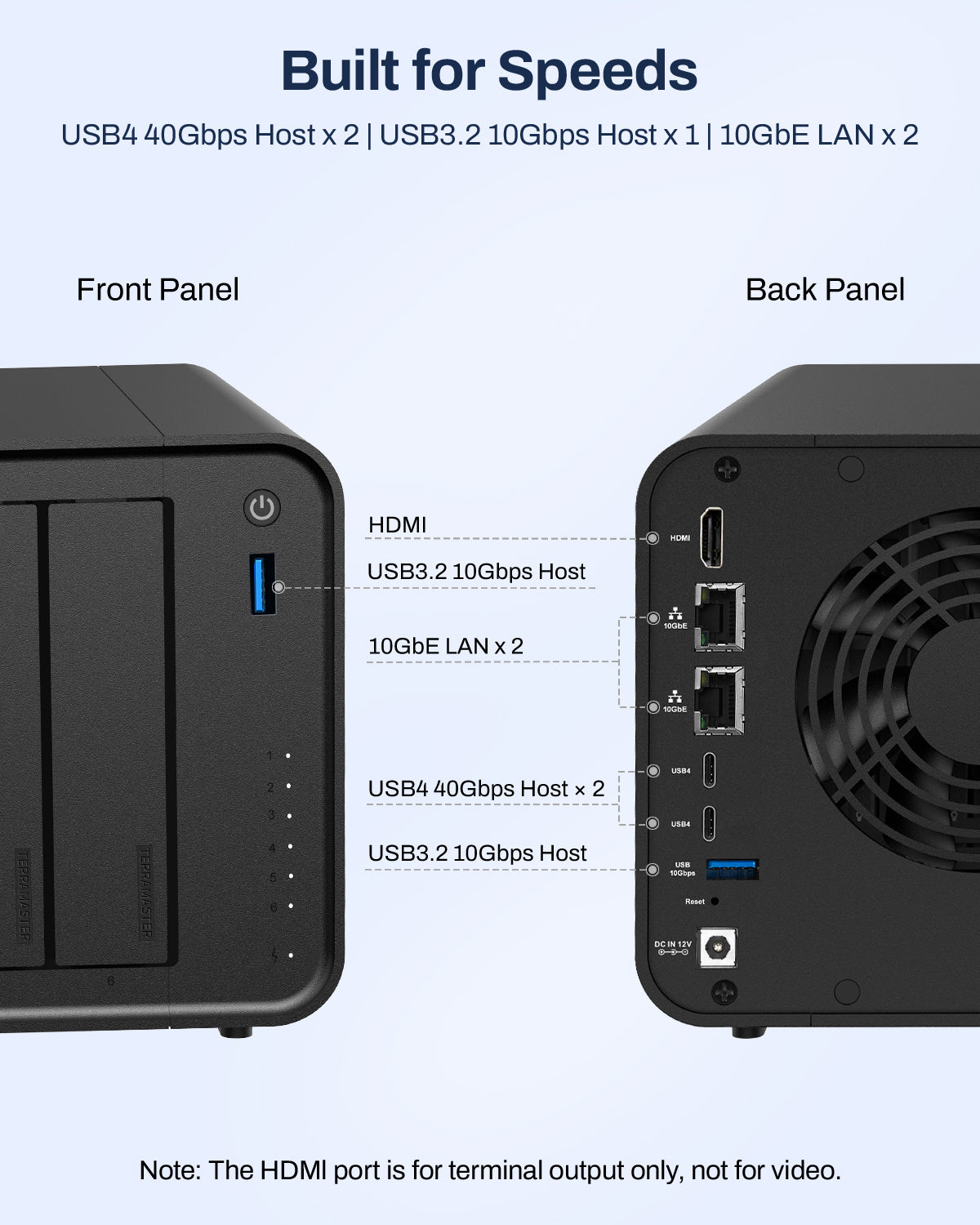
Still doesn't work under USB4 on my workstation. And this is why I wanted a USB4 one not thunderbolt. You really need to recall this item and get it sorted as Thunderbolt and USB4 is not the same. The physical device shows and has labelled USB4 ports. I will be returning this device and buying a proper brand NAS


Re: [Help] Spent $1000 For USB4 Direct Connection
If Thunderbolt4 is fully backward compatible to USB4, I'm not clear as to what the issue might be. Can anyone enlighten me? According to what I can read, there should not be an issue. TIA.
F5-221 TOS7.0.1278 - 4x4TB (Ironwolf) Traid
F2-424 TOS7.0.1278 - 2x500GB nvme (P3) Traid, 2x6TB HDD (HGST) Traid
F2-221 TOS7.0.1278 - 1x3TB Ext4, 1x4TB Btrfs
F2-425+ TOS7.0.1278 - 2x500GB nvme (P3) Traid, 2x6TB HDD (EXOS) Traid
F2-424 TOS7.0.1278 - 2x500GB nvme (P3) Traid, 2x6TB HDD (HGST) Traid
F2-221 TOS7.0.1278 - 1x3TB Ext4, 1x4TB Btrfs
F2-425+ TOS7.0.1278 - 2x500GB nvme (P3) Traid, 2x6TB HDD (EXOS) Traid
-
crisisacting

- Silver Member
- Posts: 531
- Joined: 20 Jan 2022, 16:42
Re: [Help] Spent $1000 For USB4 Direct Connection
If it's truly USB4 (you keep referring to a workstation, but aren't mentioning the model or more specifically the motherboard, making it harder to truly know if/what the limitations might be), then depending on the OS, it should have (P2P) network capabilities.
On Windows 11, it'd follow this link if you want to actually attempt to get this working; would likely have to use SSH to retrieve the IP address for the USB4 connection if/since TOS doesn't acknowledge it on their Web UI (it does seem like it's only partially implemented on this brand new 425 Pro TNAS model and the currently available stable TOS 7.× builds).
But really just return it; the capability is new, it's obviously a work-in-progress feature & you seem to need it to be plug&play simple which it likely will never be on TOS.
Re: [Help] Spent $1000 For USB4 Direct Connection
It's not though. These guys have no idea what they're talking about. Yes "some" devicess are backwards compatible with thunderbolt but they still use different protocols. Especially on AMD
Re: [Help] Spent $1000 For USB4 Direct Connection
Thunderbolt on Threadripper is really flakey especially on the WRX90 Sage which is the motherboard I had. Hence why I specifically looked for a USB4 ONLY NAS. For these guys to come back and say oh sorry it's just a typo, it's actually Thunderbolt is a pretty big deal.crisisacting wrote: ↑27 Jul 2026, 16:57If it's truly USB4 (you keep referring to a workstation, but aren't mentioning the model or more specifically the motherboard, making it harder to truly know if/what the limitations might be), then depending on the OS, it should have (P2P) network capabilities.
On Windows 11, it'd follow this link if you want to actually attempt to get this working; would likely have to use SSH to retrieve the IP address for the USB4 connection if/since TOS doesn't acknowledge it on their Web UI (it does seem like it's only partially implemented on this brand new 425 Pro TNAS model and the currently available stable TOS 7.× builds).
But really just return it; the capability is new, it's obviously a work-in-progress feature & you seem to need it to be plug&play simple which it likely will never be on TOS.
Re: [Help] Spent $1000 For USB4 Direct Connection
You say you HAD a WRX90 Sage - does that mean you are actually trying to configure something different now? Are you running Windows11 or something else. If Windows, have you checked device manager for errors?
F5-221 TOS7.0.1278 - 4x4TB (Ironwolf) Traid
F2-424 TOS7.0.1278 - 2x500GB nvme (P3) Traid, 2x6TB HDD (HGST) Traid
F2-221 TOS7.0.1278 - 1x3TB Ext4, 1x4TB Btrfs
F2-425+ TOS7.0.1278 - 2x500GB nvme (P3) Traid, 2x6TB HDD (EXOS) Traid
F2-424 TOS7.0.1278 - 2x500GB nvme (P3) Traid, 2x6TB HDD (HGST) Traid
F2-221 TOS7.0.1278 - 1x3TB Ext4, 1x4TB Btrfs
F2-425+ TOS7.0.1278 - 2x500GB nvme (P3) Traid, 2x6TB HDD (EXOS) Traid
-
crisisacting
- Silver Member
- Posts: 531
- Joined: 20 Jan 2022, 16:42
Re: [Help] Spent $1000 For USB4 Direct Connection
It does seem that the ASMedia ASM4242 solution used to provide USB4/Thunderbolt on that board is rather troublesome/fickle, with multiple firmware releases attempting to address various issues.
Yes, TerraMaster, being a smaller manufacturer, made a mistake in regards to promoting this feature, are at minimum admitting to the error (though they did have these ports posted as host ports in their press images here, so it does seem to be that sales & the development team should have held off advertising a capability that isn't fully there yet) & have a partial correction forthcoming for future units posted to these forums here.
Unfortunately, you're one of these customers impacted by this blunder and should just return it while you have the ability to do so & find whatever will fulfill this aspect that you require from a NAS provider that specifically has a USB4 DAS/NAS with documentation to support the capability (the latter of which seemingly TerraMaster will eventually publish/have as well).

Re: [Help] Spent $1000 For USB4 Direct Connection
The USB4 port supports PCIe Tunneling. After two devices are directly connected via a USB4 cable, the system will recognize and generate a virtual network adapter named USB4Net.
System Version Requirements
Your PC must run Windows 11 23H2 or later, as this OS version comes with built-in matching USB4 drivers. If your Windows build is older than 23H2, you will need to install the USB4 drivers manually.
Cable Verification
Please confirm that the connecting cable is a full-function USB4 cable. Standard 10Gbps USB-C cables are not compatible.
System Version Requirements
Your PC must run Windows 11 23H2 or later, as this OS version comes with built-in matching USB4 drivers. If your Windows build is older than 23H2, you will need to install the USB4 drivers manually.
Cable Verification
Please confirm that the connecting cable is a full-function USB4 cable. Standard 10Gbps USB-C cables are not compatible.
To contact our team, please send email to following addresses, remember to replace (at) with @
Technical team: support(at)terra-master.com (for technical support)
Service team: service(at)terra-master.com (for purchasing, return, replacement, RMA service)
Technical team: support(at)terra-master.com (for technical support)
Service team: service(at)terra-master.com (for purchasing, return, replacement, RMA service)


Re: [Help] Spent $1000 For USB4 Direct Connection
To create a network bridge, you need to go to TOS control panel > networking > interface > create network bridge, check "enable network bridge", set the bridge to port TB-LAN1, then click "confirm".
Analysis: Thunderbolt 4 Networking Bridge Not Working Over USB4
To clarify: we have internally validated this feature across multiple USB4-equipped Windows machines, and the network bridge functions correctly. The issue is not on the NAS side. Below are the most likely causes on the user's end.
1. Windows Version (Most Probable)
Native USB4 network bridging requires **Windows 11 version 24H2 (build 26100) or later**.
| Windows Version | USB4 Bridge Support |
|----------------|---------------------|
| Windows 10 (any build) | Not supported |
| Windows 11 21H2 / 22H2 / 23H2 | Not supported |
| Windows 11 24H2+ | Supported |
If the user is on Windows 10 or an older Windows 11 build, the USB4 host will negotiate the physical link successfully, but the OS will not create the virtual network adapter — which matches the symptoms described.
2. USB4 Host Controller and Driver
The user should verify:
- That the latest USB4 host controller driver is installed from the PC manufacturer's website (not just Windows Update). Some OEMs ship outdated USB4 Connection Manager drivers that lack PCIe tunneling support.
- That the Intel Thunderbolt driver (if applicable) is updated to the latest version. Some USB4 implementations rely on the Thunderbolt Control Center driver for proper PCIe tunnel management.
3. Cable
- **Passive cables (≤0.8m)**: Fully compatible with both Thunderbolt 4 and USB4.
- **Active cables (>1m)**: Some are Thunderbolt-only. When connected to a USB4 port, they may silently fall back to USB 3.2, disabling PCIe tunneling entirely.
A cable that works on a Thunderbolt 4 port may not work on a USB4 port. Recommend the user test with a short passive cable if they are currently using a longer one.
4. BIOS / UEFI Settings
Some PC manufacturers expose USB4 / Thunderbolt security and PCIe tunneling options in the BIOS. The user should check:
- **Thunderbolt / USB4 Support**: enabled
- **PCIe Tunneling Over USB4**: enabled (if present)
- **Security Level**: set to "User Authorization" or "No Security" for testing
5. Quick Diagnostic
Ask the user to run the following checks and share the results:
- **Windows + R → `winver`** — confirm build is 26100 or higher
- **Device Manager → Network Adapters** — does a "Thunderbolt Networking" or "USB4 Virtual NIC" adapter appear when the NAS is connected?
- **Device Manager → USB4 Controller** → Properties → check for "PCIe Tunneling: Supported"
---
Summary
| Likelihood | Cause | Action |
|------------|-------|--------|
| High | Windows version older than 11 24H2 | Upgrade to Windows 11 24H2 |
| Medium | Outdated USB4 / Thunderbolt drivers | Download latest drivers from PC manufacturer |
| Medium | Cable incompatibility (active cable / >1m) | Switch to a ≤0.8m passive cable |
| Low | BIOS PCIe tunneling disabled | Enable in BIOS |
We have confirmed the NAS-side implementation works properly across multiple USB4 Windows test machines. The problem is almost certainly on the host side. Please share the user's Windows version and driver details, and we can narrow it down further.
To contact our team, please send email to following addresses, remember to replace (at) with @:
Support team: support(at)terra-master.com (for technical support only)
Service team: service(at)terra-master.com (for purchasing, return, replacement, RMA service)
Support team: support(at)terra-master.com (for technical support only)
Service team: service(at)terra-master.com (for purchasing, return, replacement, RMA service)