TOS 5.1.145 (X86) is Released for Update

Official news about TOS, mobile app, PC app updates or beta releases.
User avatar
CursaYang
TM Support
Posts: 740
Joined: 06 Jan 2025, 16:34
China

Re: TOS 5.1.145 (X86) is Released for Update

Post by CursaYang »

tokingarg wrote: 14 Aug 2025, 00:27 Hello,
I have a f4-423 and attempted to upgrade from 5.1.67 to 5.1.145. The update completed but when it reset, I cannot connect. The previous IP address is not working. I tried connecting through the latest tnas-pc and tnas-mobile. They are on the same switch. I had not previous problems connecting. I cannot connect to any of the apps. Please help.

tokin
Hello, after reinstalling the system, the NAS's IP address may change.
You can try entering tnas.local in your browser to open the NAS page.
Can you find the NAS using tnas PC and tnas mobile?
You can refer to this post on the forum for guidance: viewtopic.php?t=6871
To contact our team, please send email to following addresses, remember to replace (at) with @

Technical team: support(at)terra-master.com(for technical support)
Service team: service(at)terra-master.com(for purchasing, return, replacement, RMA service)
User avatar
tokingarg
Posts: 22
Joined: 27 Dec 2023, 21:49
Canada

Re: TOS 5.1.145 (X86) is Released for Update

Post by tokingarg »

Hi,
As I said in my message, I did all of those things. I also went through the forum post that you added. My problems is that TNAS PC is not finding it. I am finding it through SSH and can login. Nothing else works. Is there anything that I can do remotely that can start the os?
User avatar
TMtina
TM Support
Posts: 245
Joined: 01 Nov 2022, 18:00

Re: TOS 5.1.145 (X86) is Released for Update

Post by TMtina »

tokingarg wrote: 23 Aug 2025, 10:47 Hi,
As I said in my message, I did all of those things. I also went through the forum post that you added. My problems is that TNAS PC is not finding it. I am finding it through SSH and can login. Nothing else works. Is there anything that I can do remotely that can start the os?
Hello, after logging into SSH, enter the ‘ifconfig’ command to check the IP address of your NAS device and see if it is in the same subnet as your computer.
To contact our team, please send email to following addresses, remember to replace (at) with @:

Technical team: support(at)terra-master.com(for technical support)
Service team: service(at)terra-master.com(for purchasing, return, replacement, RMA service)
User avatar
tokingarg
Posts: 22
Joined: 27 Dec 2023, 21:49
Canada

Re: TOS 5.1.145 (X86) is Released for Update

Post by tokingarg »

Hi,
Sorry for the delay. I have been working a lot.

tnas: inet 192.x.x.122 netmask 255.255.255.0 broadcast x.x.x.255
ether ------------------ txqueuelen 1000 (Ethernet)
RX packets 745980 bytes 63849593 (60.8 MiB)
RX errors 0 dropped 180645 overruns 0 frame 0
TX packets 131964 bytes 5918169 (5.6 MiB)
TX errors 0 dropped 0 overruns 0 carrier 0 collisions 0
device memory 0x7fc00000-7fcfffff

PC: IPv4 Address. . . . . . . . . . . : 192.x.x.160
Subnet Mask . . . . . . . . . . . : 255.255.255.0
Default Gateway . . . . . . . . . : 192.x.x.1

Everything is the same. It is the same IP that I had assigned before for the eths: 120 and 122

I can ping it from my pc and from my router and no errors. It's like the OS isn't starting. I don't understand why TNAS won't find it either.

Pinging 192.x.x.120 with 32 bytes of data:
Reply from 192.x.x.120: bytes=32 time<1ms TTL=64

Ping statistics for 192.x.x.120:
Packets: Sent = 4, Received = 4, Lost = 0 (0% loss),
Approximate round trip times in milli-seconds:
Minimum = 0ms, Maximum = 0ms, Average = 0ms
User avatar
tokingarg
Posts: 22
Joined: 27 Dec 2023, 21:49
Canada

Re: TOS 5.1.145 (X86) is Released for Update

Post by tokingarg »

I should add that all of my mnt hdds are there. I have 64 tb in a raid 5 config. I really don't want to lose everything that is on those drives. I do have approx 24 tbs backed up on a separate drive if there is no other option. My whole intent was to upgrade to 5.1.145 and then upgrade to TOS 6.

I will be monitoring this more closely over the next 2 days. I will not be working and I can respond more quickly.
User avatar
Gremlin
Gold Member
Posts: 1632
Joined: 02 Dec 2022, 22:31
Great Britain

Re: TOS 5.1.145 (X86) is Released for Update

Post by Gremlin »

tokingarg wrote: 27 Aug 2025, 13:05
I wonder if you could copy and paste the full output of 'ifconfig'. It might help clarify.
Did you set the ip addresses via dhcp at the router or by fixed ip on the nas?
If fixed, are the ip addresses chosen outside of the router's dhcp pool?
It sounds as if another device has been assigned your .120 ip address (hence you can ping).
Have you verified that both ethernet ports on nas are connected by a 'good' cable to the LAN?
Have you previously implemented any form of port bonding/aggregation?
F5-221 TOS7.0.0777 - 4x4TB (Ironwolf) Traid
F2-424 TOS7.0.0777 - 2x500GB nvme (P3) Traid, 2x6TB HDD (HGST) Traid
F2-221 TOS7.0.0777 - 1x3TB Ext4, 1x4TB Btrfs
F2-425+ TOS7.0.0777 - 2x500GB nvme (P3) Traid, 2x6TB HDD (EXOS) Traid
User avatar
tokingarg
Posts: 22
Joined: 27 Dec 2023, 21:49
Canada

Re: TOS 5.1.145 (X86) is Released for Update

Post by tokingarg »

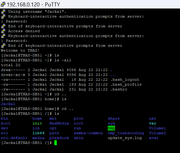
I get what you are saying but why can I ssh in to .120?
Image
Last edited by tokingarg on 28 Aug 2025, 11:09, edited 1 time in total.
User avatar
TMzethar
TM Support
Posts: 2827
Joined: 27 Oct 2020, 16:43

Re: TOS 5.1.145 (X86) is Released for Update

Post by TMzethar »

tokingarg wrote: 28 Aug 2025, 10:41
Please attempt to start the F4-423 without installing any HDD/SSD and see if the TNAS PC can detect the F4-423 running the initial boot system. If the detection is successful, it indicates that the recently updated TOS 5.1.145 system on the drive is not operating correctly. The specific cause is difficult to guess. Based on the above situation, you may consider resetting the system.
To contact our team, please send email to following addresses, remember to replace (at) with @:
Technical team: support(at)terra-master.com (for technical support)
Service team: service(at)terra-master.com (for purchasing, return, replacement, RMA service)
User avatar
tokingarg
Posts: 22
Joined: 27 Dec 2023, 21:49
Canada

Re: TOS 5.1.145 (X86) is Released for Update

Post by tokingarg »

Thank you. Took the 4 drives out. Unfortunately, TNAS found both IPs and says uninitialized. What are my options now?
User avatar
TMzethar
TM Support
Posts: 2827
Joined: 27 Oct 2020, 16:43

Re: TOS 5.1.145 (X86) is Released for Update

Post by TMzethar »

tokingarg wrote: 29 Aug 2025, 04:56
Since the NAS was discovered after booting without any HDD/SSD installed, the issue should be due to a system anomaly. You may consider resetting the system: viewtopic.php?t=423
If you have any M.2 SSD, please refer to this:
viewtopic.php?t=7179
To contact our team, please send email to following addresses, remember to replace (at) with @:
Technical team: support(at)terra-master.com (for technical support)
Service team: service(at)terra-master.com (for purchasing, return, replacement, RMA service)
Post Reply

Return to “Update Notice”