Viewing retention value


Viewing retention value
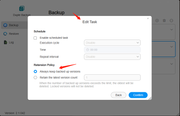
Once you create a task and save it, how do you view what value was entered for number of retention backups?
F6-424 & F4-425 Plus at 7.0.1298
F4-424 Pro (x2) at 7.0.1298
D4-320 (Offline until I can afford more HDDs)
F4-424 Pro (x2) at 7.0.1298
D4-320 (Offline until I can afford more HDDs)


Re: Viewing retention value
For managing backup versions, you can access the following page to perform operations.
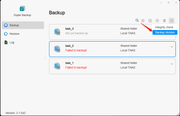
As for the number of versions to retain, you can view and modify it when editing the task.
To contact our team, please send email to following addresses, remember to replace (at) with @:
Technical team: support(at)terra-master.com(for technical support)
Service team: service(at)terra-master.com(for purchasing, return, replacement, RMA service)
Technical team: support(at)terra-master.com(for technical support)
Service team: service(at)terra-master.com(for purchasing, return, replacement, RMA service)
Re: Viewing retention value
Thanks, I see what it was, I had to enter the password on the first dialog box before I go get to the next one.
F6-424 & F4-425 Plus at 7.0.1298
F4-424 Pro (x2) at 7.0.1298
D4-320 (Offline until I can afford more HDDs)
F4-424 Pro (x2) at 7.0.1298
D4-320 (Offline until I can afford more HDDs)


Re: Viewing retention value
Similar thing happens in Rsync backup tasks. Maybe an option just to view the settings would work.
F5-221 TOS7.0.1278 - 4x4TB (Ironwolf) Traid
F2-424 TOS7.0.1278 - 2x500GB nvme (P3) Traid, 2x6TB HDD (HGST) Traid
F2-221 TOS7.0.1278 - 1x3TB Ext4, 1x4TB Btrfs
F2-425+ TOS7.0.1278 - 2x500GB nvme (P3) Traid, 2x6TB HDD (EXOS) Traid
F2-424 TOS7.0.1278 - 2x500GB nvme (P3) Traid, 2x6TB HDD (HGST) Traid
F2-221 TOS7.0.1278 - 1x3TB Ext4, 1x4TB Btrfs
F2-425+ TOS7.0.1278 - 2x500GB nvme (P3) Traid, 2x6TB HDD (EXOS) Traid