Viewing retention value


Viewing retention value
Once you create a task and save it, how do you view what value was entered for number of retention backups?
F4-424 Pro (x2) and F6-424 at 7.0.1536
F4-425 Plus at 7.0.1422
D4-320 & D4-SSD
F4-425 Plus at 7.0.1422
D4-320 & D4-SSD


Re: Viewing retention value
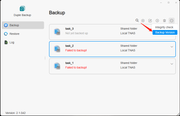
For managing backup versions, you can access the following page to perform operations.
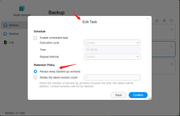
As for the number of versions to retain, you can view and modify it when editing the task.
To contact our team, please send email to following addresses, remember to replace (at) with @:
Technical team: support(at)terra-master.com(for technical support)
Service team: service(at)terra-master.com(for purchasing, return, replacement, RMA service)
Technical team: support(at)terra-master.com(for technical support)
Service team: service(at)terra-master.com(for purchasing, return, replacement, RMA service)
Re: Viewing retention value
Thanks, I see what it was, I had to enter the password on the first dialog box before I go get to the next one.
F4-424 Pro (x2) and F6-424 at 7.0.1536
F4-425 Plus at 7.0.1422
D4-320 & D4-SSD
F4-425 Plus at 7.0.1422
D4-320 & D4-SSD


Re: Viewing retention value
Similar thing happens in Rsync backup tasks. Maybe an option just to view the settings would work.
British By Birth, Canadian By Choice, Residence By Circumstance 
F5-221 TOS7.0.1422 - 4x4TB (Ironwolf) Traid
F2-424 TOS7.0.1422 - 2x500GB nvme (P3) Traid, 2x6TB HDD (HGST) Traid
Frustrated Beta Tester!!!
F2-221, F2-425+ == Tos7.1 in progress (broken)!
F5-221 TOS7.0.1422 - 4x4TB (Ironwolf) Traid
F2-424 TOS7.0.1422 - 2x500GB nvme (P3) Traid, 2x6TB HDD (HGST) Traid
Frustrated Beta Tester!!!
F2-221, F2-425+ == Tos7.1 in progress (broken)!