[Help] Unable to transfer file to mobile app

Engage in discussions, seek assistance, and report issues related to client applications, including: TNAS PC for Windows and macOS, TNAS mobile for iOS and Android, as well as smart TV applications and clients.
Post Reply
User avatar
Kuda
Posts: 3
Joined: 10 Apr 2026, 11:27
Australia

[Help] Unable to transfer file to mobile app

Post by Kuda »

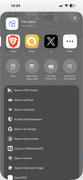
Hi. I have tried to copy a mo3 podcast file from F4-425 plus to my mobile phone using the share function. After I selected where I want the file to copy to I am faced with a blank black screen.
Image
Also I am unable to save the file to my iCloud account via the app. Seems a lot of work is required for the tnas app to be very useful.
I suggest quick action in fixing these issues.

Image
User avatar
EriChan
TM Support
Posts: 196
Joined: 06 Jan 2026, 12:27
United States of America

Re: [Help] Unable to transfer file to mobile app

Post by EriChan »

Thanks for your detailed feedback. To help us accurately identify and resolve the issue, please provide the following key information:
  • The version number of the TNAS mobile app
  • The iOS version number
User avatar
Kuda
Posts: 3
Joined: 10 Apr 2026, 11:27
Australia

Re: [Help] Unable to transfer file to mobile app

Post by Kuda »

3.4.044 iOS 26.1
User avatar
EriChan
TM Support
Posts: 196
Joined: 06 Jan 2026, 12:27
United States of America

Re: [Help] Unable to transfer file to mobile app

Post by EriChan »

Regarding the file transfer and sharing issues you encountered with TNAS Mobile, here is a detailed explanation and our recommendations:

"Link Sharing" vs. "File Transfer"

The "Share" function for remote files: In the TNAS mobile app, when you tap "Share" on a file that is still stored on your F4-425 Plus, the app is designed to generate a sharing link (URL) rather than sending the actual file data.
  • Why the blank screen?: When you select a destination to "copy" this link, the receiving application expects a file stream, but it only receives a text-based URL. This protocol mismatch causes the system's Share Sheet to fail, resulting in the blank black screen you observed.
  • iCloud Issue: Similarly, the iOS system cannot save a "text link" as an actual file to iCloud through this method, which is why the option is missing or fails.
Solutions

1. Sharing via Link

If your goal is to let others download the file, you can continue using the "Share" function and paste the link into messaging apps (like WhatsApp, Mail, etc.).

2. The "Download First" Method

To transfer the actual file data to your phone's local storage or iCloud, please follow these steps:
  • Download to Local: In the TNAS mobile app, select your .moe podcast file and tap "Download".
  • Share Local File: Once the download is complete, go to the "Downloaded" list. Tap the share icon from this local list.
  • Save to iCloud: Now, the app will pass the actual file data (not a link) to iOS. You will then be able to successfully choose "Save to Files" or "Copy to iCloud."
Tip for iOS Users

If you frequently need to manage files via the iOS "Files" app, we highly recommend enabling SMB or WebDAV services in TOS.
By adding your TNAS as a "Server" or "Location" in the native iOS Files app, you can browse, copy, and move files between your TNAS and iCloud directly and seamlessly, just like using a local folder.

We hope this clarifies the situation. Please let us know if you have any further questions!
User avatar
Kuda
Posts: 3
Joined: 10 Apr 2026, 11:27
Australia

Re: [Help] Unable to transfer file to mobile app

Post by Kuda »

Regarding these two points:

Download to Local: In the TNAS mobile app, select your .moe podcast file and tap "Download".

Share Local File: Once the download is complete, go to the "Downloaded" list. Tap the share icon from this local list.

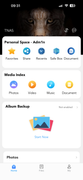
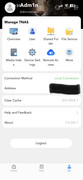
I am unable to find the downloaded list within the tnas app. I’ve been able to achieve the transfer by iOS files app using the iOS share system the fact that tnas app isn’t able to do what is standard on other apps is incredibly hmmm. No doubt this app is new but it needs a lot of work.


Image

Image
User avatar
TMzethar
TM Support
Posts: 2819
Joined: 27 Oct 2020, 16:43

Re: [Help] Unable to transfer file to mobile app

Post by TMzethar »

TNAS mobile currently does not support transferring files to TNAS via the “Share” function on your mobile device.
TNAS mobile supports backing up and uploading image and video files.(Album Backup)
Using the file transfer protocol to transfer files to TNAS is a good method.
We will continue to research and optimize the application.
To contact our team, please send email to following addresses, remember to replace (at) with @:
Technical team: support(at)terra-master.com (for technical support)
Service team: service(at)terra-master.com (for purchasing, return, replacement, RMA service)
User avatar
PodgePapin
Posts: 2
Joined: 11 Aug 2022, 23:45
Great Britain

Re: [Help] Unable to transfer file to mobile app

Post by PodgePapin »

I too have been struggling with the android app on multiple devices with the latest android app, I click the file, then more, then download and in the task centre it says waiting. And it stays like that, even on the same network.
User avatar
MikeZhang
TM Support
Posts: 381
Joined: 05 Sep 2023, 22:21

Re: [Help] Unable to transfer file to mobile app

Post by MikeZhang »

PodgePapin wrote: 28 May 2026, 06:23
Sorry for the waiting task, what is your TOS version and TNAS mobile version?

Please open the Files app on your phone.
Navigate to My iPhone > TNAS mobile > Log.
Long press the log file, select "Share," and send it to "support at terra-master.com".
To contact our team, please send email to following addresses, remember to replace (at) with @

Technical team: support(at)terra-master.com(for technical support)
Service team: service(at)terra-master.com(for purchasing, return, replacement, RMA service)
Post Reply

Return to “Mobile Apps and Desktop Clients”