Help please - F2-210 will not show on PC

Initialization of newly purchased TNAS or re-installation of your TNAS
Post Reply
User avatar
Bill8110
Posts: 1
Joined: 08 Nov 2021, 18:46
Great Britain

Help please - F2-210 will not show on PC

Post by Bill8110 »

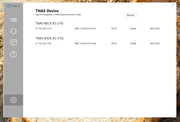
I have just recovered from a power outage. I have two F2-210 NAS units on the network on my windows 11 PC.. one is visible on the network and has mapped the drive. The other one is visible only in the "0ther devices"
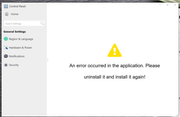
TNAS finds both drives, the correctly functioning drive TNAS page is functioning correctly. the problem drive TNAS page gives me an error "An error occurred in the application. Please uninstall it and install it again!"
I have uninstalled and re installed the TNAS application without success. which is preventing me accessing recovery for the problem drive.
will removing the drives and re initialisin the drive cure the problem?
Image

Image
User avatar
OrionXie
TM Support
Posts: 151
Joined: 14 Apr 2025, 18:30
Saudi Arabia

Re: Help please - F2-210 will not show on PC

Post by OrionXie »

Bill8110 wrote: 26 May 2025, 03:41
Please use method B:viewtopic.php?t=423
To contact our team, please send email to following addresses. "(at)" = "@"
Technical team: support(at)terra-master.com
Service team: service(at)terra-master.com
Post Reply

Return to “Initialization”