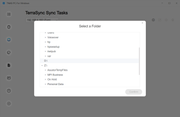
I've installed the TOS Desktop app and set up a Tera Sync server and I'm trying to create a Sync Task but the app doesn't expand/show my folders on my D drive.
I'm on the local machine as administrator and when I browse to select the source folder on my pc, it sees and allows me to drill down into C drive (OS) and E drive (external USB drive) but not D drive - internal.
What's up with that?
I've tried the latest desktop TNAS client 5.2.186 but I also tied previous version 5.2.092
The problem laptop we're having issues with is the same as the one I'm using myself, and I can see the D drive fine.
- Both are HP EliteBook's with a 4TB SSD.
- Windows 10 Home.
- Desired drive Is not encrypted.
If permissions of any kind were involved, I would not be able to see C drive or E drive.
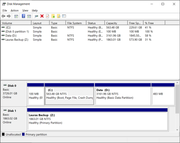
- C and D are partitions on the laptop's internal SSD drive.
- C is the first partition on the internal SSD which has the OS (many folders) and it's seen fine.
- D is the 2nd partition on the internal SSD which has 2+ TB of data and hundreds of folders
- D cannot be seen - only shows D:\ - no folders.
What would be blocking your app from seeing the folders only on that one drive?
TOS version is 6.0.673-00165
TerraSync app on the TNAS server, it is Version 1.1.994
Any insights would be appreciated.
Folders not seed - snapshot
Drive format - Snapshot