TNAS Sync desktop does not see local drive folders

TerraSync is a cloud drive service application that helps users build their own private cloud drive services with their TNAS devices.
Post Reply
User avatar
Saylrman64
Posts: 2
Joined: 28 Apr 2025, 03:21
Canada

TNAS Sync desktop does not see local drive folders

Post by Saylrman64 »

Hello all,

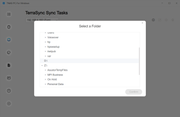
I've installed the TOS Desktop app and set up a Tera Sync server and I'm trying to create a Sync Task but the app doesn't expand/show my folders on my D drive.

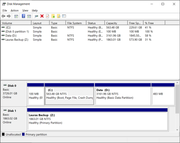
I'm on the local machine as administrator and when I browse to select the source folder on my pc, it sees and allows me to drill down into C drive (OS) and E drive (external USB drive) but not D drive - internal.
What's up with that?

I've tried the latest desktop TNAS client 5.2.186 but I also tied previous version 5.2.092

The problem laptop we're having issues with is the same as the one I'm using myself, and I can see the D drive fine.
- Both are HP EliteBook's with a 4TB SSD.
- Windows 10 Home.
- Desired drive Is not encrypted.

If permissions of any kind were involved, I would not be able to see C drive or E drive.

- C and D are partitions on the laptop's internal SSD drive.
- C is the first partition on the internal SSD which has the OS (many folders) and it's seen fine.
- D is the 2nd partition on the internal SSD which has 2+ TB of data and hundreds of folders
- D cannot be seen - only shows D:\ - no folders.

What would be blocking your app from seeing the folders only on that one drive?

TOS version is 6.0.673-00165
TerraSync app on the TNAS server, it is Version 1.1.994

Any insights would be appreciated.

Folders not seed - snapshot
Image

Drive format - Snapshot
Image
User avatar
TMzethar
TM Support
Posts: 2819
Joined: 27 Oct 2020, 16:43

Re: TNAS Sync desktop does not see local drive folders

Post by TMzethar »

Hi.
From the available phenomena and information, we are not yet able to guess the cause of the problem. Please provide us with the TerraSync related logs on your PC for analysis.
Please send them to us via Tech Support email or TerraMaster LiveChat and post a link to the forum thread.
The TerraSync Windows client log path is:
/Users/username/Library/Application\Support/TerraSync/logs
To contact our team, please send email to following addresses, remember to replace (at) with @:
Technical team: support(at)terra-master.com (for technical support)
Service team: service(at)terra-master.com (for purchasing, return, replacement, RMA service)
User avatar
Saylrman64
Posts: 2
Joined: 28 Apr 2025, 03:21
Canada

Re: TNAS Sync desktop does not see local drive folders

Post by Saylrman64 »

I have already sent them days ago.
I've not received a ticket number, but I'm certain you can find my issue by the email subject I used "TNAS PC client cannot read drive D in order to set up Sync Task".

FYI, there are no logs on the client because we've not been able to set up a sync.
User avatar
TMLila
TM Product Manager
Posts: 90
Joined: 30 Apr 2024, 16:27
China

Re: TNAS Sync desktop does not see local drive folders

Post by TMLila »

Saylrman64 wrote: 03 May 2025, 23:18 I have already sent them days ago.
I've not received a ticket number, but I'm certain you can find my issue by the email subject I used "TNAS PC client cannot read drive D in order to set up Sync Task".

FYI, there are no logs on the client because we've not been able to set up a sync.
Hi!
Thank you for contacting us. We apologize for not being able to resolve your issue in a timely manner.
We have received and recorded the details of your feedback. As we are currently on a legal holiday in China (May 1st to 5th), our technical team will resume normal work on May 6th. Please be assured that we have marked your request as a priority and will follow up as soon as our engineers return to work.
Thank you again for your understanding and support.
Post Reply

Return to “TerraSync”