Disk read speed always shows 0

RAID, Volume, storage pool, hard drive, USB, SSD cache and iSCSI LUN
Locked
User avatar
warlock00
Posts: 11
Joined: 17 Jan 2025, 00:07
Australia

Disk read speed always shows 0

Post by warlock00 »

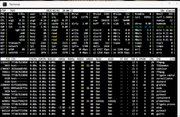
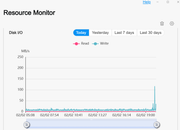
Disk read speed always shows as 0 in various UIs

Also shows up as 0 in various Docker UIs such as Glances.
Image

Image
F4-424 Max @ v6.0.794 - 2xNVME 4TB (Gen4x4) TRAID1 System/Volume1, 4xSATA SSD 4TB TRAID5 Volume2
User avatar
TMLila
TM Product Manager
Posts: 90
Joined: 30 Apr 2024, 16:27
China

Re: Disk read speed always shows 0

Post by TMLila »

warlock00 wrote: 02 Feb 2025, 20:14
Hello!
Thank you for contacting TerraMaster!

Regarding the issue you mentioned about the disk read speed always showing 0, the following is recommended:

1. Perform a file transfer test: Try transferring files from the NAS to the computer or from the computer to the NAS and observe any fluctuations in disk read speed. Also, check the Docker container configuration to make sure that there are no limitations on disk I/O. 2.

2. Check disk health: You can use a tool such as CrystalDiskInfo to check the health of the disk for bad sectors or other problems. Or run the Windows chkdsk command to detect and repair disk errors.

If the problem is still not resolved after trying the above methods, it is recommended that you contact the TerraMaster Technical Support team to provide more detailed information for further analysis and resolution.
User avatar
EvertJenkins
Posts: 2
Joined: 05 Feb 2025, 17:20
United States of America

Re: Disk read speed always shows 0

Post by EvertJenkins »

warlock00 wrote: 02 Feb 2025, 20:14 Disk read speed always shows as 0 in various UIs

Also shows up as 0 in various Docker UIs such as Glances.

ImageBlock Blast

Image
I have also encountered this case recently. The program error and always displaying 0 is very frustrating for users.
User avatar
EvertJenkins
Posts: 2
Joined: 05 Feb 2025, 17:20
United States of America

Re: Disk read speed always shows 0

Post by EvertJenkins »

EvertJenkins wrote: 05 Feb 2025, 17:22
warlock00 wrote: 02 Feb 2025, 20:14 Disk read speed always shows as 0 in various UIs

Also shows up as 0 in various Docker UIs such as Glances.

ImageBlock Blast

Image
I have also encountered this case recently. The program error and always displaying 0 is very frustrating for users.
If you find a method, please remind me.
Locked

Return to “Storage”