Page 1 of 2
Unable to Stay Connected
Posted: 18 Jul 2024, 04:42
by rudealleycat
I am unable to stay connected to my F4-210.
I have already re-installed the TOS software by using method B
viewtopic.php?f=75&t=423
I have verified that the DNS for ipv4 is set to the same as the pc I am trying to access the NAS from.
The connection will allow me to connect for less than a minute before losing connection.
If I wait and refresh the TNAS app it will allow me to log in once more.
Even when the connection fails the TNAS can always locate the device even when I cannot log in.
I am currently on version TOS 4.2.43 (most current for my device).
Re: Unable to Stay Connected
Posted: 18 Jul 2024, 09:42
by TMzethar
Please go to Control Panel > Network > Start SSH/Telnet service.
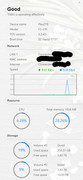
If you have enough time, try opening Control Panel > Resource Monitor and check the CPU and RAM usage and take a screenshot.
Then, try to access the F4-210 via SSH/Telnet and enter the following commands to check process operation and resource usage.
viewtopic.php?t=2350
Also, what file system are you using for your volume?
From known past cases, this is most likely a file system error or disk failure.
Re: Unable to Stay Connected
Posted: 19 Jul 2024, 01:35
by rudealleycat
SSH/Telnet service was already activated.
Attached screenshot of resources being used.
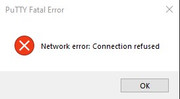
Unable to access F4-210 through SSH. I was in the middle of trying to sign in when I got the attached error.
Re: Unable to Stay Connected
Posted: 19 Jul 2024, 11:22
by TMzethar
Maybe you can check for IP conflicts and other network issues. You can try changing the IP to another one.
You can also try opening Technical Support > Report Isseus to collect system reports and send them to our technical support mailbox for checking.
Re: Unable to Stay Connected
Posted: 23 Jul 2024, 06:00
by rudealleycat
I was able to generate the information and sent it to the email provided.
Re: Unable to Stay Connected
Posted: 24 Jul 2024, 14:33
by TMzethar
When the problem occurred, by what means did you access it?
Re: Unable to Stay Connected
Posted: 25 Jul 2024, 02:00
by rudealleycat
Steps I am going through to access the NAS:
- Open TNAS
- Click Refresh button
- Click Login button
- Signing in through Chrome (default web browser)
I am initially able to sign into the NAS but it times out anywhere from 30 seconds to 1 minute. I have not timed this exactly. I am able to access my files on the drives in the F4-210 during this time frame. Once it fails to respond I lose access on the site and Windows also provides an error message while accessing the NAS file system.
Re: Unable to Stay Connected
Posted: 25 Jul 2024, 06:14
by rudealleycat
I have made sure there are no conflicting IP addresses on my network.
I also tried accessing the NAS through SMB in Windows.
The issue still persists.
Re: Unable to Stay Connected
Posted: 25 Jul 2024, 09:12
by TMroy
how long have you been using this device? what did you do before this issue happen?
Re: Unable to Stay Connected
Posted: 26 Jul 2024, 01:41
by rudealleycat
I have had the device just over 3 years.
Everything was working fine until there was a power outage (not surge) in my house due to the power grid in my area going down.
Once the power came back on I have had nothing but problems with the device since.