I am unable to stay connected to my F4-210.
I have already re-installed the TOS software by using method B viewtopic.php?f=75&t=423
I have verified that the DNS for ipv4 is set to the same as the pc I am trying to access the NAS from.
The connection will allow me to connect for less than a minute before losing connection.
If I wait and refresh the TNAS app it will allow me to log in once more.
Even when the connection fails the TNAS can always locate the device even when I cannot log in.
I am currently on version TOS 4.2.43 (most current for my device).
Unable to Stay Connected

Re: Unable to Stay Connected
Please go to Control Panel > Network > Start SSH/Telnet service.
If you have enough time, try opening Control Panel > Resource Monitor and check the CPU and RAM usage and take a screenshot.
Then, try to access the F4-210 via SSH/Telnet and enter the following commands to check process operation and resource usage.
viewtopic.php?t=2350
Also, what file system are you using for your volume?
From known past cases, this is most likely a file system error or disk failure.
If you have enough time, try opening Control Panel > Resource Monitor and check the CPU and RAM usage and take a screenshot.
Then, try to access the F4-210 via SSH/Telnet and enter the following commands to check process operation and resource usage.
viewtopic.php?t=2350
Code: Select all
ps -ef
topFrom known past cases, this is most likely a file system error or disk failure.
To contact our team, please send email to following addresses, remember to replace (at) with @:
Technical team: support(at)terra-master.com (for technical support)
Service team: service(at)terra-master.com (for purchasing, return, replacement, RMA service)
Technical team: support(at)terra-master.com (for technical support)
Service team: service(at)terra-master.com (for purchasing, return, replacement, RMA service)
-
rudealleycat

- Posts: 7
- Joined: 18 Jul 2024, 04:03

Re: Unable to Stay Connected
SSH/Telnet service was already activated.
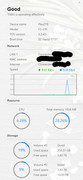
Attached screenshot of resources being used.
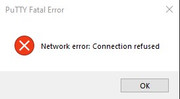
Unable to access F4-210 through SSH. I was in the middle of trying to sign in when I got the attached error.
Attached screenshot of resources being used.
Unable to access F4-210 through SSH. I was in the middle of trying to sign in when I got the attached error.
Re: Unable to Stay Connected
Maybe you can check for IP conflicts and other network issues. You can try changing the IP to another one.
You can also try opening Technical Support > Report Isseus to collect system reports and send them to our technical support mailbox for checking.
You can also try opening Technical Support > Report Isseus to collect system reports and send them to our technical support mailbox for checking.
To contact our team, please send email to following addresses, remember to replace (at) with @:
Technical team: support(at)terra-master.com (for technical support)
Service team: service(at)terra-master.com (for purchasing, return, replacement, RMA service)
Technical team: support(at)terra-master.com (for technical support)
Service team: service(at)terra-master.com (for purchasing, return, replacement, RMA service)
-
rudealleycat
- Posts: 7
- Joined: 18 Jul 2024, 04:03
Re: Unable to Stay Connected
I was able to generate the information and sent it to the email provided.
Re: Unable to Stay Connected
When the problem occurred, by what means did you access it?
To contact our team, please send email to following addresses, remember to replace (at) with @:
Technical team: support(at)terra-master.com (for technical support)
Service team: service(at)terra-master.com (for purchasing, return, replacement, RMA service)
Technical team: support(at)terra-master.com (for technical support)
Service team: service(at)terra-master.com (for purchasing, return, replacement, RMA service)
-
rudealleycat
- Posts: 7
- Joined: 18 Jul 2024, 04:03
Re: Unable to Stay Connected
Steps I am going through to access the NAS:
- Open TNAS
- Click Refresh button
- Click Login button
- Signing in through Chrome (default web browser)
I am initially able to sign into the NAS but it times out anywhere from 30 seconds to 1 minute. I have not timed this exactly. I am able to access my files on the drives in the F4-210 during this time frame. Once it fails to respond I lose access on the site and Windows also provides an error message while accessing the NAS file system.
- Open TNAS
- Click Refresh button
- Click Login button
- Signing in through Chrome (default web browser)
I am initially able to sign into the NAS but it times out anywhere from 30 seconds to 1 minute. I have not timed this exactly. I am able to access my files on the drives in the F4-210 during this time frame. Once it fails to respond I lose access on the site and Windows also provides an error message while accessing the NAS file system.
-
rudealleycat
- Posts: 7
- Joined: 18 Jul 2024, 04:03
Re: Unable to Stay Connected
I have made sure there are no conflicting IP addresses on my network.
I also tried accessing the NAS through SMB in Windows.
The issue still persists.
I also tried accessing the NAS through SMB in Windows.
The issue still persists.


Re: Unable to Stay Connected
how long have you been using this device? what did you do before this issue happen?
To contact our team, please send email to following addresses, remember to replace (at) with @:
Support team: support(at)terra-master.com (for technical support only)
Service team: service(at)terra-master.com (for purchasing, return, replacement, RMA service)
Support team: support(at)terra-master.com (for technical support only)
Service team: service(at)terra-master.com (for purchasing, return, replacement, RMA service)
-
rudealleycat
- Posts: 7
- Joined: 18 Jul 2024, 04:03
Re: Unable to Stay Connected
I have had the device just over 3 years.
Everything was working fine until there was a power outage (not surge) in my house due to the power grid in my area going down.
Once the power came back on I have had nothing but problems with the device since.
Everything was working fine until there was a power outage (not surge) in my house due to the power grid in my area going down.
Once the power came back on I have had nothing but problems with the device since.