TOS 7.0.1298 (x86) Official Release Update
Posted: 09 Oct 2026, 10:59
Target Users:
Users currently running TOS 7.0.0746 or later versions.
Note:
If your TOS version is TOS 6, please refer to the TOS 7 update instructions first.
Important: This update is only applicable to TOS 7.0.0746 and newer. Users with older versions must first upgrade to 7.0.0746 before applying this update.
Here, we sincerely thank @rfbjr, @DmMc, @EgorA, @apvm, @crisisacting, @sianderson, @ambul, @Alak, @Gremlin, @nitzer71, @Solbot, @angelo1761, @killwithpower, @OttO1916, @exqo, @Pe6yc, @qidi4feet, @Silko, @MacStainless, @Crashoveride, @nolan39, @Argonautica, @vitali and others for your sharing and feedback. Your support helped us quickly identify and fix multiple issues.
Release Notes:
This update adopts a phased gray release strategy to ensure stability across different device models and network environments.
Phase 1 (Starting Today): The manual update package is now available for download on our forum. It will be rolled out in batches based on system version, device model, and region.
Phase 2 (Next Tuesday): The full online push will officially begin. At that time, all users will receive an update notification and can complete the update by following the on-screen prompts.
Update Notes
Bug Fixes:
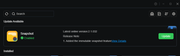
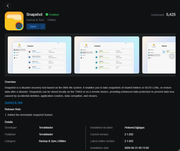
1. Fixed the issue where some TOS apps (running in containers) could not be opened after being installed online from the App Center.
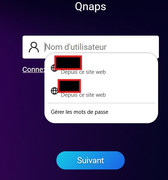
2. Fixed the issue where the account input field on the login page could not be focused automatically and required a manual click before text could be entered.
3. Fixed the issue where the Apply button was abnormally grayed out after clicking the refresh button to sync the time with the time server.
4. Fixed the issue where the time server drop-down list could still be operated while the time was being synced after clicking the refresh button.
5. Fixed the issue where the page kept showing a loading state without any error message when a non-image file was selected for the avatar upload.
6. Fixed the issue where the tooltip text was blank when hovering over the audio player icon in the navigation bar.
Important Information:
1.Updating the system theoretically will not affect the data on your hard drives, but for safety, please make sure to back up your data in advance.
2.Before updating, ensure that your primary volume (usually volume1) has at least 3GB of available space. Insufficient storage space may cause the update to fail.
3.After the update, the IP address of your TNAS may change. Please use the TNAS PC desktop client to search for and reconnect to the device.
Update Procedure:
1.Download TOS 7.0.1298 update package (MD5: df4a6e4769b3c24491961601a7cd9ba6);
2.Go to TOS > Control Panel > General Settings > System > Update;
3.Select "Manual Update" and upload the downloaded update package file;
4.Follow the prompts to complete the update;
5.After the system update is complete, please refresh your browser;
6.The TNAS IP address may change after the update. If you cannot connect to your TNAS using the previous IP address, use the TNAS PC client to search for the new IP address;
Client Downloads:
1. Download TNAS PC 5.2.548 for Windows OS.
- MD5: 72701B52336AF9FD8B97A6BE9D5D5A7C
2. Download TNAS PC 5.2.548 for macOS (x86 architecture).
- MD5: BAA63A179C43F73965EA9C31EEB9D61E
3. Download TNAS PC 5.2.548 for macOS (ARM architecture).
- MD5: BB933DA867058884C4ADFE44EAD24AFC
4. Download TNAS PC 5.2.548 for Linux.
- MD5: 06FE93F9FFE47147854A34F28D57FCC2
5. TNAS mobile for Android: Please search for "TNAS mobile" in the app store to install.
6. TNAS Mobile for iOS: Please search for "TNAS mobile" in the App Store to install.
Users currently running TOS 7.0.0746 or later versions.
Note:
If your TOS version is TOS 6, please refer to the TOS 7 update instructions first.
Important: This update is only applicable to TOS 7.0.0746 and newer. Users with older versions must first upgrade to 7.0.0746 before applying this update.
Here, we sincerely thank @rfbjr, @DmMc, @EgorA, @apvm, @crisisacting, @sianderson, @ambul, @Alak, @Gremlin, @nitzer71, @Solbot, @angelo1761, @killwithpower, @OttO1916, @exqo, @Pe6yc, @qidi4feet, @Silko, @MacStainless, @Crashoveride, @nolan39, @Argonautica, @vitali and others for your sharing and feedback. Your support helped us quickly identify and fix multiple issues.
Release Notes:
This update adopts a phased gray release strategy to ensure stability across different device models and network environments.
Phase 1 (Starting Today): The manual update package is now available for download on our forum. It will be rolled out in batches based on system version, device model, and region.
Phase 2 (Next Tuesday): The full online push will officially begin. At that time, all users will receive an update notification and can complete the update by following the on-screen prompts.
Update Notes
Bug Fixes:
1. Fixed the issue where some TOS apps (running in containers) could not be opened after being installed online from the App Center.
2. Fixed the issue where the account input field on the login page could not be focused automatically and required a manual click before text could be entered.
3. Fixed the issue where the Apply button was abnormally grayed out after clicking the refresh button to sync the time with the time server.
4. Fixed the issue where the time server drop-down list could still be operated while the time was being synced after clicking the refresh button.
5. Fixed the issue where the page kept showing a loading state without any error message when a non-image file was selected for the avatar upload.
6. Fixed the issue where the tooltip text was blank when hovering over the audio player icon in the navigation bar.
Important Information:
1.Updating the system theoretically will not affect the data on your hard drives, but for safety, please make sure to back up your data in advance.
2.Before updating, ensure that your primary volume (usually volume1) has at least 3GB of available space. Insufficient storage space may cause the update to fail.
3.After the update, the IP address of your TNAS may change. Please use the TNAS PC desktop client to search for and reconnect to the device.
Update Procedure:
1.Download TOS 7.0.1298 update package (MD5: df4a6e4769b3c24491961601a7cd9ba6);
2.Go to TOS > Control Panel > General Settings > System > Update;
3.Select "Manual Update" and upload the downloaded update package file;
4.Follow the prompts to complete the update;
5.After the system update is complete, please refresh your browser;
6.The TNAS IP address may change after the update. If you cannot connect to your TNAS using the previous IP address, use the TNAS PC client to search for the new IP address;
Client Downloads:
1. Download TNAS PC 5.2.548 for Windows OS.
- MD5: 72701B52336AF9FD8B97A6BE9D5D5A7C
2. Download TNAS PC 5.2.548 for macOS (x86 architecture).
- MD5: BAA63A179C43F73965EA9C31EEB9D61E
3. Download TNAS PC 5.2.548 for macOS (ARM architecture).
- MD5: BB933DA867058884C4ADFE44EAD24AFC
4. Download TNAS PC 5.2.548 for Linux.
- MD5: 06FE93F9FFE47147854A34F28D57FCC2
5. TNAS mobile for Android: Please search for "TNAS mobile" in the app store to install.
6. TNAS Mobile for iOS: Please search for "TNAS mobile" in the App Store to install.