

Target Users:
Users currently running TOS 7.0.0746 or later versions.
Note:
If your TOS version is TOS 6, please refer to the TOS 7 update instructions first.
Important: This update is only applicable to TOS 7.0.0746 and newer. Users with older versions must first upgrade to 7.0.0746 before applying this update.
Here, we sincerely thank @crisisacting, @Alak, @rfbjr, @apvm, @Nitrokalel, @OttO1916, @DmMc, @ambul, @sianderson, @mnewland, @kmatas, @Metrogeek, @nenominal and others for your sharing and feedback. Your support helped us quickly identify and fix multiple issues.
Update Notes
Bug Fixes:
1. Fixed the issue where the CPU temperature alarm policy was not properly adapted for certain models.
2. Fixed the issue where the message center process occasionally used excessive memory.
3. Fixed the issue where deleting the home directory gave no error prompt after enabling the safe box.
4. Fixed the issue where network connectivity checks were requested too frequently.
5. Fixed the issue where the entire folder was skipped without recursively comparing subfiles when uploading, copying, or moving a folder to a directory containing a folder with the same name.
6. Fixed the issue where subfolders in the “Select Folder” dialog of some features were not sorted by name.
7. Fixed the issue where SMB login for a newly created system user might fail after joining an LDAP domain.
8. Fixed the issue where an app was not immediately displayed in the “Installed” list after installation completed.
9. Fixed the issue where app user permissions were not saved after switching to the user page when creating a shared folder.
10. Fixed the issue where selecting all from the table header could not check the admin user group when editing app permissions.
11. Fixed the issue where an incorrect message was displayed when enabling SSH in a Traditional Chinese environment.
12. Fixed the issue where some option colors did not follow the theme color when creating a VPN.
13. Fixed the issue where a “url:null” prompt appeared when closing some dialogs.
14. Fixed various other known issues.
Important Information:
1.Updating the system theoretically will not affect the data on your hard drives, but for safety, please make sure to back up your data in advance.
2.Before updating, ensure that your primary volume (usually volume1) has at least 3GB of available space. Insufficient storage space may cause the update to fail.
3.After the update, the IP address of your TNAS may change. Please use the TNAS PC desktop client to search for and reconnect to the device.
Update Procedure:
1.Check for updates online or download TOS 7.0.1278 update package (MD5: 22c64e3f9279427d29eb47801589da61);
2.Go to TOS > Control Panel > General Settings > System > Update;
3.Select "Manual Update" and upload the downloaded update package file;
4.Follow the prompts to complete the update;
5.After the system update is complete, please refresh your browser;
6.The TNAS IP address may change after the update. If you cannot connect to your TNAS using the previous IP address, use the TNAS PC client to search for the new IP address;
Client Downloads:
1. Download TNAS PC 5.2.548 for Windows OS.
- MD5: 72701B52336AF9FD8B97A6BE9D5D5A7C
2. Download TNAS PC 5.2.548 for macOS (x86 architecture).
- MD5: BAA63A179C43F73965EA9C31EEB9D61E
3. Download TNAS PC 5.2.548 for macOS (ARM architecture).
- MD5: BB933DA867058884C4ADFE44EAD24AFC
4. Download TNAS PC 5.2.548 for Linux.
- MD5: 06FE93F9FFE47147854A34F28D57FCC2
5. TNAS mobile for Android: Please search for "TNAS mobile" in the app store to install.
6. TNAS Mobile for iOS: Please search for "TNAS mobile" in the App Store to install.
TOS 7.0.1278 (x86) Official Release Update
TOS 7.0.1278 (x86) Official Release Update
To contact our team, please send email to following addresses, remember to replace (at) with @
Technical team: support(at)terra-master.com (for technical support)
Service team: service(at)terra-master.com (for purchasing, return, replacement)
Technical team: support(at)terra-master.com (for technical support)
Service team: service(at)terra-master.com (for purchasing, return, replacement)


Re: TOS 7.0.1278 (x86) Official Release Update
All four updated w/o issue
F6-424 & F4-425 Plus at 7.0.1278
F4-424 Pro (x2) at 7.0.1278
D4-320 (Offline until I can afford more HDDs)
F4-424 Pro (x2) at 7.0.1278
D4-320 (Offline until I can afford more HDDs)


Re: TOS 7.0.1278 (x86) Official Release Update
Container manager does not work after update
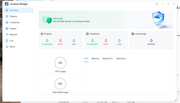
but dockhand works well
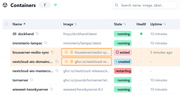
Upd. Few minutes later container manages appear to be disabled so I need to enable it manually.
Upd2. Process redis-server has a permanently high network activity - it constantly consumes 1Mb/s download traffic
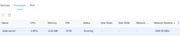
but dockhand works well
Upd. Few minutes later container manages appear to be disabled so I need to enable it manually.
Upd2. Process redis-server has a permanently high network activity - it constantly consumes 1Mb/s download traffic
Last edited by EgorA on 24 Sep 2026, 22:51, edited 2 times in total.
F4-423


Re: TOS 7.0.1278 (x86) Official Release Update
Downloaded the update file and log into f4-424 and system said there is a new update 1278, i still use the downloaded file to manual update instead of using the download and update option, everything seems to work fine, will inform if any problem. So I think this is an offical update instead of a beta update. Good Job if there is no problem.
BTW, docker manager work fine for me, I think maybe my system and app (volume 1) are two 256gb NVME M2 SSD Traid help with less problem, I am not sure though.
BTW, docker manager work fine for me, I think maybe my system and app (volume 1) are two 256gb NVME M2 SSD Traid help with less problem, I am not sure though.
F4-424
Two D4-320
Two D4-320
-
crisisacting

- Silver Member
- Posts: 529
- Joined: 20 Jan 2022, 16:42
Re: TOS 7.0.1278 (x86) Official Release Update
Stand-alone TNAS updated without issue.
-
sianderson

- Silver Member
- Posts: 452
- Joined: 02 Aug 2020, 03:42

Re: TOS 7.0.1278 (x86) Official Release Update
both updated without issues
F2-424 TOS 7.0.1278
F2-423 TOS 7.0.1278
F2-210 TOS 4.2.44
D4-320
C/O
F4-424 TOS 6.0.794
F2-423 TOS 7.0.1278
F2-210 TOS 4.2.44
D4-320
C/O
F4-424 TOS 6.0.794

Re: TOS 7.0.1278 (x86) Official Release Update
An old issue has returned—one that hadn't been seen since the very first versions of firmware 7.
It is impossible to access the web interface, yet TNAS PC can see the folders.
It is impossible to access the web interface, yet TNAS PC can see the folders.
F8 SSD Plus MADN0301. V02 TOS 7.0.1278


 F4-424
Re: TOS 7.0.1278 (x86) Official Release Update
Several errors on monitor for F2-424:
CIFS: VFS: cifs_mount failed w/return code = -113
CIFS: VFS: Error connecting to socket. Aborting operation.
Despite the "abort" it still seems to keep trying for several more attempts
CIFS: VFS: cifs_mount failed w/return code = -113
CIFS: VFS: Error connecting to socket. Aborting operation.
Despite the "abort" it still seems to keep trying for several more attempts
F5-221 TOS7.0.1201 - 4x4TB (Ironwolf) Traid
F2-424 TOS7.0.1278 - 2x500GB nvme (P3) Traid, 2x6TB HDD (HGST) Traid
F2-221 TOS7.0.1278 - 1x3TB Ext4, 1x4TB Btrfs
F2-425+ TOS7.0.1278 - 2x500GB nvme (P3) Traid, 2x6TB HDD (EXOS) Traid
F2-424 TOS7.0.1278 - 2x500GB nvme (P3) Traid, 2x6TB HDD (HGST) Traid
F2-221 TOS7.0.1278 - 1x3TB Ext4, 1x4TB Btrfs
F2-425+ TOS7.0.1278 - 2x500GB nvme (P3) Traid, 2x6TB HDD (EXOS) Traid