Process started from NAS does not see files in its own folder

Permissions, Users, Uear groups, shared folders, LDAP/domain
Post Reply
User avatar
edst1977
Posts: 2
Joined: 02 Jun 2026, 01:29
Russia

Process started from NAS does not see files in its own folder

Post by edst1977 »

Good day

Please help me solve a significant problem. I got Terramaster F2-423, TOS 6.0, domain authorization. When I place some installation files on a share, and then start "setup.exe", this process does not see files in its own folder. I noticed it, for example, on installation files of Office 2007, or driver packs. It does not matter whether I use admin account or someone's else. I can read, write, delete any file in this folder or subfolder.
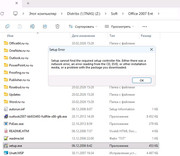
Image
User avatar
CursaYang
TM Support
Posts: 740
Joined: 06 Jan 2025, 16:34
China

Re: Process started from NAS does not see files in its own folder

Post by CursaYang »

What version of your system are you currently running? We need to conduct further testing.
To contact our team, please send email to following addresses, remember to replace (at) with @

Technical team: support(at)terra-master.com(for technical support)
Service team: service(at)terra-master.com(for purchasing, return, replacement, RMA service)
User avatar
edst1977
Posts: 2
Joined: 02 Jun 2026, 01:29
Russia

Re: Process started from NAS does not see files in its own folder

Post by edst1977 »

I found the solution. Edit smb-extend.conf

[global]
oplocks = no
casesensitive = no
User avatar
EriChan
TM Support
Posts: 196
Joined: 06 Jan 2026, 12:27
United States of America

Re: Process started from NAS does not see files in its own folder

Post by EriChan »

edst1977 wrote: 28 Jun 2026, 16:21
Thank you for your update and valuable input. We will attempt to reproduce and verify the issue you mentioned.
Post Reply

Return to “Privileges”