Process started from NAS does not see files in its own folder

Permissions, Users, Uear groups, shared folders, LDAP/domain
Post Reply
User avatar
edst1977
Posts: 2
Joined: 02 Jun 2026, 01:29
Russia

Process started from NAS does not see files in its own folder

Post by edst1977 »

Good day

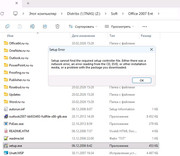
Please help me solve a significant problem. I got Terramaster F2-423, TOS 6.0, domain authorization. When I place some installation files on a share, and then start "setup.exe", this process does not see files in its own folder. I noticed it, for example, on installation files of Office 2007, or driver packs. It does not matter whether I use admin account or someone's else. I can read, write, delete any file in this folder or subfolder.
Image
User avatar
CursaYang
TM Support
Posts: 796
Joined: 06 Jan 2025, 16:34
China

Re: Process started from NAS does not see files in its own folder

Post by CursaYang »

What version of your system are you currently running? We need to conduct further testing.
To contact our team, please send email to following addresses, remember to replace (at) with @

Technical team: support(at)terra-master.com(for technical support)
Service team: service(at)terra-master.com(for purchasing, return, replacement, RMA service)
User avatar
edst1977
Posts: 2
Joined: 02 Jun 2026, 01:29
Russia

Re: Process started from NAS does not see files in its own folder

Post by edst1977 »

I found the solution. Edit smb-extend.conf

[global]
oplocks = no
casesensitive = no
User avatar
EriChan
TM Support
Posts: 316
Joined: 06 Jan 2026, 12:27
China

Re: Process started from NAS does not see files in its own folder

Post by EriChan »

edst1977 wrote: 28 Jun 2026, 16:21
Thank you for your update and valuable input. We will attempt to reproduce and verify the issue you mentioned.
To contact our team, please send email to following addresses, remember to replace (at) with @

Technical team: support(at)terra-master.com(for technical support)
Service team: service(at)terra-master.com(for purchasing, return, replacement, RMA service)
Post Reply

Return to “Privileges”