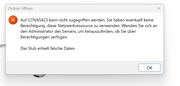
An error message stating "Stub received incorrect data" means that although your Windows PC and NAS completed the initial handshake, the underlying Windows network components crashed and failed to resolve subsequent transfers of security credentials or file lists due to protocol version mismatch or corrupted cache.
You can try the following steps
Clearing SMB Cache on Windows
1. Press Win + R, type cmd, and hit Enter to open the Command Prompt.
2. Type net use * /delete and press Enter to drop all current SMB sessions.
3. To flush all saved login tokens, type klist purge.
4. To remove the stored passwords completely, open the Start Menu, search for Credential Manager, and open it.
5. Click on Windows Credentials, locate the IP address or server name of your SMB share under Generic Credentials, click on it, and select Remove.
6. Restart File Explorer by opening Task Manager, finding Windows Explorer in the processes list, and clicking Restart.
Then follow our instructions to reconfigure SMB: https://toshelp.terra-master.com/docs/T ... windows-pc