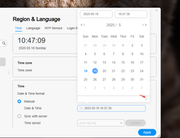
Thank you for your feedback. Date selection is performed by clicking your desired date, then confirming with the ✔ checkmark button displayed.
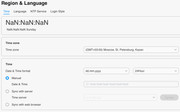
I’d like to change only date format, not to change date. If select date format and sync with server - NaN.
When select manual with dd.mm.yyyy, I have NaN too.
Is the result the same regardless of the time zone chosen?
Yes. I’ve tried several timezones, on each I see NaN. I’ve tried London (+0), Almaty (+6) and Alaska (-9). When I applying date format with dots I see date with selected format less than second, than it become NaN.
I installed this TOS version 6.0.673 on my F4-424 Pro. But all my users are unknown after the reboot.
How do I reinstall the TOS. I installed on the RAID nvme-SSD--disks. It is a pitty such an untested crap is released without
basic testing.
It is also strange I can not reinstall the TOS from the TNAS PC for Windows App.
Can I directly install 6.0.694 then and how to do so?
To contact our team, please send email to following addresses. "(at)" = "@"
Technical team: support(at)terra-master.com
Service team: service(at)terra-master.com
Thank you OrionXie!
I cleaned all disks and ssds and made a new install as all users were missing on the system. I now doubt to use the system
anymore and think to buy another brand. Do not trust the software much. Good it happend now with no data on it.