Page 9 of 14
Re: TOS 7.0.0804 Official Release (x86) is Released for Update
Posted: 03 Aug 2026, 16:54
by TMzethar
Silversnake wrote: ↑03 Aug 2026, 15:16
Jellyfin ( 10.11.0)
Following issues with drive mounting (which were resolved by installing a different version of Storage Manager), I am unable to select a folder library in Jellyfin.
I have performed the following steps:
1) Uninstallation, download, and fresh installation
2) Restart
3) Running and completing the Jellyfin setup wizard
4) During the wizard setup, it is impossible to select folders other than those on the main drive. It appears that Jellyfin cannot see the other drives or their folder structures—only the main drive where the TOS system is installed (Volume1). The other three drives are in "Move" mode. The drives are visible on the network, and the Multimedia Server is working perfectly, SMB etc.
Everything worked fine in the previous version of the TOS system; this version seems to be quite problematic.
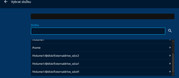
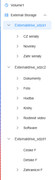
What version of TOS were you using before updating to 7.0.0804?
If you need to access it through Jellyfin, please go to Control Panel > Shared Folders > Edit > Application User and reset the permissions.
If the issue persists, you can contact us online to schedule a remote troubleshooting session with an engineer.
https://salesiq.zohopublic.com/signatur ... 97d0be8892
Please include your forum ID and the URL of this post.
Re: TOS 7.0.0804 Official Release (x86) is Released for Update
Posted: 03 Aug 2026, 18:36
by Silversnake
I don't know the version number of the last working TOS + Jellyfin setup. Most likely 7.0.0791? I always update from the last known working version.
The first issue was already mentioned in this thread:
After the update, the D4-SSD system failed to mount the drives in the NVMe slots.
This was resolved by "upgrading" the Storage Manager.
It then became possible to add the drives in Mount mode.
After upgrading to 7.0.0804, upon the first launch, Jellyfin started up in a "no server" mode; it was impossible to configure any working path.
I performed the steps outlined in this thread (uninstall, reinstall, restart, etc.).
I was able to configure Jellyfin again, but it refuses to create a library—meaning it won't connect to the folders on the individual drives.
I created a folder on the main drive, uploaded a file to it, and tried to add a library. It doesn't work; Jellyfin sees no content.
I’m not going to pursue this any further. I’ll wait for the next fixed version of TOS 7.0.xxxx.
This version (7.0.0804) is exceptionally bad for me; I hadn't experienced any issues with any of the previous versions on this device.
The problem is that a factory reset just launches version 7.0.0804 again.
The only solution seems to be wiping everything, installing TOS 6, and then upgrading to TOS 7 version 7.0.0741 followed by 0791. However, I don't have a download link for this version xx.07xx
Re: TOS 7.0.0804 Official Release (x86) is Released for Update
Posted: 03 Aug 2026, 22:39
by adam12345
TMzethar wrote: ↑03 Aug 2026, 15:51
adam12345 wrote: ↑03 Aug 2026, 02:27
hey After upgrading for TOS6 i am having a lot of issue with jellyfin
F2-424
at first the server would not would not start so i deleted the community app that i was using and installed via the regular store , i had alot of issues connecting it would not connecting even thought the server was up i deleted the app and the directories (/jellfin and /usr/local/jellyfin/) manually dunno if it helped but now it's working but very slow ,
i using my lg tv as a client and keeps either freezing entirely or i can scroll but it will not response to anything i click , on tos6 never had any issues
can it be permissions or old files from tos6?
What version were you using before updating to 7.0.804?
If the issue arose after upgrading to TOS 7 and was not caused by this 7.0.804 update, we recommend that you consider opening a separate thread to discuss the problem.
We’ll try to reproduce the issue based on the information you’ve provided.
After the upgrade, did you reconfigure Jellyfin to match the settings you used with TOS 6? Behavior can vary significantly depending on the settings.
We’ll keep you updated here as we make progress. Please let us know if you discover anything else.
What version of the Jellyfin Server app are you currently using?
hey, i am pretty sure i found the problem .
the bond interface it stoped working correctly after the upgrade
and as bond is working via mac address load balancing only the tv mac address was affected , i disconnected 1 of the cables and it seems fine now
Re: TOS 7.0.0804 Official Release (x86) is Released for Update
Posted: 04 Aug 2026, 10:03
by TMzethar
Silversnake wrote: ↑03 Aug 2026, 18:36
I don't know the version number of the last working TOS + Jellyfin setup. Most likely 7.0.0791? I always update from the last known working version.
The first issue was already mentioned in this thread:
After the update, the D4-SSD system failed to mount the drives in the NVMe slots.
This was resolved by "upgrading" the Storage Manager.
It then became possible to add the drives in Mount mode.
After upgrading to 7.0.0804, upon the first launch, Jellyfin started up in a "no server" mode; it was impossible to configure any working path.
I performed the steps outlined in this thread (uninstall, reinstall, restart, etc.).
I was able to configure Jellyfin again, but it refuses to create a library—meaning it won't connect to the folders on the individual drives.
I created a folder on the main drive, uploaded a file to it, and tried to add a library. It doesn't work; Jellyfin sees no content.
I’m not going to pursue this any further. I’ll wait for the next fixed version of TOS 7.0.xxxx.
This version (7.0.0804) is exceptionally bad for me; I hadn't experienced any issues with any of the previous versions on this device.
The problem is that a factory reset just launches version 7.0.0804 again.
The only solution seems to be wiping everything, installing TOS 6, and then upgrading to TOS 7 version 7.0.0741 followed by 0791. However, I don't have a download link for this version xx.07xx
Based on the current situation, this likely has little to do with the TOS version. It’s more likely related to the Storage Manager update package.
We are currently trying to reproduce and investigate the issue you mentioned.
If you’d like to try different TOS 7 versions, you can try the recently released 7.0.1105, or the 7.0.0791 you mentioned earlier (the installation package has been sent to you via private message on the forum).
Before reinstalling TOS7, you’ll need to flash the built-in USB Initboot with the TOS7-specific version:
viewtopic.php?t=6433
Re: TOS 7.0.0804 (x86) Official Release Update
Posted: 04 Aug 2026, 13:56
by Silversnake
Hello, thank you for the feedback. Can I install version 7.0.1105 over version 7.0.0804?
Based on the numbering, it appears to be a newer version. If so, please provide a download link.
Thank you.
Re: TOS 7.0.0804 (x86) Official Release Update
Posted: 04 Aug 2026, 13:58
by TMzethar
Silversnake wrote: ↑04 Aug 2026, 13:56
Hello, thank you for the feedback. Can I install version 7.0.1105 over version 7.0.0804?
Based on the numbering, it appears to be a newer version. If so, please provide a download link.
Thank you.
You can usually find the latest TOS update thread on the forum homepage. Here:
viewtopic.php?t=10416
Regarding the three drives that you are currently unable to access through Jellyfin — what file system format are they using?
Re: TOS 7.0.0804 (x86) Official Release Update
Posted: 04 Aug 2026, 14:05
by Silversnake
All drives = NTFS
Re: TOS 7.0.0804 (x86) Official Release Update
Posted: 04 Aug 2026, 14:07
by Silversnake
The main disk (where the system resides) is VFAT. The disk was inserted as NTFS but was likely reformatted by the TOS system.
Re: TOS 7.0.0804 (x86) Official Release Update
Posted: 04 Aug 2026, 14:26
by Silversnake
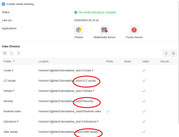
I installed version 7.0.1105. The drives are working. Media server = OK (add screen), SMB = OK.
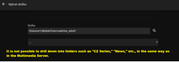
Jellyfin = Not working. I still cannot create a media library. I am unable to navigate into the drive to select a directory (as in Multimedia server)
Re: TOS 7.0.0804 (x86) Official Release Update
Posted: 04 Aug 2026, 14:33
by RyanYang
The media index is not related to the Jellyfin media library. To add "Shared Folder A", please first go to the TOS Control Panel and assign read permissions for that shared folder to the `jellyfin` user, then add it in the Jellyfin application. For more details, please refer to this post:
viewtopic.php?t=7261