Page 8 of 10
Re: TOS 6.0.610 (X86) is Released for Update
Posted: 16 Feb 2025, 10:51
by TMzethar
BerniBoy wrote: ↑16 Feb 2025, 02:59
I just updated my F5-422 from TOS 5.1.145 to TOS 6.06.10. After update had to reinstall all users and permission as well as defining the shared folders. Also the automatic power on/off setting was lost. As i was facing troubles with the automated power on/off funktion, i will observe further.With the previous release the fan was not working korrekt, got casetemp up to 50 degree c and fan did not turn on. So i manually set it to medium speed hence 53 degree max. i hope for more reliable functions now.
F5-422, 5 4T WD red
Upgrading from TOS5 to TOS6 official version will reset the system configuration.
Target Users of TOS 6.0.610 (X86)
Users currently running TOS 6.0.500 or later versions.
Note: If your TOS version does not meet the requirements, please first check the update conditions for
TOS 6.0.530.
Re: TOS 6.0.610 (X86) is Released for Update
Posted: 16 Feb 2025, 11:09
by Lau6311
A simple question: Why am I, a TM product owner, product is within warranty period and a registered user of this forum, strangely I am NOT allowed to post.
I CANNOT address my problems easily and resolve them effectively. Very COLD culture, indeed. Am I wrong?
Seen other newly registered users can post freely.
Re: TOS 6.0.610 (X86) is Released for Update
Posted: 16 Feb 2025, 12:42
by TMroy
I just checked your user profile, nothing wrong there. But one thing you need to know, you can't post in every forum section, there are some forum sections only for official stuff.
Re: TOS 6.0.610 (X86) is Released for Update
Posted: 17 Feb 2025, 11:38
by Lau6311
Thank you for clarification. Now I still could not find the "page" showing : I CANNOT post, + etc. Otherwise I can proof the point. Anyway, subject is closed now.
Glad if you can provide a simple guide "at what page or steps I can initiate a post". Searched long but still could not find where I could start to post. Many TQs.
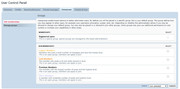
I did apply for Copper member but rejected yesterday. As you can refer to attachment, I could not CHECK the box of registered member.
Re: TOS 6.0.610 (X86) is Released for Update
Posted: 17 Feb 2025, 23:50
by dhfh522
I've noticed that after a power outage running TOS 6.0.610, the system will shut down due to low battery even though the system is on mains power again until the battery charges to a certain level. I had to unplug the UPS until the battery was charged to get it to stay up.
Re: TOS 6.0.610 (X86) is Released for Update
Posted: 18 Feb 2025, 00:03
by Gremlin
The parameters such as how much charge is required before ups will power up connected devices is often set within the ups. Some monitoring utilities will allow you to adjust that. You don't give an indication of the rating of your ups but I guess your power demand it hitting it fairly hard. The higher the demand, the longer it takes to recharge (usually, may depend on type of ups).
Re: TOS 6.0.610 (X86) is Released for Update
Posted: 20 Feb 2025, 00:18
by dhfh522
Yes, but every other system I run with a UPS allows powerup as soon as mains power is restored, I don't have to wait for the battery to charge.
Re: TOS 6.0.610 (X86) is Released for Update
Posted: 20 Feb 2025, 08:13
by crisisacting
STFU.
Yet another bot that needs to be banned (there's been a huge uptick lately of these bots).
Re: TOS 6.0.610 (X86) is Released for Update
Posted: 21 Feb 2025, 12:36
by Lau6311
Could it be a weak or expiring battery. They only last for about 3 years under well ventilated area.
Re: TOS 6.0.610 (X86) is Released for Update
Posted: 21 Feb 2025, 13:05
by Lau6311
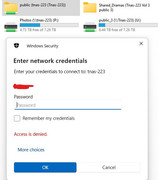
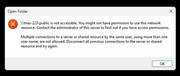
Today encountered failed to access share mapped drive "public" folder (vol 1), plus added same network location "public" folder NOT accessible. All other folders in all in all volumes 1,2 &3 are accessible (note: vol 1 other folders are accessible.)
Rebooting Tnas unit and repeatedly allowing permissions to all members failed to address the problem.
Changes before problem occurred:
1. Updated Windows 11 to 24H2 2 days ago, but Tnas public folder and all other share mapped drives (including public folder) were ALL accessible.
2. Today enabled "shared folder" with NFS and set all users with permission for read/write. Note: only public folder having problem but not all other folders.
Refer below pic for additional info. Thanks for helping. (Still do not know how to open/initial a new topic)