TOS 7.0.0559 Beta (X86) is Released for Update

Official news about TOS, mobile app, PC app updates or beta releases.
Post Reply
User avatar
rfbjr
Silver Member
Posts: 400
Joined: 16 May 2024, 23:43
United States of America

Re: TOS 7.0.0559 Beta (X86) is Released for Update

Post by rfbjr »

TMzethar wrote: 01 May 2026, 00:16
TMzethar wrote: 30 Apr 2026, 08:55
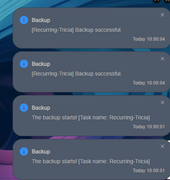
rfbjr wrote: 29 Apr 2026, 22:14 I see duplicate notifications/emails for rsync jobs.These happen to be recurring ones, if that matters.
Also I happen to notice new notification options for various apps, under control panel/notifications. While all the new options are turned on by default for each, the email isn't. Just more of an FYI.
Image
Recorded, will verify the issue.
We are currently unable to reproduce the situation of the 'double notification' you mentioned
Perhaps it was caused by some special operation If you have any discoveries, please feel free to raise them
Ok with this, I'll see where the rsync notifications fall under which category and turn them off. I see setting under "Backup" as well as a separate section for "Duple Backup". Also this is happening not on the F4-424 Pro but on the F4-425 Plus. :)
I will do some trial and error with the notifications settings.
F6-424 & F4-425 Plus at 7.0.0777
F4-424 Pro also at 7.0.0777
D4-320
User avatar
rfbjr
Silver Member
Posts: 400
Joined: 16 May 2024, 23:43
United States of America

Re: TOS 7.0.0559 Beta (X86) is Released for Update

Post by rfbjr »

TMzethar wrote: 01 May 2026, 00:05
rfbjr wrote: 29 Apr 2026, 18:13 Image
Here is the postg modules, no clue why .1 or even it wants .2
If this issue occurs multiple times, you may consider checking the M.2 SSD or contacting the sales team to replace it with a new NAS, and sending this NAS back to us for research
Removed the SSD's completely. Physically out of the device. System disk is HDD#1.
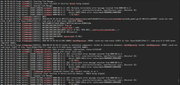
PCIE correctable errors still flooding syslog.
F6-424 & F4-425 Plus at 7.0.0777
F4-424 Pro also at 7.0.0777
D4-320
User avatar
samius
Posts: 49
Joined: 14 Apr 2024, 21:46
Russia

Re: TOS 7.0.0559 Beta (X86) is Released for Update

Post by samius »

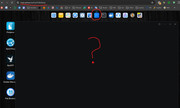
The question concerns the entire 7th branch... Previously, on version 6, if I accessed us through Nginx, everything was fine, but on version 7, some apps, like the app store or file manager, won't open through Nginx. How can I fix this?
Image

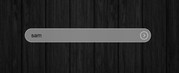
And the login page is still hard to read in dark theme, it would be better to return it to how it was 2 releases ago.

Image
F4-424 MAX TOS 7
User avatar
TMzethar
TM Support
Posts: 2819
Joined: 27 Oct 2020, 16:43

Re: TOS 7.0.0559 Beta (X86) is Released for Update

Post by TMzethar »

rfbjr wrote: 01 May 2026, 01:35 Removed the SSD's completely. Physically out of the device. System disk is HDD#1.
PCIE correctable errors still flooding syslog.
We will arrange for a sales specialist to contact you. :)
To contact our team, please send email to following addresses, remember to replace (at) with @:
Technical team: support(at)terra-master.com (for technical support)
Service team: service(at)terra-master.com (for purchasing, return, replacement, RMA service)
User avatar
TMzethar
TM Support
Posts: 2819
Joined: 27 Oct 2020, 16:43

Re: TOS 7.0.0559 Beta (X86) is Released for Update

Post by TMzethar »

samius wrote: 01 May 2026, 05:06 The question concerns the entire 7th branch... Previously, on version 6, if I accessed us through Nginx, everything was fine, but on version 7, some apps, like the app store or file manager, won't open through Nginx. How can I fix this?
Image
And the login page is still hard to read in dark theme, it would be better to return it to how it was 2 releases ago.
Image
It seems that you accessed the TOS webpage remotely through TNAS.online, which may be due to low speed We suggest that you achieve remote connection through TNAS PC and then remotely access the TOS webpage through virtual IP Additionally, you can compare the performance when accessing with LAN IP to determine if it is a network connection issue

We have noticed the issue of unclear display of the dark gray login window that you mentioned. Please wait for future version updates
To contact our team, please send email to following addresses, remember to replace (at) with @:
Technical team: support(at)terra-master.com (for technical support)
Service team: service(at)terra-master.com (for purchasing, return, replacement, RMA service)
User avatar
samius
Posts: 49
Joined: 14 Apr 2024, 21:46
Russia

Re: TOS 7.0.0559 Beta (X86) is Released for Update

Post by samius »

TMzethar wrote: 01 May 2026, 06:13
I don't use Tnas.online. I use my own Nginx server. And on TOS 6, everything was fine (if I proxy the websocket). On TOS 7, the applications page, file manager, and storage manager aren't visible thrue nginx.
F4-424 MAX TOS 7
User avatar
rfbjr
Silver Member
Posts: 400
Joined: 16 May 2024, 23:43
United States of America

Re: TOS 7.0.0559 Beta (X86) is Released for Update

Post by rfbjr »

Felix wrote: 30 Apr 2026, 14:29
rfbjr wrote: 29 Apr 2026, 22:14 I see duplicate notifications/emails for rsync jobs.These happen to be recurring ones, if that matters.

Also I happen to notice new notification options for various apps, under control panel/notifications. While all the new options are turned on by default for each, the email isn't. Just more of an FYI.

Image
In the TOS 7.0.0448 Beta update, we modified the system notification trigger rules and changed them to the default. You will need to manually customize these settings.

See the second warning in this update announcement for details.
viewtopic.php?t=9872
Okay you are going to love this:
Turned off the email notification for backup start and completion. Manually ran the recurring rsync. Only received one notification for backup start and completion. Cool.
Turned on the email notification back on, and let the recurring job run, it did just before. Now I get FOUR notifications and emails, each for start and end. Okay, turned email notification back off, next recurring job just ended. I get FOUR notifications for start and stop, no emails obviously.
I have another recurring going to stat in 10min. This time I might leave email notify on and turn off notification and see what happens.

**I will also create a new recurring task, maybe something with the recurring tasks existing before the 559 release applied? Stay tuned.....
BINGO! A new task created after 559 was installed, notifications and email notifications work correctly! One each for start and end.
F6-424 & F4-425 Plus at 7.0.0777
F4-424 Pro also at 7.0.0777
D4-320
User avatar
luismartin
Posts: 58
Joined: 14 Jan 2025, 01:56
United States of America

Re: TOS 7.0.0559 Beta (X86) is Released for Update

Post by luismartin »

TMzethar wrote: 30 Apr 2026, 09:08
luismartin wrote: 30 Apr 2026, 04:16 I have 12 disks in RAID 5 (200TB) and a couple of days ago I installed a 1TB M.2 as a balanced hypercache.
When I boot the enclosure, disk and hypercache activity reading and writing is frantic for almost 3 hours.
Is this a normal behavior how is working hypercache?
Naturally, I've disabled hypercache while awaiting your response.
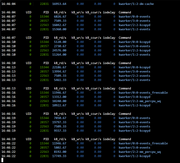
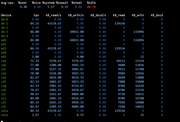
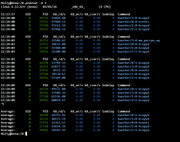
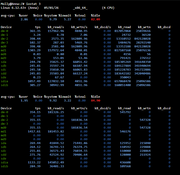
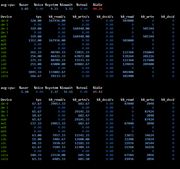
Based on the existing information, we are currently unable to guess the reason You can consider observing the DiskIO read and write status of processes and devices through the following commands on the terminal:

Code: Select all

pidstat -d 3
iostat 3
Is there any documentation that explains how the Terramaster hypercache works?
I've used other caches on other NAS devices and I've never experienced this 3-hour period of activity disk everytime when booting up a NAS because I have activated an M.2 hypercache.

The M.2 capacity is 1TB and the enclosure has 16GB of memory RAM.
Image

Image
Last edited by luismartin on 02 May 2026, 05:23, edited 2 times in total.
User avatar
rfbjr
Silver Member
Posts: 400
Joined: 16 May 2024, 23:43
United States of America

Re: TOS 7.0.0559 Beta (X86) is Released for Update

Post by rfbjr »

Image


Image


Image

Image
F6-424 & F4-425 Plus at 7.0.0777
F4-424 Pro also at 7.0.0777
D4-320
User avatar
nikk
Posts: 10
Joined: 02 May 2026, 07:34
Canada

Re: TOS 7.0.0559 Beta (X86) is Released for Update

Post by nikk »

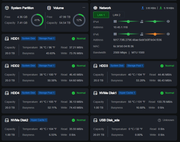
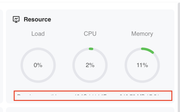
The text with the description under the indicators didn't fit. Tried different zooms - all same.
This is also present in previous versions
Control Panel -> Device Monitoring -> Overview
MacOS M1 26.3.1 Safari Version 26.3.1

Image
Post Reply

Return to “Update Notice”