Re: How to Properly Install and Use TOS 7 on the 424 Series TNAS
Posted: 24 Sep 2026, 00:17
Done. Thanks!
EriChan wrote: ↑23 Sep 2026, 17:14
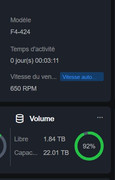
The model shows as "---" because Steps 7 and 8 were skipped during the update. The first boot flashes the BIOS, while the second USB boot automatically writes the model information.
To fix it:
1. Power off, remove all drives, insert the BIOS update USB, and connect a monitor and keyboard.
2. Power on and tap Del or Esc to enter the BIOS.
3. Go to Save & Exit, select the BIOS update USB device (the UEFI entry), and press Enter.
4. Wait for the script to finish writing the model info, then remove the USB.
5. Reinstall your drives and boot into TOS. The model will now display correctly.
Please try these steps and let us know how it goes. Looking forward to your feedback!