

EriChan wrote: ↑23 Sep 2026, 17:14
The model shows as "---" because Steps 7 and 8 were skipped during the update. The first boot flashes the BIOS, while the second USB boot automatically writes the model information.
To fix it:
1. Power off, remove all drives, insert the BIOS update USB, and connect a monitor and keyboard.
2. Power on and tap Del or Esc to enter the BIOS.
3. Go to Save & Exit, select the BIOS update USB device (the UEFI entry), and press Enter.
4. Wait for the script to finish writing the model info, then remove the USB.
5. Reinstall your drives and boot into TOS. The model will now display correctly.
Please try these steps and let us know how it goes. Looking forward to your feedback!
How to Properly Install and Use TOS 7 on the 424 Series TNAS
Re: How to Properly Install and Use TOS 7 on the 424 Series TNAS
Done. Thanks!


Re: How to Properly Install and Use TOS 7 on the 424 Series TNAS
C'est Ok pour moi... Désolé, je pensais ces étapes optionnelles lorsque l'on choisissait bien la bonne clef USB de mise à jour... De plus, vu que j'avais un message de succès de la mise à jour, j'ai pensé que tout était terminé.
Bravo à vous et merci, bien que cela ne semblait pas avoir d'incidence pour moi.



 F4-424 D6-320

Re: How to Properly Install and Use TOS 7 on the 424 Series TNAS
Hi!
I am unable to update from TOS 6.0.794 BIOS MADN0102.V05 to TOS 7.
Some months ago it gave me the option, but now there it says that there is no available update.
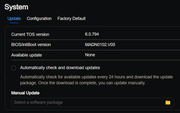
It tells me to check my network connection, but nothing has changed and other things work perfectly.

I then tried to manually update it and I downloaded TOS update package from here:
https://support.terra-master.com/downlo ... uct=F6-424
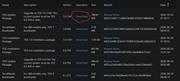
When i selected the package, it uploaded it, extracted, and then it gave me a tip "Failed to update!"
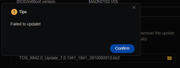
Why can't I update automatically?
And why is the manual update failing?
What can I do to successfully update?
Thanks
I am unable to update from TOS 6.0.794 BIOS MADN0102.V05 to TOS 7.
Some months ago it gave me the option, but now there it says that there is no available update.
It tells me to check my network connection, but nothing has changed and other things work perfectly.
I then tried to manually update it and I downloaded TOS update package from here:
https://support.terra-master.com/downlo ... uct=F6-424
When i selected the package, it uploaded it, extracted, and then it gave me a tip "Failed to update!"
Why can't I update automatically?
And why is the manual update failing?
What can I do to successfully update?
Thanks

Re: How to Properly Install and Use TOS 7 on the 424 Series TNAS
Hi. You skipped a required intermediate version, so the upgrade failed.
Please refer to this guide for upgrading to TOS7:
viewtopic.php?t=10183
To contact our team, please send email to following addresses, remember to replace (at) with @:
Technical team: support(at)terra-master.com (for technical support)
Service team: service(at)terra-master.com (for purchasing, return, replacement, RMA service)
Technical team: support(at)terra-master.com (for technical support)
Service team: service(at)terra-master.com (for purchasing, return, replacement, RMA service)