Page 11 of 14
Re: TOS 7.0.0804 Official Release (x86) is Released for Update
Posted: 06 Aug 2026, 11:11
by TMzethar
Jimmsan wrote: ↑05 Aug 2026, 03:23
Ok, i tried sending it again now, with some more info and screenshots!
let me know if you find it our ill try again.
Still no email from you. Please confirm that your attachments are within the 20 MB size limit; otherwise, the email may be rejected.
If the issue persists, it could be due to your network restrictions — we would suggest trying a different network connection.
Re: TOS 7.0.0804 Official Release (x86) is Released for Update
Posted: 06 Aug 2026, 12:21
by TMzethar
TMzethar wrote: ↑03 Aug 2026, 16:07
Glad that you figured out the issue, and thank you for sharing the details.
We'll discuss it to see if we can avoid UPS false alerts.
This issue may be related to the “Unable to use external NTP” problem. We will monitor the situation once the “Unable to use external NTP” issue has been resolved.
Re: TOS 7.0.0804 Official Release (x86) is Released for Update
Posted: 06 Aug 2026, 16:08
by TMzethar
The issue has been identified — the update package did not successfully overwrite the old files. Please wait for a future TOS 7 update.
Re: TOS 7.0.0804 Official Release (x86) is Released for Update
Posted: 06 Aug 2026, 20:11
by snapsh0t
TMzethar wrote: ↑06 Aug 2026, 16:08
The issue has been identified — the update package did not successfully overwrite the old files. Please wait for a future TOS 7 update.
I hope 7.0.1105 isn't the fixed version as the smartd service is not behaving nicely but, as I'm sure you've seen, I'm feeding info to RyanYang to help find the problem.
Re: TOS 7.0.0804 (x86) Official Release Update
Posted: 07 Aug 2026, 03:33
by fbfragomeni
Yesterday, August 5, I decided to take the plunge and update my TerraMaster F4-424 Max to TOS 7. I started from TOS 6.0.794 and simply using Control Panel > System > Update > Download and Update I updated to TOS 7.0.0747. I gave this update time to perform the automated Shared Folder permission conversion which completed successfully. Then I went back to Control Panel > System > Update where TOS 7.0.0804 was waiting for me and again I did Download and Update which also completed successfully. The entire process from TOS 6 to TOS 7.0.0804 took under a hour. I checked logs and system messages and even updated some App Center apps that needed updating. All went smoothly, quickly, and without any system errors and without any obvious visible malfunctioning. It was a good experience but more importantly a great relief that it went so well. THEN, I used file manager to check the files and folders I have on the NAS. The file manager as well as the TNAS PC and TNAS Mobile apps did not display any files or folders in the Shared Folders with the exception of the public folder which seemed to display files and folders as expected. I verified that all files and folder were indeed there. They just were not displaying in those apps. My thoughts were that it was a permissions problem but I checked all user and group permissions and they were correct and matching. Out of desperation and for test and confirmation purposes I picked a user and his Shared Folder and modified different permissions checking with file manager after each changes and finally back to the original and correct permissions that he had. None of the tests had any affect. What finally worked and I don't know why was the following procedure. I went to Control Panel > Shared Folder > selected an affected share > click on Edit > click on Permissions > select a user in that Share and click the Customize check box > highlight the user again and even though all permissions were correct I nevertheless checked the box for Apply to this folder, subfolders and files and finally clicked Apply. File manager and TNAS apps then displayed all files and folders correctly. I repeated the process for the other Shared Folders. So it seems that I am all good now. If anyone has an explanation as to why file manager didn't see file and folders, I would be interested in learning the answer. Thank you all for your efforts.
Re: TOS 7.0.0804 (x86) Official Release Update
Posted: 07 Aug 2026, 12:10
by athurdent
I have updated my F8 SSD from TOS6 to this version. Works and looks fine so far, thanks a bunch for this great update!
One question though, about the App Center. I may be mistaken but it seems I am seeing what appears to be community (docker) apps in there for direct installation now? E.g. this one:
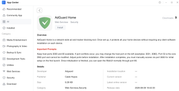
What checks are performed by TerraMaster, to rule out a malicious status of these apps now, and for possible future updates?
Re: TOS 7.0.0804 (x86) Official Release Update
Posted: 07 Aug 2026, 12:52
by storageninja
Yeah that’s confusing right. I also got tricked in with a community app which I thought it was native TM.
Could be stated more clear in the right sidebar if you asked me.
Re: TOS 7.0.0804 (x86) Official Release Update
Posted: 07 Aug 2026, 13:14
by athurdent
storageninja wrote: ↑07 Aug 2026, 12:52
Yeah that’s confusing right. I also got tricked in with a community app which I thought it was native TM.
Could be stated more clear in the right sidebar if you asked me.
Thanks, good to see I‘m not the only one confused by this.
Also, in case of AdGuard at least - there’s an official docker image (
https://hub.docker.com/r/adguard/adguardhome ) and no apparent reason I can find to not simply use that…?
Re: TOS 7.0.0804 (x86) Official Release Update
Posted: 07 Aug 2026, 14:37
by TMzethar
fbfragomeni wrote: ↑07 Aug 2026, 03:33
Yesterday, August 5, I decided to take the plunge and update my TerraMaster F4-424 Max to TOS 7. I started from TOS 6.0.794 and simply using Control Panel > System > Update > Download and Update I updated to TOS 7.0.0747. I gave this update time to perform the automated Shared Folder permission conversion which completed successfully. Then I went back to Control Panel > System > Update where TOS 7.0.0804 was waiting for me and again I did Download and Update which also completed successfully. The entire process from TOS 6 to TOS 7.0.0804 took under a hour. I checked logs and system messages and even updated some App Center apps that needed updating. All went smoothly, quickly, and without any system errors and without any obvious visible malfunctioning. It was a good experience but more importantly a great relief that it went so well.
THEN, I used file manager to check the files and folders I have on the NAS. The file manager as well as the TNAS PC and TNAS Mobile apps did not display any files or folders in the Shared Folders with the exception of the public folder which seemed to display files and folders as expected. I verified that all files and folder were indeed there. They just were not displaying in those apps. My thoughts were that it was a permissions problem but I checked all user and group permissions and they were correct and matching. Out of desperation and for test and confirmation purposes I picked a user and his Shared Folder and modified different permissions checking with file manager after each changes and finally back to the original and correct permissions that he had. None of the tests had any affect.
What finally worked and I don't know why was the following procedure. I went to Control Panel > Shared Folder > selected an affected share > click on Edit > click on Permissions > select a user in that Share and click the Customize check box > highlight the user again and even though all permissions were correct I nevertheless checked the box for Apply to this folder, subfolders and files and finally clicked Apply. File manager and TNAS apps then displayed all files and folders correctly. I repeated the process for the other Shared Folders. So it seems that I am all good now. If anyone has an explanation as to why file manager didn't see file and folders, I would be interested in learning the answer. Thank you all for your efforts.
It seems like the permission conversion may have only been partially completed. You also mentioned that "the system automatically completed the permission conversion for shared folders."
Could you confirm whether you actually saw a prompt indicating that the permission conversion was completed? Did you perform any shutdown or restart during the conversion process? Or can you think of any other actions that might be relevant?
We'll keep an eye out for similar feedback from other users.
Re: TOS 7.0.0804 (x86) Official Release Update
Posted: 07 Aug 2026, 16:32
by TMzethar
athurdent wrote: ↑07 Aug 2026, 13:14
storageninja wrote: ↑07 Aug 2026, 12:52
Yeah that’s confusing right. I also got tricked in with a community app which I thought it was native TM.
Could be stated more clear in the right sidebar if you asked me.
Thanks, good to see I‘m not the only one confused by this.
Also, in case of AdGuard at least - there’s an official docker image (
https://hub.docker.com/r/adguard/adguardhome ) and no apparent reason I can find to not simply use that…?
Put simply, "Docker Apps" are just a simplified way to install commonly used Docker images and containers.
The images come from public registries like Docker Hub and are maintained by the publishers. Like everywhere else in the Docker ecosystem, nobody can audit third‑party images at the source‑code level. The App Center just handles the installation setup—templating things like the image, ports, and volume mounts. Before you install, you'll see the exact image and version tag so you can check them before proceeding.