EgorA wrote: ↑24 Sep 2026, 21:29
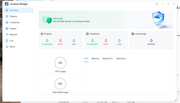
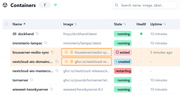
Container manager does not work after update
but dockhand works well
Upd. Few minutes later container manages appear to be disabled so I need to enable it manually.
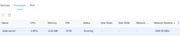
Upd2. Process redis-server has a permanently high network activity - it constantly consumes 1Mb/s download traffic
This happens to me after EVERY update and even after a simple reboot. Docker Engine and Container Manager both are disabled upon reboot. It's maddening and honestly, makes it near-impossible to rely on TNAS for Docker until this is fixed. If my NAS has an unattended reboot for any reason, all my containers will simply not work.
I don't use docker/containers but I'm sure it must be possible to enable them via command line. As such I would be tempted, if their operation is that important, to investigate a scheduled task for every power-on/reboot to ensure they are not ever missed.
I don't use docker/containers but I'm sure it must be possible to enable them via command line. As such I would be tempted, if their operation is that important, to investigate a scheduled task for every power-on/reboot to ensure they are not ever missed.
They can't be enabled via command line because TOS7 doesn't start the docker engine upon boot. So unless you start the docker engine, to my knowledge, you're SOL until you open the App Center and re-enable the engine. Only THEN can you spin up the containers. But here's the thing: why is it disabled upon boot if it was enabled prior to that? If Plex Media Server or JellyFin or any other service we depend on for these NAS' did this, there would be a major uproar over it.
If a service / app is enabled, it should NOT be disabled when the system reboots. Period.
We have received the feedback email you sent to our support team.
Regarding the issue you mentioned, it may be influenced by other factors. Please follow the instructions in our email reply to generate and collect a new system diagnostic report, then send it back to us so we can analyze it further.
Thank you for your patience and support!
Thanks for the reply. I did not receive said email yet, but I did sent a newly generated system report to support already.
Another thing you might want to look into, is the constant stream of smack_inode_permission denials by collectd (VMs-ca20 → DockerEn-ca20).
rfbjr wrote: ↑28 Sep 2026, 18:36
Haven't see this before with prior releases.
Delete the top stacked message and the next one is blank.
Edit: It seems to happen when you logon and there are messages. They display stacked up.
We will look into the display issue you mentioned and try to reproduce it.
To contact our team, please send email to following addresses, remember to replace (at) with @:
Technical team: support(at)terra-master.com (for technical support)
Service team: service(at)terra-master.com (for purchasing, return, replacement, RMA service)
We are currently verifying the situation you mentioned.
What version of TOS were you using before the update?
Generally, Docker is enabled later in the startup sequence; in extreme cases, it may take up to 3 minutes to enable automatically.
Additionally, if you were using an older version of TOS7 before the update, it may not enable automatically after the update or a reboot. In this case, simply disable it manually and re-enable it to reactivate automatic enablement.
To contact our team, please send email to following addresses, remember to replace (at) with @:
Technical team: support(at)terra-master.com (for technical support)
Service team: service(at)terra-master.com (for purchasing, return, replacement, RMA service)
rfbjr wrote: ↑28 Sep 2026, 18:36
Haven't see this before with prior releases.
Delete the top stacked message and the next one is blank.
Edit: It seems to happen when you logon and there are messages. They display stacked up.
We will look into the display issue you mentioned and try to reproduce it.
Model: TerraMaster F2-425 Plus (Intel N95)
TOS: 7, build 1278
Second NIC: eth1, static 10.10.10.1/24, no gateway, MTU 8192
Primary NIC: eth0, DHCP 192.168.1.100/24, MTU 1500, connected to the router — this path always works
Link partner: Mac mini M4 → ACASIS NT0201 (Thunderbolt/USB4 10GbE, Aquantia AQC113) → short Cat6 → NAS LAN2.
Mac side: static 10.10.10.2/24, no gateway, MTU 8192. Link negotiates 5000Base-T full duplex.
The Mac is fully powered off every night. The adapter is bus-powered, so the link partner on eth1 disappears completely. In the morning the Mac is powered on again and the 5GbE link comes back.
Symptom (reproducible):
- ip link / ethtool eth1: state UP, Link detected: yes, Speed: 5000Mb/s, Duplex: Full
- ip -4 addr: inet 10.10.10.1/24 is still on eth1
- From the NAS: arping -c 5 -I eth1 10.10.10.2 → Sent 5 probes, Received 0 response(s); ping returns Destination Host Unreachable
- From the Mac: ping 10.10.10.1 times out; route get 10.10.10.1 correctly uses the Thunderbolt Ethernet interface
- tcpdump -ni en10 on the Mac while the NAS is sending ARP captures 0 packets
- eth0 / 192.168.1.100 keeps working the whole time
So the PHY reports a valid 5GbE link, but the data path on eth1 is dead until the interface is reset.
Workaround that restores traffic immediately (no NAS reboot):
ip link set eth1 down
sleep 2
ip link set eth1 up
After that, ARP and ping to 10.10.10.2 work again. A full reboot also fixes it, but is not required.
This has happened on two consecutive mornings after the Mac was shut down overnight. It looks like eth1 does not fully reinitialize after the link partner powers off and comes back, especially with jumbo frames (MTU 8192) and a bus-powered 5/10GbE adapter.
Could you check whether this is a known issue with the onboard multi-gig driver in TOS 7.1278, and whether a later build reinitializes the port correctly on link-down/link-up?
We tested this on TOS 7.0.1278 hardware. Your port isn't failing — it re-links fine at 5G. What's stuck is the data path (the MAC), which doesn't re-arm after your Mac's bus-powered adapter disappears overnight.
The main suspect is EEE (energy-saving Ethernet) at 5G: Realtek's own driver deliberately avoids advertising 5G EEE due to compatibility issues, but TOS ships it enabled.
Note: jumbo frames / MTU 8192 is almost certainly a red herring — a 42-byte ARP can't be affected by MTU, and your Mac captured 0 packets, meaning nothing ever left the NAS.
If this fixes it, we'll make the setting persistent.
To contact our team, please send email to following addresses, remember to replace (at) with @:
Support team: support(at)terra-master.com (for technical support only)
Service team: service(at)terra-master.com (for purchasing, return, replacement, RMA service)