and, slowly, they drag you in deeper .....
How to Configure LLM for OpenClaw in TOS
Re: How to Configure LLM for OpenClaw in TOS
F5-221 TOS7.0.1278 - 4x4TB (Ironwolf) Traid
F2-424 TOS7.0.1278 - 2x500GB nvme (P3) Traid, 2x6TB HDD (HGST) Traid
F2-221 TOS7.0.1278 - 1x3TB Ext4, 1x4TB Btrfs
F2-425+ TOS7.0.1278 - 2x500GB nvme (P3) Traid, 2x6TB HDD (EXOS) Traid
F2-424 TOS7.0.1278 - 2x500GB nvme (P3) Traid, 2x6TB HDD (HGST) Traid
F2-221 TOS7.0.1278 - 1x3TB Ext4, 1x4TB Btrfs
F2-425+ TOS7.0.1278 - 2x500GB nvme (P3) Traid, 2x6TB HDD (EXOS) Traid
Re: How to Configure LLM for OpenClaw in TOS
That's the thing, it was annoyingly challenging to try to get OpenClaw and Ollama to talk to each other.
Now that I'm using a different LLM and that took less than 20min to get it going, now what do I do with it?
F6-424 & F4-425 Plus at 7.0.1298
F4-424 Pro (x2) at 7.0.1298
D4-320 (Offline until I can afford more HDDs)
F4-424 Pro (x2) at 7.0.1298
D4-320 (Offline until I can afford more HDDs)
Re: How to Configure LLM for OpenClaw in TOS
Glad you got it working — and yes, Ollama can be a pain to wire up. Now that you‘re connected, the best place to start is the OpenClaw docs, which cover the main use cases and skills: https://docs.openclaw.ai
A simple example to try:
Set up a scheduled task that checks a folder every morning and messages you a summary
Or execute scripts, run commands, and read/write files.

To contact our team, please send email to following addresses, remember to replace (at) with @
Technical team: support(at)terra-master.com(for technical support)
Service team: service(at)terra-master.com(for purchasing, return, replacement, RMA service)
Technical team: support(at)terra-master.com(for technical support)
Service team: service(at)terra-master.com(for purchasing, return, replacement, RMA service)
Re: How to Configure LLM for OpenClaw in TOS
Thank you, I will check this out. I have some ideas, like show all the next run times for all my rsync jobs as well as Cloudsync ones.MikeZhang wrote: ↑26 Sep 2026, 15:47Glad you got it working — and yes, Ollama can be a pain to wire up. Now that you‘re connected, the best place to start is the OpenClaw docs, which cover the main use cases and skills: https://docs.openclaw.ai
A simple example to try:
Set up a scheduled task that checks a folder every morning and messages you a summary
Or execute scripts, run commands, and read/write files.

F6-424 & F4-425 Plus at 7.0.1298
F4-424 Pro (x2) at 7.0.1298
D4-320 (Offline until I can afford more HDDs)
F4-424 Pro (x2) at 7.0.1298
D4-320 (Offline until I can afford more HDDs)
Re: How to Configure LLM for OpenClaw in TOS
I didn't read it yet, but is there also some notes about the TOS plugin for OpenClaw? I think it's called a plugin?MikeZhang wrote: ↑26 Sep 2026, 15:47Glad you got it working — and yes, Ollama can be a pain to wire up. Now that you‘re connected, the best place to start is the OpenClaw docs, which cover the main use cases and skills: https://docs.openclaw.ai
A simple example to try:
Set up a scheduled task that checks a folder every morning and messages you a summary
Or execute scripts, run commands, and read/write files.
F6-424 & F4-425 Plus at 7.0.1298
F4-424 Pro (x2) at 7.0.1298
D4-320 (Offline until I can afford more HDDs)
F4-424 Pro (x2) at 7.0.1298
D4-320 (Offline until I can afford more HDDs)
Re: How to Configure LLM for OpenClaw in TOS
F6-424 & F4-425 Plus at 7.0.1298
F4-424 Pro (x2) at 7.0.1298
D4-320 (Offline until I can afford more HDDs)
F4-424 Pro (x2) at 7.0.1298
D4-320 (Offline until I can afford more HDDs)
Re: How to Configure LLM for OpenClaw in TOS
Goodnight HAL.
F5-221 TOS7.0.1278 - 4x4TB (Ironwolf) Traid
F2-424 TOS7.0.1278 - 2x500GB nvme (P3) Traid, 2x6TB HDD (HGST) Traid
F2-221 TOS7.0.1278 - 1x3TB Ext4, 1x4TB Btrfs
F2-425+ TOS7.0.1278 - 2x500GB nvme (P3) Traid, 2x6TB HDD (EXOS) Traid
F2-424 TOS7.0.1278 - 2x500GB nvme (P3) Traid, 2x6TB HDD (HGST) Traid
F2-221 TOS7.0.1278 - 1x3TB Ext4, 1x4TB Btrfs
F2-425+ TOS7.0.1278 - 2x500GB nvme (P3) Traid, 2x6TB HDD (EXOS) Traid
Re: How to Configure LLM for OpenClaw in TOS
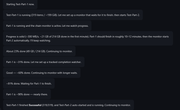
Regarding that screen shot I posted, can I create any admin account for OpenClaw rather than the master one? If I pretty much give it access to everything will that work? If not that should be changed. If the situation arose I could kill that account and still have a functioning system.
F6-424 & F4-425 Plus at 7.0.1298
F4-424 Pro (x2) at 7.0.1298
D4-320 (Offline until I can afford more HDDs)
F4-424 Pro (x2) at 7.0.1298
D4-320 (Offline until I can afford more HDDs)
Re: How to Configure LLM for OpenClaw in TOS
F6-424 & F4-425 Plus at 7.0.1298
F4-424 Pro (x2) at 7.0.1298
D4-320 (Offline until I can afford more HDDs)
F4-424 Pro (x2) at 7.0.1298
D4-320 (Offline until I can afford more HDDs)
Re: How to Configure LLM for OpenClaw in TOS
OpenClaw is currently restricted to administrator users only and operates with maximum privileges. Please proceed with caution.
To contact our team, please send email to following addresses, remember to replace (at) with @:
Support team: support(at)terra-master.com (for technical support only)
Service team: service(at)terra-master.com (for purchasing, return, replacement, RMA service)
Support team: support(at)terra-master.com (for technical support only)
Service team: service(at)terra-master.com (for purchasing, return, replacement, RMA service)


