[Share] F4-425 Pro (N350). Thermalgate

Discuss, seek assistance, and report issues related to hardware components, such as hardware platforms, memory, network ports, power supplies, UPS systems, and so on.
Post Reply
User avatar
DekkaR
Posts: 15
Joined: 08 Sep 2024, 06:09
Iceland

[Share] F4-425 Pro (N350). Thermalgate

Post by DekkaR »

DekkaR wrote: ↑21 Aug 2026, 19:24
I want to share with all of you an update on this topic, after several tests during these last weeks.

First, I want to highlight the excellent support from Terra-Master. They shipped me a brand-new Terra-Master F4-425 Pro (N350) NAS unit straight from their factories in China, and I'd like to thank their team for handling this so promptly.

Now let's talk about the problem with the F4-425 Pro model, which uses the Intel N350 chip:

Throughout, Terra-Master support indicates that the initial batch of this model had an issue with thermal paste that was not applied properly at the factory. I'm not going to contradict Terra-Master support, but I think there's more to it. I'm not denying that these early batches had the thermal paste issue, but I feel like there's something else going on with this specific model. There's definitely a bigger problem here at least.

On the first unit I received from Amazon, since I bought this unit directly from Amazon, the PL1 value in the BIOS was set to 13,500 or 13.5 watts. This is the second unit sent by Terra-Master support from China. I've checked the BIOS on this unit, and out of the box, the PL1 value on this received unit is 12,000 milliwatts, or 12 watts. In other words, we can see that aside from the thermal paste issue, there is something else going on here. This value, which was 13.5 watts on the first unit, is now 12 watts, and that already points to something else.

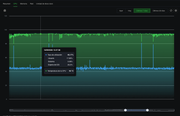
After putting this unit through prolonged "torture testing", how does it hold up? Frankly, its thermal performance is neither correct nor efficient. The unit immediately and rapidly hits 94°C and goes into thermal throttling, meaning it constantly drops its frequency because it keeps hitting that 94-degree mark. Meanwhile, the unit's fan is running constantly at its maximum possible RPM.

This is clearly not the right situation. Hitting 94 degrees and entering thermal throttling is definitely not right, nor is it desirable for a NAS unit subjected to prolonged workloads, which is something these types of units have to handle on many occasions.

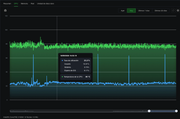
After several different tests, I've adjusted the PL1 value to 10 W, or 10,000 mW. Under this setting, the unit's temperature during stress testing hovers around 80 °C, which is a solid and, in my view, ideal result.

I've attached two images. The first one shows the temperature graph with the factory-default PL1 value on the second unit sent by TerraMaster support, which is set to 12 watts:
Image

The second image shows the current state of this unit, with the PL1 value already changed by me to 10 watts:
Image

I should note that with the PL1 value changed to 10W, the unit's fan does not reach maximum RPM, topping out at around 1,300 RPM instead of the maximum 1,400 RPM under load.

Now, my opinion on this whole situation and these F4-425 Pro units with the Intel N350 chip: I wanted to share this with all of you, as this is my reflection, and I think TerraMaster should also listen to these thoughts.

I think the issue with this unit is industrial design. Specifically, the layout features four 3.5-inch drive bays, with the motherboard, memory, M.2 drives, and CPU heatsink positioned off to the side. That industrial design with a single fan just doesn't provide adequate cooling for that side-mounted board where all the system components are housed. For less powerful processors, perhaps quad-core or with an architecture that doesn't require much ventilation, this kind of design can work. But here, obviously, there's a problem: the industrial design doesn't guarantee adequate cooling because the processor heatsink is constrained in a space where it can't increase in size, and that's probably the situation.
Maybe another industrial design where that part of the motherboard, along with all its components, took up half the case, with two storage drives on one side and two on the other, meaning 3.5-inch drives. In other words, perhaps in a design where a single fan could adequately ventilate all the components.


I hope that was helpful.
TM F8 SSD: 8GB RAM: 9 TB TRAID EXT4: TOS 7:
TM F8 SSD Plus: 32GB RAM: 4TB RAID0 EXT4: 2TB RAID0 EXT4: TOS 7:
TM F4-425 Pro (N350): 16GB RAM: 8TB RAID0 EXT4: 6TB RAID5 EXT4: TOS 7:
---
[ DekkaR ]
User avatar
EriChan
TM Support
Posts: 361
Joined: 06 Jan 2026, 12:27
China

Re: [Share] F4-425 Pro (N350). Thermalgate

Post by EriChan »

DekkaR wrote: ↑19 Sep 2026, 00:36
Thank you very much for your rigorous testing, detailed documentation, and constructive feedback, as well as your kind words regarding our support team!

Regarding the processor specifications and our engineering considerations, we would like to share some technical context with you and the community:

1. Intel Official Specifications & Power Calibration:

According to Intel's official specifications, the standard TDP for this 8-core processor is 15 W, with a configurable TDP-down (cTDP-down) rating of 9 W.

In our factory engineering calibration, configuring the PL1 within the 12W–13.5W range was an intentional decision to balance thermal safety while unleashing the true multi-threaded compute capability of the 8-core processor—particularly for demanding workloads such as virtualization, Docker containers, and multi-stream real-time transcoding—rather than aggressively restricting performance down to the 9W lower limit out of the box.

2. Synthetic Stress Tests vs. Real-World NAS Workloads:

High-intensity synthetic torture testing represents an extreme operational condition that forces continuous 100% all-core saturation, which rarely occurs continuously in real-world NAS applications. Modern Intel processors feature mature, integrated hardware-level thermal regulation and protection mechanisms that dynamically throttle at thermal boundaries to ensure hardware safety and long-term reliability without damaging the silicon. In typical day-to-day scenarios (file transfers, multimedia streaming, and routine container operations), the operating temperature remains well within a healthy, normal range.

3. Flexibility & Future Optimization:

We intentionally retain tuning flexibility in the BIOS so advanced users can balance between low noise/temperatures and peak performance based on their specific environment. Your finding that 10W (10,000 mW) achieves an ideal balance between stable thermals, reduced fan acoustics, and solid performance is very valuable.

We have forwarded your constructive feedback directly to our hardware product team to be thoroughly referenced in the structural and thermal designs of our next-generation products.

Thank you again for your in-depth exploration of TerraMaster products and your valuable contributions to the community!
To contact our team, please send email to following addresses, remember to replace (at) with @

Technical team: support(at)terra-master.com(for technical support)
Service team: service(at)terra-master.com(for purchasing, return, replacement, RMA service)
User avatar
DekkaR
Posts: 15
Joined: 08 Sep 2024, 06:09
Iceland

Re: [Share] F4-425 Pro (N350). Thermalgate

Post by DekkaR »

EriChan wrote: ↑20 Sep 2026, 10:51
Thank you very much for your prompt and detailed response.

Regarding points 1 and 2 of your reply, I have to say you're probably right. It's difficult to find a "correct" configuration that covers all the wide-ranging uses of a NAS device.
Perhaps my case is quite extreme, since I really push the devices to their limits when working with large amounts of data, MariaDB databases, and Python script programming.
Possibly, for "standard" use of these devices, the factory configuration (as this second unit of the F4-425 Pro model came) is the most appropriate and correct one.

3:
Perhaps it would be worth documenting more clearly, for those users who need it, the flexibility these devices offer for making modifications through the BIOS.
This way, users who may have a specific use case—one that falls outside, let's say, "normal" use—would have this documented so they can adjust the power parameters of their NAS units as correctly as possible to fit their specific needs.
The idea is to have a clearly documented guide that contributes knowledge and allows for better use (and better performance) of these devices.

Industrial design:
In any case, I still believe that the "form factor" of four storage units with the motherboard/processor off to one side is not a good solution for certain types of processors with certain power levels.
I think it would be worth exploring a different layout that moves that processing section to the center of the device, so that the airflow (with a single fan) would actually be equal for all the components of the device.

Additional note:
I have two F8 units (SSD and SSD Plus). The F8 SSD Plus performs the same tasks as this F4-425 Pro, and I haven't needed to touch its configuration. It delivers great performance and stable thermal behavior.
I consider the F8 NAS units to have perhaps the best industrial design of any I've been able to test. I've tried NAS units from QNAP, ASUSTOR, and Synology, and these F8 units seem to me to have the best and most brilliant design of any NAS I've handled.
I'm looking forward to seeing when Terra-Master updates this design with new, more powerful models.
TM F8 SSD: 8GB RAM: 9 TB TRAID EXT4: TOS 7:
TM F8 SSD Plus: 32GB RAM: 4TB RAID0 EXT4: 2TB RAID0 EXT4: TOS 7:
TM F4-425 Pro (N350): 16GB RAM: 8TB RAID0 EXT4: 6TB RAID5 EXT4: TOS 7:
---
[ DekkaR ]
Post Reply

Return to “Hardware, Power and Accessories”