

Target Users:
Users currently running TOS 7.0.0746 or later versions.
Note:
If your TOS version is TOS 6, please refer to the TOS 7 update instructions first.
Important: This update is only applicable to TOS 7.0.0746 and newer. Users with older versions must first upgrade to 7.0.0746 before applying this update.
Here, we sincerely thank @pjarinov, @ambul, @akaserge, @rfbjr, @Alak, @crisisacting, @apvm, @Nitrokalel, @snapsh0t, @angelor, @OttO1916, @sianderson, @Lavenir, @dnetkach, @Gremlin, @nitzer71, @mnewland and others for your sharing and feedback. Your support helped us quickly identify and fix multiple issues.
Release Notes:
This update adopts a phased gray release strategy to ensure stability across different device models and network environments.
Phase 1 (Starting Today): The manual update package is now available for download on our forum. It will be rolled out in batches based on system version, device model, and region.
Phase 2 (In One Week): The full online push will officially begin. At that time, all users will receive an update notification and can complete the update by following the on-screen prompts.
Update Notes
Bug Fixes:
1. Fixed the issue where the system desktop did not refresh automatically after the Desktop directory was deleted.
2. Fixed the issue where the disk's file system might not be displayed properly after a disk was removed and then reinserted.
3. Fixed the issue where removing one disk from a multi-disk array might cause the quantity information to display incorrectly.
4. Fixed the issue where the "-O" parameter was always required when transferring files with the SCP command.
5. Fixed the issue where some terms were improperly translated in Italian.
Important Information:
1.Updating the system theoretically will not affect the data on your hard drives, but for safety, please make sure to back up your data in advance.
2.Before updating, ensure that your primary volume (usually volume1) has at least 3GB of available space. Insufficient storage space may cause the update to fail.
3.After the update, the IP address of your TNAS may change. Please use the TNAS PC desktop client to search for and reconnect to the device.
Update Procedure:
1.Download TOS 7.0.1201 update package (MD5: 51a09e5f77b610fd180e932f5ce15d0f);
2.Go to TOS > Control Panel > General Settings > System > Update;
3.Select "Manual Update" and upload the downloaded update package file;
4.Follow the prompts to complete the update;
5.After the system update is complete, please refresh your browser;
6.The TNAS IP address may change after the update. If you cannot connect to your TNAS using the previous IP address, use the TNAS PC client to search for the new IP address;
Client Downloads:
1. Download TNAS PC 5.2.548 for Windows OS.
- MD5: 72701B52336AF9FD8B97A6BE9D5D5A7C
2. Download TNAS PC 5.2.548 for macOS (x86 architecture).
- MD5: BAA63A179C43F73965EA9C31EEB9D61E
3. Download TNAS PC 5.2.548 for macOS (ARM architecture).
- MD5: BB933DA867058884C4ADFE44EAD24AFC
4. Download TNAS PC 5.2.548 for Linux.
- MD5: 06FE93F9FFE47147854A34F28D57FCC2
5. TNAS mobile for Android: Please search for "TNAS mobile" in the app store to install.
6. TNAS Mobile for iOS: Please search for "TNAS mobile" in the App Store to install.
TOS 7.0.1201 (x86) Official Release Update
TOS 7.0.1201 (x86) Official Release Update
To contact our team, please send email to following addresses, remember to replace (at) with @
Technical team: support(at)terra-master.com (for technical support)
Service team: service(at)terra-master.com (for purchasing, return, replacement)
Technical team: support(at)terra-master.com (for technical support)
Service team: service(at)terra-master.com (for purchasing, return, replacement)

Re: TOS 7.0.1201 (x86) Official Release Update
Merci.
La mise à jour s'est effectuée rapidement et sans problème. Le NAS semble parfaitement opérationnel pour les usages que j'en fais. Comme avec la version précédente, en fait. Les synchronisations se déroulent correctement et les accès semblent corrects depuis les autres machines. Autant anticiper les versions officielles .
.
Bonne journée à toute votre équipe.
La mise à jour s'est effectuée rapidement et sans problème. Le NAS semble parfaitement opérationnel pour les usages que j'en fais. Comme avec la version précédente, en fait. Les synchronisations se déroulent correctement et les accès semblent corrects depuis les autres machines. Autant anticiper les versions officielles
.Bonne journée à toute votre équipe.
 F4-424

Re: TOS 7.0.1201 (x86) Official Release Update
F4-424 Pro, turned on debug mode prior to update to 1201, was attempting to capture data for a different issue.
After system came back and signed on, after just a few minutes CPU temp warning triggered 83c, forced fan to high, after a few minutes temp dropped 40c. The issue was going to capture didn't happen. Rebooted unit again, still with debug mode on, same high temp after a few. This time left fan in auto mode, point being forcing high speed didn't help dropping temp, whatever the system was doing, it finished then temp dropped.
Late here. I turned off debug mode. I'll upload my logs in the morning. Turned off scheduled power on, will do that manually and see if debug mode off, if cpu temp doesn't spike.
Update: Tue AM
Remaining devices (even other F4-424 Pro) all updated w/o issues or any noticeable CPU temp spikes.
Support has been emailed with pictures and links to logs.
So the one F4-424 Pro that has TerraSync installed is having the short CPU temp spike after rebooting. Debug mode on at the time was enough of an extra load to trigger the CPU temp alert.
After system came back and signed on, after just a few minutes CPU temp warning triggered 83c, forced fan to high, after a few minutes temp dropped 40c. The issue was going to capture didn't happen. Rebooted unit again, still with debug mode on, same high temp after a few. This time left fan in auto mode, point being forcing high speed didn't help dropping temp, whatever the system was doing, it finished then temp dropped.
Late here. I turned off debug mode. I'll upload my logs in the morning. Turned off scheduled power on, will do that manually and see if debug mode off, if cpu temp doesn't spike.
Update: Tue AM
Remaining devices (even other F4-424 Pro) all updated w/o issues or any noticeable CPU temp spikes.
Support has been emailed with pictures and links to logs.
So the one F4-424 Pro that has TerraSync installed is having the short CPU temp spike after rebooting. Debug mode on at the time was enough of an extra load to trigger the CPU temp alert.
F6-424 & F4-425 Plus at 7.0.1201
F4-424 Pro (x2) at 7.0.1201
D4-320 (Offline until I can afford more HDDs)
F4-424 Pro (x2) at 7.0.1201
D4-320 (Offline until I can afford more HDDs)

-
Crashoveride

- Posts: 1
- Joined: Yesterday, 19:59

Re: TOS 7.0.1201 (x86) Official Release Update
Could you please explain why the NVMe drive in the second slot is not shown in the Disk Information section of Storage Manager, and why in the Hard Disk section it is named “NVMe Disk_sdzc” instead of “NVMe Disk1” like the other drives? NAS: F2-425 Plus (Intel N95), TOS 7 1201 (the same behavior was present on previous versions as well).
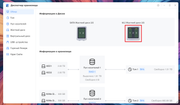
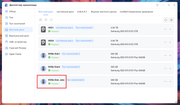
TerraMaster F2-425 Plus (Intel N95)


Re: TOS 7.0.1201 (x86) Official Release Update
Have you previously had an NVME configured as Hyper-Cache?
F5-221 TOS7.0.1188 - 4x4TB (Ironwolf) Traid
F2-424 TOS7.0.1201 - 2x500GB nvme (P3) Traid, 2x6TB HDD (HGST) Traid
F2-221 TOS7.0.1201 - 1x3TB Ext4, 1x4TB Btrfs
F2-425+ TOS7.0.1201 - 2x500GB nvme (P3) Traid, 2x6TB HDD (EXOS) Traid
F2-424 TOS7.0.1201 - 2x500GB nvme (P3) Traid, 2x6TB HDD (HGST) Traid
F2-221 TOS7.0.1201 - 1x3TB Ext4, 1x4TB Btrfs
F2-425+ TOS7.0.1201 - 2x500GB nvme (P3) Traid, 2x6TB HDD (EXOS) Traid
-
Flyingbike

- Posts: 13
- Joined: 22 Dec 2023, 16:28

Re: TOS 7.0.1201 (x86) Official Release Update
Hello
Is anything going on regarding this issue :
Is anything going on regarding this issue :
Flyingbike wrote: ↑30 Aug 2026, 00:48 I run this version.
I recently switched from ISP DNS to self-hosted pihole and I quickly noticed my F2-423 was requesting A LOT
Every 15 seconds.Code: Select all
2026-08-29 18:40:36		AAAA	ipv6.baidu.com.lan	********.lan	25.3 µs
2026-08-29 18:40:36		AAAA	www.google.com	********.lan	12.9 µs
2026-08-29 18:40:36		AAAA	ipv6.baidu.com	********.lan	12.9 µs
2026-08-29 18:40:36		AAAA	www.cloudflare.com	********.lan	65.1 µs
2026-08-29 18:40:21		AAAA	ipv6.baidu.com.lan	********.lan	55.6 µs
2026-08-29 18:40:21		AAAA	www.google.com	********.lan	36.5 µs
2026-08-29 18:40:21		A	www.baidu.com	********.lan	28.6 µs
2026-08-29 18:40:21		AAAA	ipv6.baidu.com	********.lan	35.8 µs
2026-08-29 18:40:21		AAAA	www.cloudflare.com	********.lan	56.3 µs
2026-08-29 18:40:06		AAAA	ipv6.baidu.com.lan	********.lan	52.5 µs
2026-08-29 18:40:06		AAAA	www.google.com	********.lan	47.9 µs
2026-08-29 18:40:06		AAAA	ipv6.baidu.com	********.lan	26.7 µs
2026-08-29 18:40:06		AAAA	www.cloudflare.com	********.lan	42.2 µs
2026-08-29 18:39:51		AAAA	ipv6.baidu.com.lan	********.lan	50.5 µs
2026-08-29 18:39:51		AAAA	www.google.com	********.lan	36.7 µs
2026-08-29 18:39:51		A	www.baidu.com	********.lan	24.6 µs
2026-08-29 18:39:51		AAAA	ipv6.baidu.com	********.lan	26.5 µs
2026-08-29 18:39:51		AAAA	www.cloudflare.com	********.lan	50.1 µs
2026-08-29 18:39:36		AAAA	ipv6.baidu.com.lan	********.lan	53.6 µs
2026-08-29 18:39:36		AAAA	www.google.com	********.lan	12.4 µs
2026-08-29 18:39:36		AAAA	ipv6.baidu.com	********.lan	11.7 µs
2026-08-29 18:39:36		AAAA	www.cloudflare.com	********.lan	34.3 µs
2026-08-29 18:39:21		AAAA	ipv6.baidu.com.lan	********.lan	61.5 µs
2026-08-29 18:39:21		A	www.baidu.com	********.lan	27.9 µs
2026-08-29 18:39:21		AAAA	www.google.com	********.lan	48.2 µs
Why so frequently ?
And additionally, why AAAA when ipv6 is deactivated on this device ?
This is orchestrated by TOSDaemon through gitlab.local/golibrary/wanip and probed domains are hard coded.
It seems I am not the first one to notice.
viewtopic.php?p=59673#p59673, the explanation of packet loss or timeout in this other topic is incorrect. The DNS answers correctly and the domains are reachable.
It surely needs an explanation and a correction.
THanks
-
crisisacting

- Silver Member
- Posts: 527
- Joined: 20 Jan 2022, 16:42
Re: TOS 7.0.1201 (x86) Official Release Update
Successfully updated stand-alone TNAS.
Will await online update for testbed units.
Will await online update for testbed units.

Re: TOS 7.0.1201 (x86) Official Release Update
Updated w/o issues
F5-422 (MAPL0304V22) - TOS 7.0.1201 (x86)
D8 Hybrid
D8 Hybrid

Re: TOS 7.0.1201 (x86) Official Release Update
T6-423
Upgraded this morning from 1188, at arround 7am
checking this afternoon at 4pm ERRORS:
when accessing settings im getting the error message URL: v2/desktop/recentlyVisited message: Network Error
I cant get into settings currently.
update 1: I came back to it 20 minutes later I can now get back into settings and the error no longer shows.
update 2: kids are complaining Jellyfin no longer works. they can view the library but nothing will play...
Update 3: kids informed me they rebooted - Jellyfin now working..... will try and look further when home from work
Upgraded this morning from 1188, at arround 7am
checking this afternoon at 4pm ERRORS:
when accessing settings im getting the error message URL: v2/desktop/recentlyVisited message: Network Error
I cant get into settings currently.
update 1: I came back to it 20 minutes later I can now get back into settings and the error no longer shows.
update 2: kids are complaining Jellyfin no longer works. they can view the library but nothing will play...
Update 3: kids informed me they rebooted - Jellyfin now working..... will try and look further when home from work
My TNAS
- Device = T6-423
- RAM = 32gb official Terramaster ram
- Disks = 3 x Seagate IronWolf ST400VN006 4TB
- TOS = 7.0.1201
- BIOS = 5.19
- Mobile App = 3.5.0.81