

Thank you for your patience! TOS 7 for ARM is now officially available. The all-new TOS 7 delivers a cleaner interface, improved user-friendliness, over 50 new features, and more than 1,000 detailed optimizations. Enjoy faster response, smoother operation, and a better overall experience. With its forward-looking design, TOS 7 brings you a completely refreshed user experience.
Learn more about the all-new TOS 7: https://terra-master.com/pages/tos7
Introduction Video(Please note: TOS 7 for ARM does not support AI features, nor does it support installing third-party Agent applications (such as OpenClaw).):
Compatible Models:
F2-211, F2-212, F4-212
Warnings!
1. TOS 7 adopts a brand-new root file system that is fully compatible with the Ubuntu 22.04 root file system. Please note: After the update, all previous system configurations will be cleared. If you need to retain your configurations, do not proceed with this update.
2. This update only supports updating from TOS 5.1.73 and TOS 6 β (for TOS 7 β, please refer to this method for updating:viewtopic.php?t=10662).
3. The entire update process takes approximately 10 minutes. Please be patient and do not force shutdown or disconnect power during the update.
4. This version no longer provides Surveillance Manager, iSCSI Manager, Portainer, ZenTao, Verysync, or development tool applications. Please be sure to back up relevant data before updating.
5. If you have previously installed the x86 version of TOS 7 on your disk, you may be unable to find your TNAS after updating from TOS 6 β due to permission issues. If this occurs, please refer to Method B to perform an online installation of TOS 7 after the update.
6. After updating to TOS 7, rolling back to TOS 5 / TOS 6 is not supported.
7. Domain/LDAP functionality is no longer supported.
8. Docker is not yet available and is still under development.
Important Notes:
1. Updating the system theoretically does not affect the data on your hard drives. However, for safety, please be sure to back up your data in advance.
2. The update will completely reset the system partition. All your previous system configurations will be cleared. Even if you have backed up configuration files in advance, they cannot be restored in the updated system.
3. After the update, you can go to the TOS Application Center to download the latest version of TNAS PC for Windows or TNAS PC for MAC; otherwise, compatibility issues may occur.
4. After the update, you need to go to the Remote Access module in Control Panel and register a TerraMaster account to reconfigure TNAS.online.
5. After the update, you need to rebuild the media index, then re-enable applications such as Photos and Multimedia Server to use their related features.
6. After updating the system, some applications you have installed may need to be updated or reconfigured to run properly on the new system. For applications downloaded from the Community Apps, you may need to re-download and install the latest version.
7. After updating the system, you need to go to the Shared Folders module in Control Panel and edit the application user permissions for the shared folders corresponding to Aria2, MariaDB, Plex, and Transmission before you can properly enable or use those applications.
8. After updating the system, your VPN Server and Multimedia Server configurations will be cleared. You will need to reconfigure them after updating the applications.
9. After updating the system, applications that rely on databases will need to be reconfigured before use.
10. After updating the system, application information needs to be reinitialized. Therefore, after entering the system, you may need to wait 1-3 minutes before applications can be started and installed properly.
11. This version of File Manager only supports the "Always Ask" upload mode. Issues with other modes will be addressed in a future update.
12. All existing backup tasks in the Backup Center will be cleared upon update. Please reconfigure your backup tasks after the update is finished.
13. After updating the system, the device's IP address may change. Please use the TNAS PC desktop client to search and reconnect to the device.
Release Notes:
This update adopts a phased gray release strategy to ensure stability across different device models and network environments.
Phase 1 (Starting Today): The manual update package is now available for download on our forum. It will be rolled out in batches based on system version, device model, and region.
Phase 2 (In One Week): The full online push will officially begin. At that time, all users will receive an update notification and can complete the update by following the on-screen prompts.
How to Update to TOS 7
Manual Update:
1. Download TOS 7.0.1114 update package (MD5: 22b49247745b4e1745dbd389bf35f653);
2. Go to TOS > Control Panel > General Settings > System.
3. Under "Manual Update", select the update package to upload.
4. Click "Apply" once, then wait for the upload. Do not click Apply multiple times.
5. After the system update is complete, you need to refresh your browser.
6. Your TNAS IP address may change after the system update. If you cannot connect to your TNAS using the previous IP address, use the TNAS PC client to search for the new IP address.
Client Downloads:
1. Download TNAS PC 5.2.548 for Windows OS.
- MD5: 72701B52336AF9FD8B97A6BE9D5D5A7C
2. Download TNAS PC 5.2.548 for macOS (x86 architecture).
- MD5: BAA63A179C43F73965EA9C31EEB9D61E
3. Download TNAS PC 5.2.548 for macOS (ARM architecture).
- MD5: BB933DA867058884C4ADFE44EAD24AFC
4. Download TNAS PC 5.2.548 for Linux.
- MD5: 06FE93F9FFE47147854A34F28D57FCC2
5. TNAS mobile for Android: Please search for "TNAS mobile" in the app store to install.
6. TNAS Mobile for iOS: Please search for "TNAS mobile" in the App Store to install.
Bug Reports:
We greatly appreciate your support. Should you need to report a bug, please send its description, reproduction steps, and screenshots to the following email: [email protected]
TOS 7 ARM Official Release Announcement
TOS 7 ARM Official Release Announcement
To contact our team, please send email to following addresses, remember to replace (at) with @
Technical team: support(at)terra-master.com (for technical support)
Service team: service(at)terra-master.com (for purchasing, return, replacement)
Technical team: support(at)terra-master.com (for technical support)
Service team: service(at)terra-master.com (for purchasing, return, replacement)
-
crisisacting

- Silver Member
- Posts: 531
- Joined: 20 Jan 2022, 16:42
Re: TOS 7 ARM Official Release Announcement
Glad to read that docker is “under development” for a future release.
-
funnyplace

- Posts: 4
- Joined: 05 Jun 2025, 01:44

Re: TOS 7 ARM Official Release Announcement
Upgraded and now I'm missing 400 gigabytes of storage?
Usage details shows its all in the Other category.
Any idea why?
Usage details shows its all in the Other category.
Any idea why?

Re: TOS 7 ARM Official Release Announcement
“Other“ ncluding system files, application configuration files, and user data.funnyplace wrote: ↑06 Aug 2026, 05:54 Upgraded and now I'm missing 400 gigabytes of storage?
Usage details shows its all in the Other category.
Any idea why?
To contact our team, please send email to following addresses, remember to replace (at) with @:
Technical team: support(at)terra-master.com (for technical support)
Service team: service(at)terra-master.com (for purchasing, return, replacement, RMA service)
Technical team: support(at)terra-master.com (for technical support)
Service team: service(at)terra-master.com (for purchasing, return, replacement, RMA service)


Re: TOS 7 ARM Official Release Announcement
I'm happy about it—and the good news is that it fixed my transfer-related bug.
On the downside, it's a shame that "Manager Surveillance" is no longer compatible.
On the downside, it's a shame that "Manager Surveillance" is no longer compatible.
-
pennypacker

- Posts: 29
- Joined: 12 Nov 2024, 18:52

Re: TOS 7 ARM Official Release Announcement
Well, this is a pleasing development. I thought we'd never get here. Better late than never and all of that...
Wealthy industrialist, philanthropist, and uhh, bicyclist.
-
pennypacker
- Posts: 29
- Joined: 12 Nov 2024, 18:52
Re: TOS 7 ARM Official Release Announcement
Just upated my F2-212 from TOS 5.x using the manual process in OP. I didn't try any of the betas. Some notes that other users may be interested in to clarify questions or resolve uncertainty.
Update
1. Update process: The update itself only took about 4 mins once the file was uploaded. Then I got a countdown timer (about 5 mins) onscreen to tell me the TNAS was rebooting.
2. Reboot: Once the countdown finished the browser tab stopped working and I could see in my network it was attempting to join the network (I have a reserved IP for the TNAS so I didn't have to locate a new IP address). The reboot took quite a while before eventually coming back online (I'd say at least 10 mins after the update finished).
Post-update
3. Create superuser again (username/password/email). I just set it to what it was previously.
4. Re-enable HTTP redirection (the security wizard was complaining about this immediately)
5. Update Plex, then enable Plex (this was the only application I has installed on TOS 5.x)
6. Users/Groups/Permissions/Applications (my previous settings were gone). The wizard allows you to add users to standard groups and assign permissions, so you might want to create your groups before this step).
7. Services: I had to re-enable (e.g. FTP, SSH, TNAS.online, UPS) and disable (e.g. Bonjour) certain services and options to match my needs.
8. Applications - TNAS Mobile: One piece that tripped me up for a while was the TNAS mobile app. I couldn't login with my Android app, it turned out I needed to give my user (i.e. not the superuser) permissions under Control Panel > Privileges > Applications > TOS
9. Remote access: I'm quite certain I had this turned on with TOS 5, but I had to set up a TerraMaster account under TOS 7 which seems a bit odd. I didn't have a TerraMaster account (nothing in my password manager), but now I can't bind my NAS to the account (Operation failed! The device already exists). This is the only unresolvable issue so far for me. Update: In account.terra-master.com my device has appeared magically, so that explains the "device already exists error". Seems to be working fine. Still confused about creating a new account though.
Good luck! Hopefully this helps someone.
And TerraMaster, I appreciate you eventually releasing TOS 7. It was **way** too long to wait between updates, but we got one eventually.
Hopefully this means support for ARM devices won't be forgotten from here.
Update
1. Update process: The update itself only took about 4 mins once the file was uploaded. Then I got a countdown timer (about 5 mins) onscreen to tell me the TNAS was rebooting.
2. Reboot: Once the countdown finished the browser tab stopped working and I could see in my network it was attempting to join the network (I have a reserved IP for the TNAS so I didn't have to locate a new IP address). The reboot took quite a while before eventually coming back online (I'd say at least 10 mins after the update finished).
Post-update
3. Create superuser again (username/password/email). I just set it to what it was previously.
4. Re-enable HTTP redirection (the security wizard was complaining about this immediately)
5. Update Plex, then enable Plex (this was the only application I has installed on TOS 5.x)
6. Users/Groups/Permissions/Applications (my previous settings were gone). The wizard allows you to add users to standard groups and assign permissions, so you might want to create your groups before this step).
7. Services: I had to re-enable (e.g. FTP, SSH, TNAS.online, UPS) and disable (e.g. Bonjour) certain services and options to match my needs.
8. Applications - TNAS Mobile: One piece that tripped me up for a while was the TNAS mobile app. I couldn't login with my Android app, it turned out I needed to give my user (i.e. not the superuser) permissions under Control Panel > Privileges > Applications > TOS
9. Remote access: I'm quite certain I had this turned on with TOS 5, but I had to set up a TerraMaster account under TOS 7 which seems a bit odd. I didn't have a TerraMaster account (nothing in my password manager), but now I can't bind my NAS to the account (Operation failed! The device already exists). This is the only unresolvable issue so far for me. Update: In account.terra-master.com my device has appeared magically, so that explains the "device already exists error". Seems to be working fine. Still confused about creating a new account though.
Good luck! Hopefully this helps someone.
And TerraMaster, I appreciate you eventually releasing TOS 7. It was **way** too long to wait between updates, but we got one eventually.
Hopefully this means support for ARM devices won't be forgotten from here.
Wealthy industrialist, philanthropist, and uhh, bicyclist.

Re: TOS 7 ARM Official Release Announcement
TerraMaster accounts and official website accounts are different. Previously, we migrated the official website server, and the registered accounts were migrated along with it.
To contact our team, please send email to following addresses, remember to replace (at) with @
Technical team: support(at)terra-master.com(for technical support)
Service team: service(at)terra-master.com(for purchasing, return, replacement, RMA service)
Technical team: support(at)terra-master.com(for technical support)
Service team: service(at)terra-master.com(for purchasing, return, replacement, RMA service)
-
pennypacker
- Posts: 29
- Joined: 12 Nov 2024, 18:52
Re: TOS 7 ARM Official Release Announcement
I'll report this through the official email channel, but since upgrading to TOS 7, my NAS is extraordinarily chatty with my DNS server.
Over 24 hours the tnas has queried the DNS server more than 25k times. In #2 position is my PC with not even 1.5k.
The tnas lookups include:
I have remote access turned off, and most of these seem to be public IP lookups. Seems excessive? What's going on and how do I turn this off?
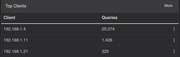
Over 24 hours the tnas has queried the DNS server more than 25k times. In #2 position is my PC with not even 1.5k.
The tnas lookups include:
Code: Select all
api6.ipify.org
api.ipify.org
only.ipv6.gg
only.ipv4.gg
ipv6.seeip.org
ipv4.seeip.org
www.google.com
ipv6.baidu.com
www.cloudflare.comWealthy industrialist, philanthropist, and uhh, bicyclist.

Re: TOS 7 ARM Official Release Announcement
These connections stem from the network connectivity detection mechanism in TOS 7.
The system implements a CheckNetworkBy204 service that checks internet connectivity approximately every 15 seconds. As part of this process, it performs DNS queries and connectivity checks against multiple well-known domains (such as baidu.com, google.com, cloudflare.com, etc.) to determine whether the NAS has an active internet connection.
This is expected background behavior used purely for network status monitoring. Hope this clarifies your concern!
To contact our team, please send email to following addresses, remember to replace (at) with @
Technical team: support(at)terra-master.com(for technical support)
Service team: service(at)terra-master.com(for purchasing, return, replacement, RMA service)
Technical team: support(at)terra-master.com(for technical support)
Service team: service(at)terra-master.com(for purchasing, return, replacement, RMA service)