TOS 7.0.0791 Official Release (x86) is Released for Update


Re: TOS 7.0.0791 Official Release (x86) is Released for Update
For the first time after the update to 7, my NAS rebooted itself and immediately went to the web interface! This is a big step forward, thank you!
F8 SSD Plus MADN0301. V02 TOS 7.0.1298


Re: TOS 7.0.0791 Official Release (x86) is Released for Update
All my devices were updated w/o issue, actually while I was in the kitchen making coffee. The iOS app is handy for that, updating, not the coffee part. 
I will test later today.
I will test later today.
F6-424 & F4-425 Plus at 7.0.1341
F4-424 Pro (x2) at 7.0.1341
D4-320 (Offline until I can afford more HDDs)
F4-424 Pro (x2) at 7.0.1341
D4-320 (Offline until I can afford more HDDs)

Re: TOS 7.0.0791 Official Release (x86) is Released for Update
Our team is still looking into the issue you brought up earlier. We'll let you know if anything comes up.Gremlin wrote: ↑21 Jul 2026, 17:17 Updated F2-221, F5-221, F2-424, F2-425Plus. And Tnas-PC*
Now both -424 and -425 show a LAN1 connection as well as alb-Bond on Lan1 and Lan2. While this is not a direct issue it is **** annoying.
The Good News: New Version of Tnas-PC no longer shows the errant LAN1 connection in it's listing. Plus WOL now appears to work on alb-Bond connections.
*Is 'Surrogate Com' a part of Tnas-PC? My windows 11 system always has issues with it while updating Tnas-PC. If I opt to try and close, it fails. If I opt to ignore it, it appears to update - but that does not feel "good". I have taken to deleting Tnas-PC entirely and re-installing it. Makes me feel better about the installation, but seems totally unnecessary. The down-side is that details that should be remembered also are deleted - I don't use Terrasync options, but I am guessing that some of that info may be 'lost' as is 'Access History'.
viewtopic.php?t=10302
Regarding the "Surrogate Com" you mentioned, we have not been able to find any relevant information about it. Could you please let us know where you saw this term?
To contact our team, please send email to following addresses, remember to replace (at) with @:
Technical team: support(at)terra-master.com (for technical support)
Service team: service(at)terra-master.com (for purchasing, return, replacement, RMA service)
Technical team: support(at)terra-master.com (for technical support)
Service team: service(at)terra-master.com (for purchasing, return, replacement, RMA service)


Re: TOS 7.0.0791 Official Release (x86) is Released for Update
Subject: Docker Engine does not auto-start after reboot on F4-424 (TOS 7.0.0791)
Message:
Hello TerraMaster Support,
I am running TOS 7.0.0791 on an F4-424 NAS. After every reboot, Docker Engine shows as "Enable" in App Center and does not start automatically. I have to manually click "Enable" every time.
Issue:
Docker Engine installed via App Center
After reboot, App Center shows Docker Engine as disabled
Must manually click "Enable" to start Docker Engine
Docker containers do not start automatically
What I have tried:
Created systemd service (docker-autostart.service) with sleep 60 && systemctl start docker
Service runs successfully but docker command is not found in PATH
/Volume1/@apps/DockerEngine/dockerd/bin/docker works when run manually
/etc/init.d/DockerEngine symlink exists and works manually
Expected behavior:
Docker Engine should start automatically after reboot without manual intervention.
Device: F4-424
TOS Version: 7.0.0791
Docker Engine Version: installed via App Center
Please advise on the correct method to auto-start Docker Engine on boot.
Thank you,
Weerasak
Message:
Hello TerraMaster Support,
I am running TOS 7.0.0791 on an F4-424 NAS. After every reboot, Docker Engine shows as "Enable" in App Center and does not start automatically. I have to manually click "Enable" every time.
Issue:
Docker Engine installed via App Center
After reboot, App Center shows Docker Engine as disabled
Must manually click "Enable" to start Docker Engine
Docker containers do not start automatically
What I have tried:
Created systemd service (docker-autostart.service) with sleep 60 && systemctl start docker
Service runs successfully but docker command is not found in PATH
/Volume1/@apps/DockerEngine/dockerd/bin/docker works when run manually
/etc/init.d/DockerEngine symlink exists and works manually
Expected behavior:
Docker Engine should start automatically after reboot without manual intervention.
Device: F4-424
TOS Version: 7.0.0791
Docker Engine Version: installed via App Center
Please advise on the correct method to auto-start Docker Engine on boot.
Thank you,
Weerasak
Re: TOS 7.0.0791 Official Release (x86) is Released for Update
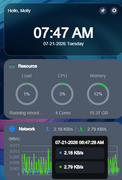
Time is still off an hour here
F6-424 & F4-425 Plus at 7.0.1341
F4-424 Pro (x2) at 7.0.1341
D4-320 (Offline until I can afford more HDDs)
F4-424 Pro (x2) at 7.0.1341
D4-320 (Offline until I can afford more HDDs)


Re: TOS 7.0.0791 Official Release (x86) is Released for Update
This release only fixes the defect where system log timestamps were inconsistent with daylight saving time. The issue you reported is still being addressed.
To contact our team, please send email to following addresses, remember to replace (at) with @
Technical team: support(at)terra-master.com (for technical support)
Service team: service(at)terra-master.com (for purchasing, return, replacement)
Technical team: support(at)terra-master.com (for technical support)
Service team: service(at)terra-master.com (for purchasing, return, replacement)
Re: TOS 7.0.0791 Official Release (x86) is Released for Update
Ah okay, thanks
F6-424 & F4-425 Plus at 7.0.1341
F4-424 Pro (x2) at 7.0.1341
D4-320 (Offline until I can afford more HDDs)
F4-424 Pro (x2) at 7.0.1341
D4-320 (Offline until I can afford more HDDs)
Re: TOS 7.0.0791 Official Release (x86) is Released for Update
Could you please restart and wait a few minutes before checking again? We've found that when Docker is running a large number of containers, if you enter the App Center immediately after the login page becomes accessible, the Docker applications have not fully started yet.
To contact our team, please send email to following addresses, remember to replace (at) with @
Technical team: support(at)terra-master.com (for technical support)
Service team: service(at)terra-master.com (for purchasing, return, replacement)
Technical team: support(at)terra-master.com (for technical support)
Service team: service(at)terra-master.com (for purchasing, return, replacement)


Re: TOS 7.0.0791 Official Release (x86) is Released for Update
During update I see a warning dialogue along the lines of
--------------------------------------------------
"need to close programme" (there follows a list containing only)
----------------------------------------------------
Surrogate Com (it might presumably be Surrogate.com BUT that is whole other ballgame)
-------------------------------------------------------------------------
with options
Close Continue (Something like that)
If you Continue Might need to restart Windows.
---------------------------------------------------------------------
Choosing 'Close' nothing happens and the prompt returns.
Choosing 'Continue' nothing happens and the prompt goes away and Tnas=PC appears to install (no restart).
The prompt does not appear with a clean install.
However:
Feel free to move this content to another thread.The COM Surrogate (dllhost.exe) is a legitimate, essential Windows background process used to run Component Object Model (COM) objects outside the main requesting process. It securely hosts file extensions and driver-related tasks, such as generating thumbnails or handling file previews in File Explorer.While native COM Surrogate is harmless, malware or corrupted drivers can sometimes disguise themselves under the same name, causing crashes or high CPU usage.
F5-221 TOS7.0.1278 - 4x4TB (Ironwolf) Traid
F2-424 TOS7.0.1278 - 2x500GB nvme (P3) Traid, 2x6TB HDD (HGST) Traid
F2-221 TOS7.0.1278 - 1x3TB Ext4, 1x4TB Btrfs
F2-425+ TOS7.0.1278 - 2x500GB nvme (P3) Traid, 2x6TB HDD (EXOS) Traid
F2-424 TOS7.0.1278 - 2x500GB nvme (P3) Traid, 2x6TB HDD (HGST) Traid
F2-221 TOS7.0.1278 - 1x3TB Ext4, 1x4TB Btrfs
F2-425+ TOS7.0.1278 - 2x500GB nvme (P3) Traid, 2x6TB HDD (EXOS) Traid
-
Nitrokalel

- Posts: 53
- Joined: 24 Apr 2024, 05:51

Re: TOS 7.0.0791 Official Release (x86) is Released for Update
F8 SSD Plus (8x4TB NVMe, TRaid, 48GB, prod) update ok
F8 SSD Plus (6x1TB+2x2TB, TRaid, 48GB, beta) update ok
F4-424 Pro (2x22TB+2x10TB HDD +1TB+500GB NVMe, TRaid, 32GB, beta) update ok
F2-423 (2x18TB, TRaid, 32GB, beta) update ok
F2-221 (6TB+10TB, TRaid, 10GB, beta) update ok
D1 SSD (2TB, prod) is recognized
F8 SSD Plus (6x1TB+2x2TB, TRaid, 48GB, beta) update ok
F4-424 Pro (2x22TB+2x10TB HDD +1TB+500GB NVMe, TRaid, 32GB, beta) update ok
F2-423 (2x18TB, TRaid, 32GB, beta) update ok
F2-221 (6TB+10TB, TRaid, 10GB, beta) update ok
D1 SSD (2TB, prod) is recognized
F8 SSD Plus (8x4TB NVMe, TRaid, 48GB, prod)
F8 SSD Plus (6x1TB+2x2TB, TRaid, 48GB, prod)
F4-424 Pro (2x22TB+2x10TB HDD +1TB+500GB NVMe, TRaid, 32GB, prod)
F2-423 (2x18TB, TRaid, 32GB, prod)
F2-221 (6TB+10TB, TRaid, 10GB, prod)
D1 SSD (2TB, prod)
F8 SSD Plus (6x1TB+2x2TB, TRaid, 48GB, prod)
F4-424 Pro (2x22TB+2x10TB HDD +1TB+500GB NVMe, TRaid, 32GB, prod)
F2-423 (2x18TB, TRaid, 32GB, prod)
F2-221 (6TB+10TB, TRaid, 10GB, prod)
D1 SSD (2TB, prod)