TOS 7 Is Now Out of Beta — Official Release

Official news about TOS, mobile app, PC app updates or beta releases.
User avatar
k.wechselberger
Posts: 23
Joined: 15 Feb 2022, 23:23
Austria

Re: TOS 7 Is Now Out of Beta — Official Release

Post by k.wechselberger »

chris0478 wrote: 15 Jul 2026, 15:30
I had TOS7 installed on my F2-422 as follows.
viewtopic.php?p=53879#p53879
User avatar
jhnbrg
Posts: 9
Joined: 03 Dec 2024, 21:04
Germany

Re: TOS 7 Is Now Out of Beta — Official Release

Post by jhnbrg »

TMzethar wrote: 12 Jul 2026, 11:58 Yes, you can upgrade with an M.2 SSD first, then add four HDDs that were used with TOS 6 but don't have a system installed.

After the TOS upgrade, keep the NAS running and plug in the four HDDs while it's on. You can then assemble and mount them through Storage Management, or just run the script /etc/tos/scripts/mntdata in the terminal.
I followed exactly this way and had no issues with update. 👍
F4-423
User avatar
Gremlin
Gold Member
Posts: 1715
Joined: 02 Dec 2022, 22:31
Great Britain

Re: TOS 7 Is Now Out of Beta — Official Release

Post by Gremlin »

jhnbrg wrote: 17 Jul 2026, 04:13
Glad it worked out.
F5-221 TOS7.0.1130 - 4x4TB (Ironwolf) Traid
F2-424 TOS7.0.1130 - 2x500GB nvme (P3) Traid, 2x6TB HDD (HGST) Traid
F2-221 TOS7.0.1130 - 1x3TB Ext4, 1x4TB Btrfs
F2-425+ TOS7.0.1130 - 2x500GB nvme (P3) Traid, 2x6TB HDD (EXOS) Traid
User avatar
nightskyre
Posts: 3
Joined: 18 Jul 2026, 03:52
United States of America

Re: TOS 7 Is Now Out of Beta — Official Release

Post by nightskyre »

I am running a F4-423 with no M.2 drives, 4 Seagate Ironwolf drives, 16GB RAM. I have plenty (8TB) of free space on RAID 6.

BIOS: 5.19
TOS: 6.0.794

I upgraded from TOS 5.1 this morning to 6.0.794 (multi-step process). Twice now I have downloaded the installer and attempted to install, and it has just reset my 6.0.794 OS and that's it. I downloaded the install package, tried uploading from my machine or putting it on the server first, neither worked. Confused!

Any ideas?
User avatar
MikeZhang
TM Support
Posts: 413
Joined: 05 Sep 2023, 22:21

Re: TOS 7 Is Now Out of Beta — Official Release

Post by MikeZhang »

nightskyre wrote: 18 Jul 2026, 03:58
Please doanload update package: https://download3.terra-master.com/TOS% ... 171225.bz2
Go to TOS > Control Panel > General Settings > System.
Under Manual Update, upload the update package.
Click Apply.
After the system update is complete, refresh your browser.

There is no install package, please double check if you have followed our instruction correctly
To contact our team, please send email to following addresses, remember to replace (at) with @

Technical team: support(at)terra-master.com(for technical support)
Service team: service(at)terra-master.com(for purchasing, return, replacement, RMA service)
User avatar
davep1628
Posts: 5
Joined: 10 Mar 2026, 18:47
Great Britain

Re: TOS 7 Is Now Out of Beta — Official Release

Post by davep1628 »

I've tried that update package many times on my F4-423 with 6.0.794 and I always get a brief "Operation Failed!" message when I try to apply the update!

Regards,
Dave.
User avatar
nightskyre
Posts: 3
Joined: 18 Jul 2026, 03:52
United States of America

Re: TOS 7 Is Now Out of Beta — Official Release

Post by nightskyre »

I did exactly what you said, Mike. I said "Installer" but that update package is precisely what I was referring to.
User avatar
Badger3981
Posts: 9
Joined: 22 Aug 2024, 03:12
Great Britain

Re: TOS 7 Is Now Out of Beta — Official Release

Post by Badger3981 »

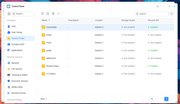
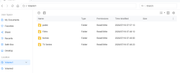
I migrated my system disk to a nvme all fine my nvme is vol 2 and volume 1 which was the old system disk has 2 folders on it which are shared folders public and homes they are no longer listed under the shared folders section and i wish to completely delete them but unable to do so in file explorer is there a way to do so this has only happend since i upgraded from tos 6 to tos 7.0.0780

Image

Image
F2 423
User avatar
MikeZhang
TM Support
Posts: 413
Joined: 05 Sep 2023, 22:21

Re: TOS 7 Is Now Out of Beta — Official Release

Post by MikeZhang »

Badger3981 wrote: 19 Jul 2026, 04:18
When the File Manager cannot be used to perform the operation, logging in via SSH and using the command line is usually the most direct and effective method.

Open the terminal application included with TOS.

Enter the following command to view the contents of the `/Volume1` directory and confirm that the folders exist:
ls /Volume1

Delete the folders: Execute the deletion command. Please proceed with caution and verify that the path is correct.
rm -rf /Volume1/public
rm -rf /Volume1/homes
The `rm -rf` command forcibly deletes the folder and all its contents; please double-check everything before executing it.
To contact our team, please send email to following addresses, remember to replace (at) with @

Technical team: support(at)terra-master.com(for technical support)
Service team: service(at)terra-master.com(for purchasing, return, replacement, RMA service)
User avatar
MikeZhang
TM Support
Posts: 413
Joined: 05 Sep 2023, 22:21

Re: TOS 7 Is Now Out of Beta — Official Release

Post by MikeZhang »

davep1628 wrote: 18 Jul 2026, 16:09
Please open the link below to schedule remote session, let us check for you
https://salesiq.zohopublic.com/signatur ... 97d0be8892
To contact our team, please send email to following addresses, remember to replace (at) with @

Technical team: support(at)terra-master.com(for technical support)
Service team: service(at)terra-master.com(for purchasing, return, replacement, RMA service)
Post Reply

Return to “Update Notice”