Hello,
I am running a single Nvme SSD on the D5 Hybrid. Windows 11 Pro.
I have been experiencing random disconnects from the D5 Hybrid.
I found this post for a TerraMaster diagnostic/firmware update tool but am having issues with the tool itself.
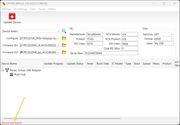
I can actually access the Nvme on the D5 Hybrid through the Windows explorer and manipulate files. But when I run the TerraMaster application, I cannot see the drive and there is a "Device not found" error at the bottom.
I can also see the drive via Disk Management. It's very strange that I cannot view it on the TerraMaster software.
Please advise.
[Help] D5 Hybrid - random disconnects
-
lemonSqueezy

- Posts: 4
- Joined: 27 Jun 2026, 21:41

Re: [Help] D5 Hybrid - random disconnects
My apologies, this was a problem on my side.
I disabled the "Parsec Virtual USB Adapter" in Device Manager, ran the TerraMaster app again and the Nvme connected to the TerraMaster showed-up correctly.
I went through the update steps and confirm that the update went through properly.
Sorry about the confusion, and thank you to the TerraMaster team for addressing this issue.
I do have one question: if I install another Nvme SSD into the D5 Hybrid, do I have to go through the same update process for that one, too?
Thank you very much.
I disabled the "Parsec Virtual USB Adapter" in Device Manager, ran the TerraMaster app again and the Nvme connected to the TerraMaster showed-up correctly.
I went through the update steps and confirm that the update went through properly.
Sorry about the confusion, and thank you to the TerraMaster team for addressing this issue.
I do have one question: if I install another Nvme SSD into the D5 Hybrid, do I have to go through the same update process for that one, too?
Thank you very much.


Re: [Help] D5 Hybrid - random disconnects
Thank you for your detailed feedback.
The update and upgrade process primarily targets the M.2 slot rather than the hard drive, but it requires the hard drive's cooperation.
For example, if you currently want to upgrade other M.2 slots of the Hybrid but only have one M.2 NVMe SSD, you can install the M.2 NVMe SSD into another M.2 slot after the current upgrade operation is complete, and then continue clicking to upgrade.
The update and upgrade process primarily targets the M.2 slot rather than the hard drive, but it requires the hard drive's cooperation.
For example, if you currently want to upgrade other M.2 slots of the Hybrid but only have one M.2 NVMe SSD, you can install the M.2 NVMe SSD into another M.2 slot after the current upgrade operation is complete, and then continue clicking to upgrade.
To contact our team, please send email to following addresses, remember to replace (at) with @
Technical team: support(at)terra-master.com(for technical support)
Service team: service(at)terra-master.com(for purchasing, return, replacement, RMA service)
Technical team: support(at)terra-master.com(for technical support)
Service team: service(at)terra-master.com(for purchasing, return, replacement, RMA service)
-
lemonSqueezy
- Posts: 4
- Joined: 27 Jun 2026, 21:41
Re: [Help] D5 Hybrid - random disconnects
Hello,
Thank you for the clarification. I understand (in layman's terms) that, in order for the M.2 slot to be updated, it requires an M.2 SSD to be physically connected.
I'll connect my current M.2 to the second slot in the D5 Hybrid, then update that.
Ah, sorry, one more question: since I am currently only using one M.2 slot (the other HDD/SSD slots are empty).
Would I also need to update those 3.5"/2.5" slots with the upgrade tool, as well?
Thanks for the help.
Thank you for the clarification. I understand (in layman's terms) that, in order for the M.2 slot to be updated, it requires an M.2 SSD to be physically connected.
I'll connect my current M.2 to the second slot in the D5 Hybrid, then update that.
Ah, sorry, one more question: since I am currently only using one M.2 slot (the other HDD/SSD slots are empty).
Would I also need to update those 3.5"/2.5" slots with the upgrade tool, as well?
Thanks for the help.
Re: [Help] D5 Hybrid - random disconnects
You do not need to use the upgrade tool to update the 3.5-inch/2.5-inch drive bays, this update only applies to the M.2 NVMe SSD serial number duplication and disconnection issues on the D5/D8 Hybrid.
To contact our team, please send email to following addresses, remember to replace (at) with @
Technical team: support(at)terra-master.com(for technical support)
Service team: service(at)terra-master.com(for purchasing, return, replacement, RMA service)
Technical team: support(at)terra-master.com(for technical support)
Service team: service(at)terra-master.com(for purchasing, return, replacement, RMA service)