

I am not in a hurry, I just wanted to make sure that a way for a simple online update will be available at some time in the future. Thanks for clarification!TMroy wrote: ↑25 Jun 2026, 18:00If you're not in a hurry, you don't need to manually update right now — you can wait a bit longer. For TOS 6 users, we will roll out online push updates soon, but they will be delivered in batches by model.usersky wrote: ↑25 Jun 2026, 05:00 So one on TOS6 needs to upgrade manually, not using the automatic online way? Is this reasonable for 2026? Would you install windows updates manually after downloading them one by one because you know about an obscure thread somewhere on the internet where the updates are advertised?
I for one, after messing up with a betas and finally failing miserably with the last two, went to TOS6 and want to just play safe as a regular user would. So as a regular user I am expected to know about this obscure thread, read the instructions, download and install manually? If that's final TOS7 and the normal upgrade path, that's a fail for most users.
A good UX would be getting a notification like NEW TOS7 WAS JUST RELEASED. HERE'S WHAT'S NEW... CLICK FOR UPGRADE! Then click, reboot and have TOS7 running.
Of course this is just my opinion as an an ex beta tester and a humble recently converted regular user.
TOS 7.0.0746 Official Release (X86) is Now Available
Re: TOS 7.0.0746 Official Release (X86) is Now Available


Re: TOS 7.0.0746 Official Release (X86) is Now Available
For check i try install Portainer. Installed successfully.
F4-423


Re: TOS 7.0.0746 Official Release (X86) is Now Available
Updated F2-424 (Bios MADN0101.V05)
"Failed to retrieve data" error on first login.
Updated 3 apps.
Reboot and login OK.
"Failed to retrieve data" error on first login.
Updated 3 apps.
Reboot and login OK.
F5-221 TOS7.0.1278 - 4x4TB (Ironwolf) Traid
F2-424 TOS7.0.1278 - 2x500GB nvme (P3) Traid, 2x6TB HDD (HGST) Traid
F2-221 TOS7.0.1278 - 1x3TB Ext4, 1x4TB Btrfs
F2-425+ TOS7.0.1278 - 2x500GB nvme (P3) Traid, 2x6TB HDD (EXOS) Traid
F2-424 TOS7.0.1278 - 2x500GB nvme (P3) Traid, 2x6TB HDD (HGST) Traid
F2-221 TOS7.0.1278 - 1x3TB Ext4, 1x4TB Btrfs
F2-425+ TOS7.0.1278 - 2x500GB nvme (P3) Traid, 2x6TB HDD (EXOS) Traid

Re: TOS 7.0.0746 Official Release (X86) is Now Available
To contact our team, please send email to following addresses, remember to replace (at) with @
Technical team: support(at)terra-master.com(for technical support)
Service team: service(at)terra-master.com(for purchasing, return, replacement, RMA service)
Technical team: support(at)terra-master.com(for technical support)
Service team: service(at)terra-master.com(for purchasing, return, replacement, RMA service)


Re: TOS 7.0.0746 Official Release (X86) is Now Available
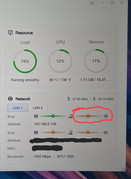
Since i installed official TOS 7 on my F4-425 Plus. I have this orange line in network device monitoring. After a NAS reboot it's green for few hours, then it come orange. Either way, Internet working fine on the NAS and every service is accessible. Didn't have that on 6.0.794. Don't know if it's a know bug or just an issue on my side.
Re: TOS 7.0.0746 Official Release (X86) is Now Available
Updated F2-425Plus. All good, although (because I was looking) did note that both Bond and LAN1 were 'connected' (As in -424). In this case however I did not see a defined IP and LAN1 did not appear in TnasPC. After a reboot this cleared and network appears normal again. (Whereas no reboot 'fix' on my -424)
(Update was performed after Bios update even though non-essential as I am not using nvme slot 3)
(Update was performed after Bios update even though non-essential as I am not using nvme slot 3)
F5-221 TOS7.0.1278 - 4x4TB (Ironwolf) Traid
F2-424 TOS7.0.1278 - 2x500GB nvme (P3) Traid, 2x6TB HDD (HGST) Traid
F2-221 TOS7.0.1278 - 1x3TB Ext4, 1x4TB Btrfs
F2-425+ TOS7.0.1278 - 2x500GB nvme (P3) Traid, 2x6TB HDD (EXOS) Traid
F2-424 TOS7.0.1278 - 2x500GB nvme (P3) Traid, 2x6TB HDD (HGST) Traid
F2-221 TOS7.0.1278 - 1x3TB Ext4, 1x4TB Btrfs
F2-425+ TOS7.0.1278 - 2x500GB nvme (P3) Traid, 2x6TB HDD (EXOS) Traid


Re: TOS 7.0.0746 Official Release (X86) is Now Available
TOS 7.0.0746 (X86)
F-425 + DAS 4- 320.
TOS 7 is installed, clean install. The drives are also clean. The storage pool and other settings are not configured. When choosing "Restart" from within the OS, it fails to boot. After powering off, it starts correctly from the power button, but not always. Periodically, it drops into initialization with a prompt to install TOS 6.
F-425 + DAS 4- 320.
TOS 7 is installed, clean install. The drives are also clean. The storage pool and other settings are not configured. When choosing "Restart" from within the OS, it fails to boot. After powering off, it starts correctly from the power button, but not always. Periodically, it drops into initialization with a prompt to install TOS 6.


Re: TOS 7.0.0746 Official Release (X86) is Now Available
In my experience, after updating to TOS 7.0.0747 final, if SPC is enabled the management pages of the following apps do not open: VirtualBox, qBittorrent, Tailscale.
If SPC is disabled, the pages open, but after a reboot the applications do not start automatically (e.g. Docker, Portainer, VirtualBox); they have to be started manually.
If SPC is disabled, the pages open, but after a reboot the applications do not start automatically (e.g. Docker, Portainer, VirtualBox); they have to be started manually.
Re: TOS 7.0.0746 Official Release (X86) is Now Available
F5-221 TOS7.0.1278 - 4x4TB (Ironwolf) Traid
F2-424 TOS7.0.1278 - 2x500GB nvme (P3) Traid, 2x6TB HDD (HGST) Traid
F2-221 TOS7.0.1278 - 1x3TB Ext4, 1x4TB Btrfs
F2-425+ TOS7.0.1278 - 2x500GB nvme (P3) Traid, 2x6TB HDD (EXOS) Traid
F2-424 TOS7.0.1278 - 2x500GB nvme (P3) Traid, 2x6TB HDD (HGST) Traid
F2-221 TOS7.0.1278 - 1x3TB Ext4, 1x4TB Btrfs
F2-425+ TOS7.0.1278 - 2x500GB nvme (P3) Traid, 2x6TB HDD (EXOS) Traid
Re: TOS 7.0.0746 Official Release (X86) is Now Available
i do a clean installBFG wrote: ↑27 Jun 2026, 17:46 In my experience, after updating to TOS 7.0.0747 final, if SPC is enabled the management pages of the following apps do not open: VirtualBox, qBittorrent, Tailscale.
If SPC is disabled, the pages open, but after a reboot the applications do not start automatically (e.g. Docker, Portainer, VirtualBox); they have to be started manually.