

Target Users:
Users currently running TOS 7.0.0299 beta or later versions.
Note:
If your TOS version is TOS 6, please refer to the TOS 7 beta update instructions first
Here, we sincerely thank users @Lex, @Felix, @Gremlin, @rfbjr, @Shadeofspirit, @snapsh0t, @Joesh, @samius, @OttO1916, @joka388, @AlanMarch, @ctmutlow, @andreyzhukov, @bartmans99, @yxyx999 and others for their sharing and feedback. It is your support that has enabled us to quickly identify and resolve some issues.
Update Notes
Bug Fixes:
1. Fixed an issue where File Manager could not mount Dropbox cloud storage.
2. Fixed an issue where a USB device and a shared folder with the same name could not be mounted.
3. Fixed an issue where the display was incorrect when USB device information could not be obtained.
4. Fixed an issue where prompts for some functions were inaccurate in Security Isolation Mode.
5. Fixed an issue where the App Center opened slowly and the app list refreshed too slowly.
6. Fixed an issue where a failure to view HEIC image properties could cause the File Manager service to malfunction.
7. Fixed an issue where the phone number verification methods were inconsistent between the Control Panel and User Settings.
8. Fixed an issue where removing a disk while adding disks to an array would cause the storage pool status to get stuck.
What's New:
1. Added the ability to enter spaces in user, user group, and shared folder names.
Important Information:
1.Updating the system theoretically will not affect the data on your hard drives, but for safety, please make sure to back up your data in advance.
2.Before updating, ensure that your primary volume (usually volume1) has at least 3GB of available space. Insufficient storage space may cause the update to fail.
3.After the update, the IP address of your TNAS may change. Please use the TNAS PC desktop client to search for and reconnect to the device.
Update Procedure:
1.Go to TOS > Control Panel > General Settings > System > Update, and click "Check for updates."
2.Follow the prompts to update the system.
3.After the system update is complete, you may need to refresh your browser.
4.The TNAS IP address may change after the update. If you cannot connect to your TNAS using the previous IP address, use the TNAS PC client to search for the new IP address.
Client Downloads:
1. Download TNAS PC 5.2.540 for Windows OS.
- MD5: AFB7CD77DE2A4F0434D69D52D15959AF
2. Download TNAS PC 5.2.540 for macOS (x86 architecture).
- MD5: 715FEB00FDB06DF4CC9A228622566F70
3. Download TNAS PC 5.2.540 for macOS (ARM architecture).
- MD5: A6954F192DD23AF7374CF2AF20190B6C
4. Download TNAS PC 5.2.540 for Linux.
- MD5: A5B13A2C2C9B0F9FFFCBDF6F3BA9E342
5. TNAS Mobile for Android: To be released
6. TNAS Mobile for iOS: To be released
TOS 7.0.0601 Beta (X86) is Released for Update
TOS 7.0.0601 Beta (X86) is Released for Update
To contact our team, please send email to following addresses, remember to replace (at) with @
Technical team: support(at)terra-master.com (for technical support)
Service team: service(at)terra-master.com (for purchasing, return, replacement)
Technical team: support(at)terra-master.com (for technical support)
Service team: service(at)terra-master.com (for purchasing, return, replacement)
-
crisisacting

- Silver Member
- Posts: 531
- Joined: 20 Jan 2022, 16:42
Re: TOS 7.0.0601 Beta (X86) is Released for Update
Installed without issue onto test bed TNAS; awaiting final stable release for expanded deployment.


Re: TOS 7.0.0601 Beta (X86) is Released for Update
Updated all 3 Tos7 models - no apparent issues. However, I have noticed (on all 3 models):
I cannot modify user desktop settings for 'Display Mode' or 'Accent Colo{u!}r' unless I also change the 'Wallpaper' settings. Trying to change one of the former on it's own, the 'Apply' button does not enable. Not significant, but irritating when you are there.
I cannot modify user desktop settings for 'Display Mode' or 'Accent Colo{u!}r' unless I also change the 'Wallpaper' settings. Trying to change one of the former on it's own, the 'Apply' button does not enable. Not significant, but irritating when you are there.
F5-221 TOS7.0.1278 - 4x4TB (Ironwolf) Traid
F2-424 TOS7.0.1278 - 2x500GB nvme (P3) Traid, 2x6TB HDD (HGST) Traid
F2-221 TOS7.0.1278 - 1x3TB Ext4, 1x4TB Btrfs
F2-425+ TOS7.0.1278 - 2x500GB nvme (P3) Traid, 2x6TB HDD (EXOS) Traid
F2-424 TOS7.0.1278 - 2x500GB nvme (P3) Traid, 2x6TB HDD (HGST) Traid
F2-221 TOS7.0.1278 - 1x3TB Ext4, 1x4TB Btrfs
F2-425+ TOS7.0.1278 - 2x500GB nvme (P3) Traid, 2x6TB HDD (EXOS) Traid


Re: TOS 7.0.0601 Beta (X86) is Released for Update
All three devices updated w/o issues. Testing later.
F6-424 & F4-425 Plus at 7.0.1298
F4-424 Pro (x2) at 7.0.1298
D4-320 (Offline until I can afford more HDDs)
F4-424 Pro (x2) at 7.0.1298
D4-320 (Offline until I can afford more HDDs)


TOS 7.0 Beta: Boot hang, internal array drop (mdadm DeviceDisappeared), and Web UI failure on F8 NVMe
Hello,
I want to report a critical boot pipeline bug in the current TOS 7.0 Beta running on the new TerraMaster F8 (NVMe architecture, drives configured in Single Drive Mode).
During a standard system update/reboot, the device completely disappears from the network and hangs indefinitely. The Web UI crashes completely (502/404 or connection timed out), while SSH access eventually becomes available after a very long delay.
I checked journalctl -b -p 0..3 via SSH, and the logs clearly show a severe race condition between NVMe drive initialization and systemd startup services. Here are the core log sequences from my boot cycle:
1. Hardware & ACPI Timeouts:
kernel: ACPI BIOS Error (bug): Could not resolve symbol [\_SB.PC00.TXHC.RHUB.SS01], AE_NOT_FOUND (20240827/dswload2-162)
kernel: ACPI Error: AE_NOT_FOUND, During name lookup/catalog (20240827/psobject-220)
kernel: ACPI BIOS Error (bug): Could not resolve symbol [\_SB.UBTC.RUCC], AE_NOT_FOUND (20240827/psargs-332)
2. Leftover Dev-Environment Rules:
systemd-udevd[462]: /etc/udev/rules.d/60-vboxdrv.rules:1 Unknown user 'lfh123', ignoring
systemd-udevd[462]: /etc/udev/rules.d/60-vboxdrv.rules:1 Unknown group 'vboxusers', ignoring
(Note: Please clean up internal developer "lfh123" VirtualBox rules from production builds).
3. Critical System Array Disconnect:
nmbd[1062]: daemon 'nmbd' : No local IPv4 non-loopback interfaces available, waiting for interface ...
mdadm[1334]: DeviceDisappeared event detected on md device /dev/md4
mdadm[1334]: DeviceDisappeared event detected on md device /dev/md1
mdadm[1334]: DeviceDisappeared event detected on md device /dev/md0
nmbd[1062]: Unable to open new log file '/var/log/samba/log.nmbd': No such file or directory
mdadm[1334]: DegradedArray event detected on md device /dev/md8
Technical Analysis:
Because of the ACPI table errors in the BIOS, the new Linux kernel suffers from NVMe controller polling delays. As a result, the internal background software RAID-1 array (md0-md4), which mirrors the TOS system root partition across NVMe slots, panics and triggers a DeviceDisappeared event mid-boot.
Crucial system runtime paths like /var/log/ instantly vanish because the base arrays dropped, completely breaking the Nginx web server stack. Network services (nmbd) also attempt to load before the physical NIC is ready.
The web interface only comes back to life if I manually log in via SSH and execute systemctl restart nginx after the arrays finally stabilize.
Please forward this to the TOS 7.0 dev team to optimize systemd target ordering for fast NVMe platforms and fix the ACPI tables in the motherboard BIOS.
I want to report a critical boot pipeline bug in the current TOS 7.0 Beta running on the new TerraMaster F8 (NVMe architecture, drives configured in Single Drive Mode).
During a standard system update/reboot, the device completely disappears from the network and hangs indefinitely. The Web UI crashes completely (502/404 or connection timed out), while SSH access eventually becomes available after a very long delay.
I checked journalctl -b -p 0..3 via SSH, and the logs clearly show a severe race condition between NVMe drive initialization and systemd startup services. Here are the core log sequences from my boot cycle:
1. Hardware & ACPI Timeouts:
kernel: ACPI BIOS Error (bug): Could not resolve symbol [\_SB.PC00.TXHC.RHUB.SS01], AE_NOT_FOUND (20240827/dswload2-162)
kernel: ACPI Error: AE_NOT_FOUND, During name lookup/catalog (20240827/psobject-220)
kernel: ACPI BIOS Error (bug): Could not resolve symbol [\_SB.UBTC.RUCC], AE_NOT_FOUND (20240827/psargs-332)
2. Leftover Dev-Environment Rules:
systemd-udevd[462]: /etc/udev/rules.d/60-vboxdrv.rules:1 Unknown user 'lfh123', ignoring
systemd-udevd[462]: /etc/udev/rules.d/60-vboxdrv.rules:1 Unknown group 'vboxusers', ignoring
(Note: Please clean up internal developer "lfh123" VirtualBox rules from production builds).
3. Critical System Array Disconnect:
nmbd[1062]: daemon 'nmbd' : No local IPv4 non-loopback interfaces available, waiting for interface ...
mdadm[1334]: DeviceDisappeared event detected on md device /dev/md4
mdadm[1334]: DeviceDisappeared event detected on md device /dev/md1
mdadm[1334]: DeviceDisappeared event detected on md device /dev/md0
nmbd[1062]: Unable to open new log file '/var/log/samba/log.nmbd': No such file or directory
mdadm[1334]: DegradedArray event detected on md device /dev/md8
Technical Analysis:
Because of the ACPI table errors in the BIOS, the new Linux kernel suffers from NVMe controller polling delays. As a result, the internal background software RAID-1 array (md0-md4), which mirrors the TOS system root partition across NVMe slots, panics and triggers a DeviceDisappeared event mid-boot.
Crucial system runtime paths like /var/log/ instantly vanish because the base arrays dropped, completely breaking the Nginx web server stack. Network services (nmbd) also attempt to load before the physical NIC is ready.
The web interface only comes back to life if I manually log in via SSH and execute systemctl restart nginx after the arrays finally stabilize.
Please forward this to the TOS 7.0 dev team to optimize systemd target ordering for fast NVMe platforms and fix the ACPI tables in the motherboard BIOS.
TerraMaster F8, TerraMaster F2-425, Syno 218+


Re: TOS 7.0.0601 Beta (X86) is Released for Update
This looks like a bug (gif attached):
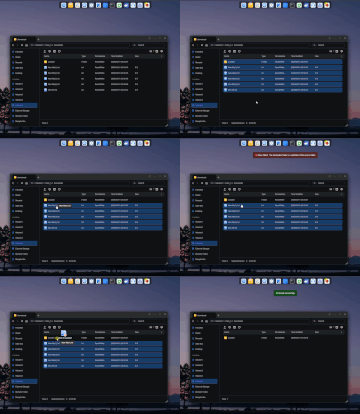
1) I press Ctrl+A in the “downloads” folder
2) I deselect the “youtube” subfolder where I want to move the files
3) I move the files to the “youtube” subfolder
4) I get the error “Move failed! The destination folder is a subfolder of the source folder.”
***
1) I select the same files with the mouse
2) I move the files to the “youtube” subfolder
3) Success
It's not certain that this issue appeared in this particular version, since I haven't checked previous versions for it.
P.S. Thanks for updating docker/docker-compose
1) I press Ctrl+A in the “downloads” folder
2) I deselect the “youtube” subfolder where I want to move the files
3) I move the files to the “youtube” subfolder
4) I get the error “Move failed! The destination folder is a subfolder of the source folder.”
***
1) I select the same files with the mouse
2) I move the files to the “youtube” subfolder
3) Success
It's not certain that this issue appeared in this particular version, since I haven't checked previous versions for it.
P.S. Thanks for updating docker/docker-compose
F4-424 Pro

Re: TOS 7.0 Beta: Boot hang, internal array drop (mdadm DeviceDisappeared), and Web UI failure on F8 NVMe
Please enter the following command in the terminal to view the relevant nginx logs and share them with us for analysis.
Code: Select all
systemctl status nginx.serviceTo contact our team, please send email to following addresses, remember to replace (at) with @
Technical team: support(at)terra-master.com(for technical support)
Service team: service(at)terra-master.com(for purchasing, return, replacement, RMA service)
Technical team: support(at)terra-master.com(for technical support)
Service team: service(at)terra-master.com(for purchasing, return, replacement, RMA service)
Re: TOS 7.0.0601 Beta (X86) is Released for Update
To contact our team, please send email to following addresses, remember to replace (at) with @
Technical team: support(at)terra-master.com(for technical support)
Service team: service(at)terra-master.com(for purchasing, return, replacement, RMA service)
Technical team: support(at)terra-master.com(for technical support)
Service team: service(at)terra-master.com(for purchasing, return, replacement, RMA service)

Re: TOS 7.0.0601 Beta (X86) is Released for Update
My F2-425+ updated without any problems. Will test a few things later.
F2-425 Plus, 16GB RAM, 2 x 500GB WD SN700 EXT4 RAID1, 2 x 3TB WD Red EXT4 RAID1, TOS 7.0.<latest>
F4-SSD, 16GB RAM, 4 x 4TB SN700 Btrfs TRAID, TOS 7.0.<latest>
F4-SSD, 16GB RAM, 4 x 4TB SN700 Btrfs TRAID, TOS 7.0.<latest>