Does anybody knows how to fix such issue?Shadeofspirit wrote: ↑07 May 2026, 20:06 F2-425 plus
Does not boot after update. For serveral hours there is a notification "Loading..., please wait!"
Both ips (connected to independed networks) are accessable via ICMP (ping).
I had already tried differend browsers, cash cleaning, mobile app, etc.
TOS 7.0.0567 Beta (X86) is Released for Update
-
Shadeofspirit

- Posts: 11
- Joined: 07 May 2026, 20:00

Re: TOS 7.0.0567 Beta (X86) is Released for Update


Re: TOS 7.0.0567 Beta (X86) is Released for Update
Regarding the issue you reported that the app update count badge on the taskbar is not displaying, we failed to reproduce it during internal testing. Please clear your browser cache and try again.
To contact our team, please send email to following addresses, remember to replace (at) with @
Technical team: support(at)terra-master.com(for technical support)
Service team: service(at)terra-master.com(for purchasing, return, replacement, RMA service)
Technical team: support(at)terra-master.com(for technical support)
Service team: service(at)terra-master.com(for purchasing, return, replacement, RMA service)


Re: TOS 7.0.0567 Beta (X86) is Released for Update
Ok sure, question though if an app is updated after you are logged on to the webgui, will that icon get updated in real time?
F6-424 & F4-425 Plus at 7.0.1341
F4-424 Pro (x2) at 7.0.1341
D4-320 (Offline until I can afford more HDDs)
F4-424 Pro (x2) at 7.0.1341
D4-320 (Offline until I can afford more HDDs)


Re: TOS 7.0.0567 Beta (X86) is Released for Update
Successfully update, no problem appear, open TOS desktop on firefox or chrome no problem

Re: TOS 7.0.0567 Beta (X86) is Released for Update
It might be because the page still has cached resources after the update or the network update check is not timely. Try logging into TOS Desktop again to see if it works normally.

To contact our team, please send email to following addresses, remember to replace (at) with @:
Support team: support(at)terra-master.com (for technical support only)
Support team: support(at)terra-master.com (for technical support only)
Re: TOS 7.0.0567 Beta (X86) is Released for Update
I fully understand the problem you are experiencing. Based on your provided instructions, I have outlined detailed troubleshooting and repair steps. Please try the following steps in order:Shadeofspirit wrote: ↑08 May 2026, 04:11Does anybody knows how to fix such issue?Shadeofspirit wrote: ↑07 May 2026, 20:06 F2-425 plus
Does not boot after update. For serveral hours there is a notification "Loading..., please wait!"
Both ips (connected to independed networks) are accessable via ICMP (ping).
I had already tried differend browsers, cash cleaning, mobile app, etc.
First, please confirm that your NAS device has SSH access enabled.
If possible: Use a terminal (such as CMD/PowerShell on Windows or Terminal on macOS) to try connecting to your device using the command `ssh username@NAS_IP_address`.
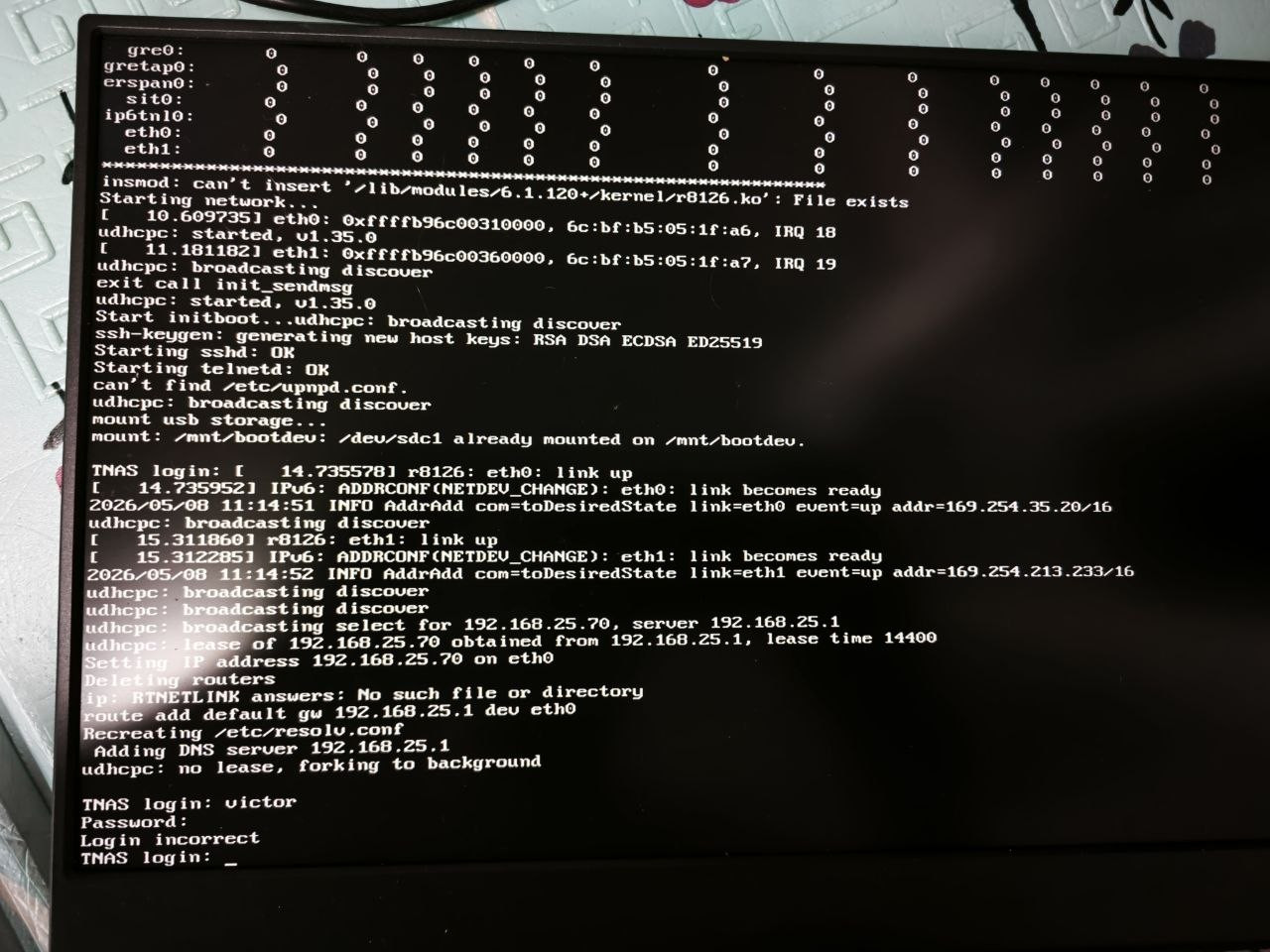
If this doesn't work or is not enabled: You can try connecting the HDMI port on the back of the NAS directly to a monitor or TV using an HDMI cable to check if there is system output information on the screen. This helps determine the device's status.
After successfully logging in through the terminal, please execute the following command to check disk space usage:
Code: Select all
df -hScenario 1: The `/` directory is full (100% usage)
If the `/` directory usage reaches 100%, core system services may stop responding due to the inability to write logs or temporary files, resulting in your inability to access the NAS. At this point, to ensure data security and avoid accidentally deleting important system files, it is strongly recommended that you do not perform the cleanup operation yourself.
Please contact the official support team directly; they can provide the most professional assistance. Please contact our online support through the official website homepage for assistance with file cleanup.
Scenario 2: / Directory Still Has Free Space
If there is still available space in the root directory, the problem may lie with critical service processes. Please perform the following operations in order:
Restart Critical Services
Try restarting the TOSDaemon and Nginx services. You can usually use the following commands:
Code: Select all
systemctl restart TOSDaemon.serviceCode: Select all
systemctl restart nginx.serviceIf you find that the Nginx service cannot start, it is likely that its configuration file has a problem. You can try overwriting the existing configuration with the default configuration file to repair it. Please execute the following three commands in sequence in the terminal:
Code: Select all
cp /etc.default/nginx/nginx-extend.conf /etc/nginxCode: Select all
cp /ec.default/nginx/nginx-http.conf /etc/nginxCode: Select all
cp /etc.default/nginx/nginx.conf /etc/nginxreboot
If you encounter any difficulties at any stage, or need more detailed guidance, you can always go to the official website homepage, where our online support team will provide you with real-time chat assistance.
To contact our team, please send email to following addresses, remember to replace (at) with @:
Support team: support(at)terra-master.com (for technical support only)
Support team: support(at)terra-master.com (for technical support only)
Re: TOS 7.0.0567 Beta (X86) is Released for Update
This issue is caused by some pages and programs not fully starting after the TOS update. Did you refresh the page by right-clicking the TOS desktop and pressing F5 to restore it? Does this problem persist after use? We're noting this down for now because we haven't been able to reproduce your issue. If this problem recurs, please contact our engineers online through the official website for troubleshooting to determine the cause. Thank you for your understanding and support.
To contact our team, please send email to following addresses, remember to replace (at) with @:
Support team: support(at)terra-master.com (for technical support only)
Support team: support(at)terra-master.com (for technical support only)
Re: TOS 7.0.0567 Beta (X86) is Released for Update
Thank you for your positive feedback. The issue of the USB ejector being obstructed is already in our fix plan and is expected to be fixed in a future version. Please stay tuned for future update announcements.Gremlin wrote: ↑07 May 2026, 20:51 F2-424 Updated: Similar to my earlier viewtopic.php?p=56445#p56445
I just noticed that when a usb device is mounted, and the dashboard is open, the usb eject dialogue is hidden behind the dashboard panel.
F2-221 Updated. No issues - desktop appeared as normal after login.
The older, simpler systems work better


To contact our team, please send email to following addresses, remember to replace (at) with @:
Support team: support(at)terra-master.com (for technical support only)
Support team: support(at)terra-master.com (for technical support only)
-
Shadeofspirit
- Posts: 11
- Joined: 07 May 2026, 20:00
Re: TOS 7.0.0567 Beta (X86) is Released for Update
Hi, thanks for the response.
SSH was enabled but it does not work now.
Also, i had tried to connect monitor and keyboard, but, for some reason, i could not login - 'Login incorrect' (i had checked in password manager my password). Is there any kind of special user used for local access?
is there any way, for example, re-install but keep existing data (there are about 2Tb of data)
The overall config is 32GB Ram, 2*8TB HDD(in traid)
Re: TOS 7.0.0567 Beta (X86) is Released for Update
Thank you for your feedback!
We have confirmed that the issue exists and have submitted it to our product team. The issue will be addressed in a future version.
To contact our team, please send email to following addresses, remember to replace (at) with @:
Support team: support(at)terra-master.com (for technical support only)
Support team: support(at)terra-master.com (for technical support only)