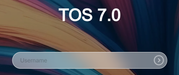
TMzethar wrote: ↑30 Apr 2026, 02:55
Regarding your mention of 'unable to use Bitwarden auto fill username', may I ask which browser you are using?
We have noticed the issue you mentioned about ordinary users being unable to access Transmission and will conduct an investigation.
I am using Firefox. I have tried login in a private tab aswell but the issue persists.
We haven't made any changes to prevent autofill. You can check your browser's autofill exclusion list to see if the TOS Desktop URL is added and if the page's password is saved.
I have checked that setting but no luck. I have also been troubleshooting with Gemini AI which suggests some changes have been made but I am not sure if it's just guessing wildly with this answer:
"Updating to TOS 7.0.0517 introduces a redesigned login interface that handles form inputs differently than previous versions. This issue often stems from how the new WebUI interacts with browser password managers (like Chrome, Bitwarden, or 1Password), as the username field may no longer be identified as a standard "login" field by the browser's autofill engine."
However something I noticed right after updating to 7.0.0517 was that the username field was darker or more greyed out than before.
Spotted my time machine backups had stopped working after the 7.0.0517 update on my F4 SSD; the update went smoothly although I didn’t check I could log in at the time.
I have now realised web interface won’t load after a successful login BUT can access via iOS app and so tried to update to next version. This failed with an out of space message despite there being 2Tb available in Volume 1, noticed cpu and memory usage were hitting maximum levels. Managed to enable ssh and dmesg shows tasks being off loaded and system out of memory! The nas rapidly becomes unreachable now as it hits memory issue.
Any suggestions about how to recover from this please ? Is there a usb update version of 7.0.0599 I could try and install?
ctmutlow wrote: ↑05 May 2026, 21:35
Do you mean buy more physical RAM and add it to the NAS or wait until the existing RAM frees as tasks die?
Sorry I don’t understand?
We recommend that you purchase physical memory and install it into your NAS to accelerate task processing.
To contact our team, please send email to following addresses, remember to replace (at) with @:
Support team: support(at)terra-master.com (for technical support only)
We regret to inform you that the Bitwarden autofill feature you raised is not currently supported, as it would require dedicated integration work.
TOS 7 continues to support native autofill functionality in popular browsers including Edge and Chrome.
To contact our team, please send email to following addresses, remember to replace (at) with @:
Technical team: support(at)terra-master.com (for technical support)
Service team: service(at)terra-master.com (for purchasing, return, replacement, RMA service)